
VaultarHUD
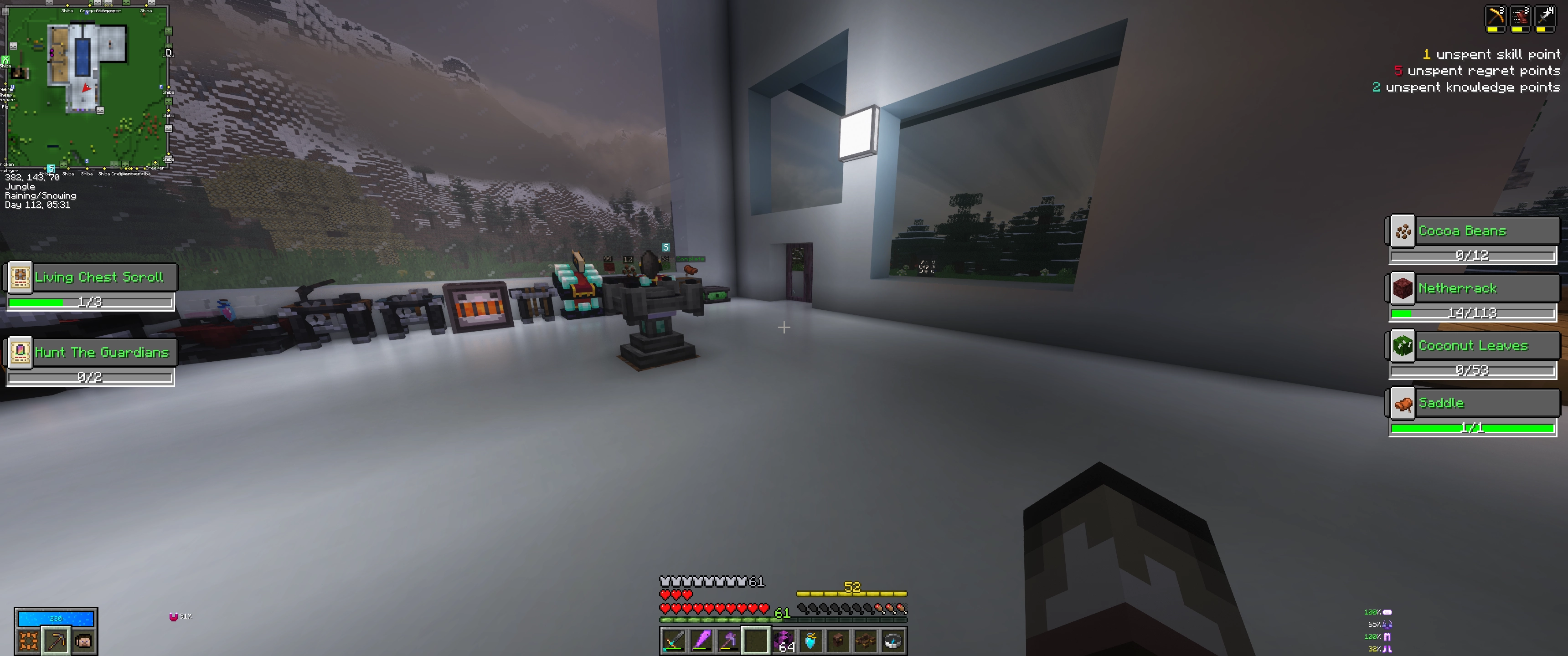
For Vault Hunters 3rd Edition: Adds a HUD that shows the currently required items for your Vault Altar
截图
介绍

_Requires Vault Hunters 3rd Edition!_
Adds a HUD opposite the bounty table HUD (when you press Tab) that shows a similar progress bar for items towards your current vault crystal. Required items that have variants (e.g. Oak logs, Birch logs) will cycle through the options automatically.
Installation / Usage:
- Drop the jar file into your
modsfolder - In game, press
Tabto show the HUD. The HUD will also show up automatically in any inventory screens. Pressing0will toggle the HUD on/off.
Notes:
This mod can be installed either on the client only, or on both the client and server with a few caveats:
- If it is installed on the client only, you will need to first track an altar by getting within 10 blocks of it, and then it will remain tracked while you are within its render distance (~5 chunks?). You can also manually right-click another altar to track that one instead.
- If it is installed on both the client and the server, then the HUD will update automatically and be live-tracked to you regardless of where you are.
Keybinds:
Key bindings can be reconfigured from the standard in-game menu.
Configuration:
Chose whether the HUD shows up within inventories, or just when the Tab key is held in-game. Also choose which type of inventory HUD (regular or small) is shown. Requires either editing the vaultarhud-client.toml config file, or using an in-game config mod such as Configured.
常见问题
VaultarHUD 支持哪些 Minecraft 版本?
VaultarHUD 支持 Minecraft Java 版 1.18.2,可用的加载器:Forge。下载时注意选择和你游戏版本一致的文件。
VaultarHUD 怎么安装?
先用 PCL2 或 HMCL 启动器安装对应版本的 Forge,再把下载的 .jar 文件放进游戏目录的 mods 文件夹,重新启动游戏即可。开启了版本隔离的,mods 文件夹在 versions/版本名 下面。运行环境:仅客户端。
Iridium 的其他作品
查看全部 →
QOL Hunters
Quality of Life Changes for the Vault Hunters Modpack

OverVaults
Adds ruined portals to the overworld in Vault Hunters 3rd Edition
VaultarHUD
For Vault Hunters 3rd Edition: Adds a HUD that shows the currently required items for your Vault Altar

Mouse Buttons Close Inventory
Fixes a Minecraft Bug that prevents closing the inventory when bound to a mouse button
评论
登录后评论和评分