
Vanilla PVP presets
You can switch between Vanilla and Non-Vanilla modes. DrDonut uses this during his streams. This could be used for when you would want to be in vanilla mode or non-vanilla which is basically PvP mode.
截图


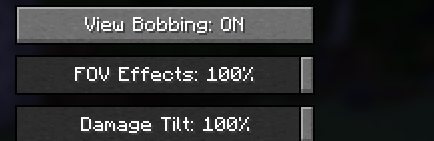
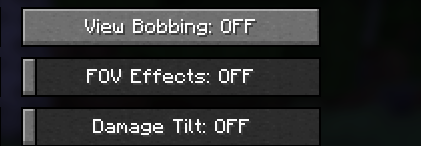
介绍
Vanilla PVP Presets
Vanilla PVP Presets is a lightweight Minecraft mod that enables players to switch between Vanilla Mode and Non-Vanilla Mode with a keybind.
This mod is useful for players looking to switch between the Vanilla mode visuals and the optimized settings for PvP mode gameplay.
The default keybind for this mod is F9 and can be changed via the Minecraft controls menu.
Vanilla Mode
Explosion particles
Normal fire height
View bobbing
Damage tilt
FOV effects
Non-Vanilla Mode
Explosion particles disabled
Low fire is enabled
View bobbing disabled
Damage tilt disabled
FOV effects disabled
why use ths mod
This mod enables players to quickly switch between vanilla mode and non vanilla mode to play with the visuals they want
常见问题
Vanilla PVP presets 支持哪些 Minecraft 版本?
Vanilla PVP presets 支持 Minecraft Java 版 1.21.11,可用的加载器:Fabric。下载时注意选择和你游戏版本一致的文件。
Vanilla PVP presets 怎么安装?
先用 PCL2 或 HMCL 启动器安装对应版本的 Fabric,再把下载的 .jar 文件放进游戏目录的 mods 文件夹,重新启动游戏即可。开启了版本隔离的,mods 文件夹在 versions/版本名 下面。运行环境:仅客户端。
评论
登录后评论和评分