
Simply Death Coordinates
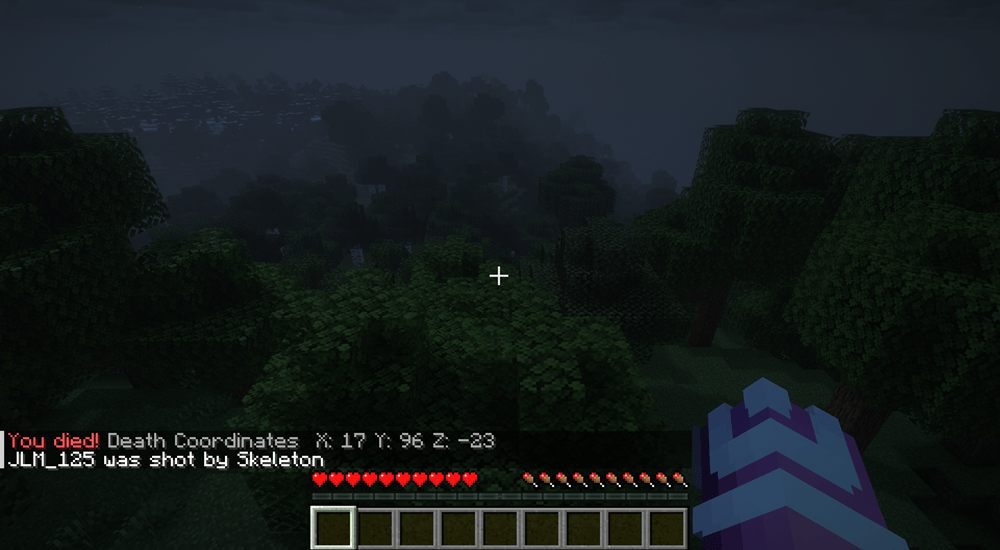
whenever you die, your exact coordinates are shown in chat so you can easily find your items again.
截图

介绍
Death Coordinates adds a simple but powerful quality-of-life feature: whenever you die, your exact coordinates are shown in chat so you can easily find your items again.
✨ Features
- 📍 Shows your exact death coordinates in chat
- 👤 Only the player who died can see their coordinates
- ⚡ Lightweight and lag-free
- 🧭 Coordinates are rounded to clean whole numbers (no messy decimals)
- 🔒 Works in singleplayer and multiplayer
- 🔧 No configuration needed — just install and play
💀 Example
When you die, you’ll see:
📦 Why use this mod?
Minecraft can be annoying when you lose your items far from home. This mod makes recovery fast and simple without needing external tools, commands, or minimap mods.
🔥 Compatibility
- Minecraft Java Edition 1.20.1
- Forge
- Singleplayer & Multiplayer
🛠️ Simple by design
This mod is intentionally lightweight and focused on one thing: helping you recover your items quickly after death.
常见问题
Simply Death Coordinates 支持哪些 Minecraft 版本?
Simply Death Coordinates 支持 Minecraft Java 版 1.20.1–26.2,共 4 个版本,可用的加载器:Fabric / Forge / NeoForge。下载时注意选择和你游戏版本一致的文件。
Simply Death Coordinates 怎么安装?
先用 PCL2 或 HMCL 启动器安装对应版本的 Fabric / Forge / NeoForge,再把下载的 .jar 文件放进游戏目录的 mods 文件夹,重新启动游戏即可。开启了版本隔离的,mods 文件夹在 versions/版本名 下面。
JLM_125 的其他作品
查看全部 →
Better Visible Ancient Debris
This resource pack replaces the texture of Ancient Debris with a bright blue color, making it much easier to spot while mining in the Nether

Better Rainbow Outlines
Better Rainbow Outlines is a simple Minecraft resource pack that gives the block you are currently looking at a vibrant rainbow outline

Better Enchantment Glint
Better Enchantment Glint enhances Minecraft's default enchantment glint with a smoother and more refined appearance

Better Invisible item frames
Better Invisible Item Frames adds simple crafting recipes that let you create invisible Item Frames and Glow Item Frames using vanilla Minecraft items.
评论
登录后评论和评分