
截图
介绍
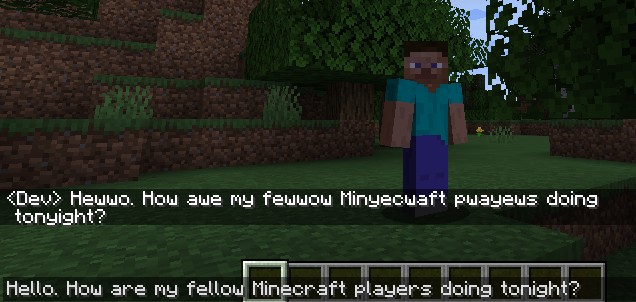
Converts all player chat to be uwu-ized
For example, what starts out as:
Hello. How are my fellow Minecraft players doing tonight?
Turns into:
Hewwo. How awe my fewwow Minyecwaft pwayews doing tonyight?
There is currently no config or way to turn off this behavior. All players, without exception are subjected to this translation before their chat is sent.
Universal forge mod that is able to run client only, allowing connection to vanilla servers. Can also be installed on a forge server and as long as the server is only server mods, vanilla clients will be able to connect.*
*1.19.1 version is only server-side. All other releases are universal
1.19.1 – Back to the old way again!
1.19.1 brought back the ability to let the server modify messages. The server side code now does exactly what the old versions did, modifying all users’ messages to be uwu-ized. Note that the messages will be flagged as modified and users connecting to the server may even get a warning that the server could modify their messages.
This is only for 1.19.1: 1.19 will use the “enforcer” version (see below)
Server-side only mod at this time. Client side code not currently upgraded to be compatible
1.19 version. The “uwu-enforcer”
The 1.19 release of Minecraft included a change to how chat messages are transmitted. In short, they implemented a system for signing the messages and preventing the transmission of messages that are altered by the server beyond styling. This unfortunately breaks a core piece of the mod as originally designed.
State of the 1.19 version:
- Client side mod still works the same. If a client has the mod, their messages are altered exactly as before
- Server side mod works differently. If a message comes in that is already “uwuized” then it is transmitted. If it is not, the server will cancel the message so users won’t get it, and sends an error to the chatter telling them what to type instead.
Older versions
All supported pre 1.19 versions will fully uwu-ize the text on the server
常见问题
Uwuize-Chat 支持哪些 Minecraft 版本?
Uwuize-Chat 支持 Minecraft Java 版 1.14–1.19.1,共 21 个版本,可用的加载器:Forge。下载时注意选择和你游戏版本一致的文件。
Uwuize-Chat 怎么安装?
先用 PCL2 或 HMCL 启动器安装对应版本的 Forge,再把下载的 .jar 文件放进游戏目录的 mods 文件夹,重新启动游戏即可。开启了版本隔离的,mods 文件夹在 versions/版本名 下面。
评论
登录后评论和评分