
URLium
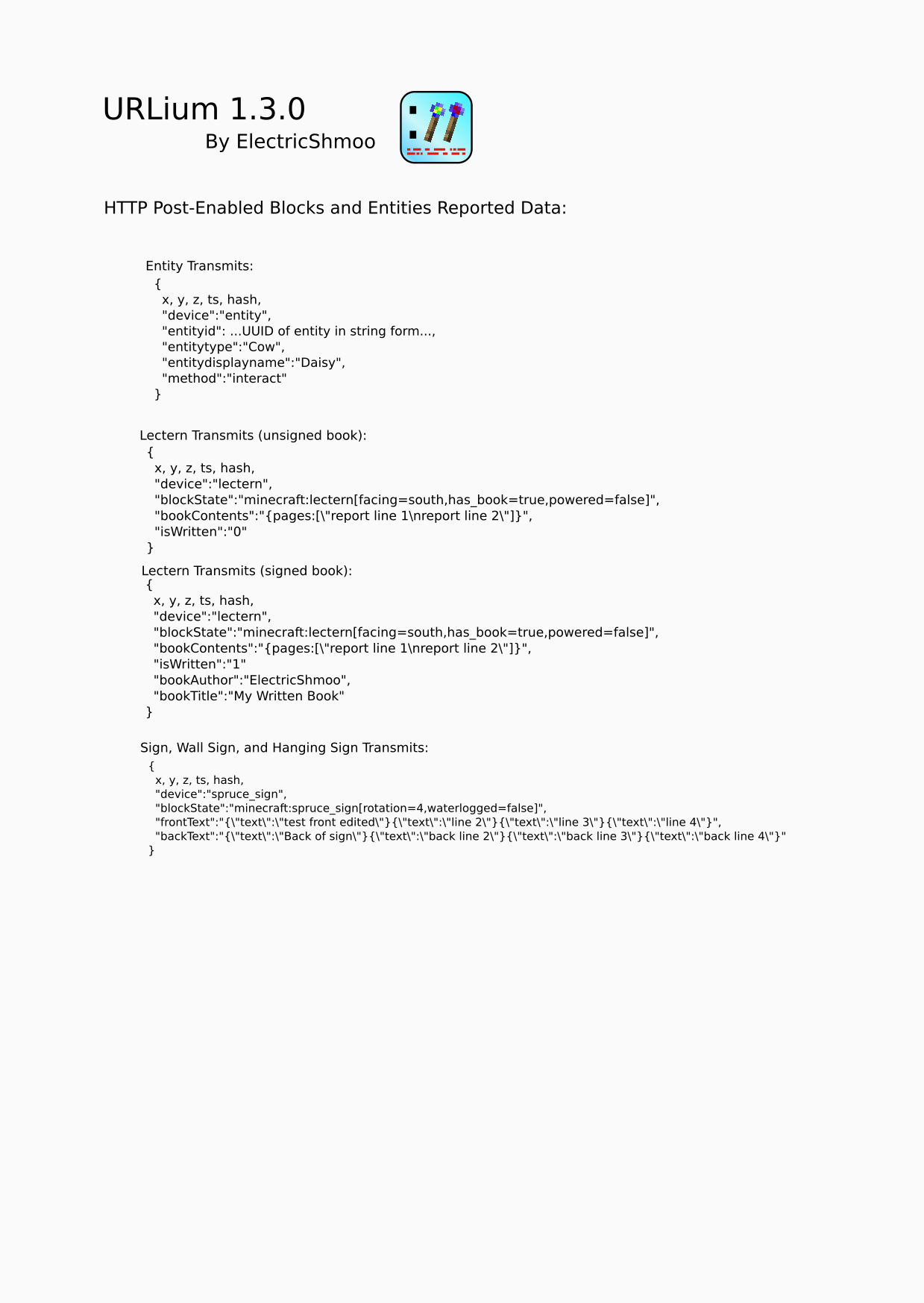
Transmit redstone and block state data over HTTP(S) to a webserver with this Polymer Library server-side mod. Get data from the Post Wand on any block, or Config Wand to turn Containers, Lecterns, Detectors, Signs, and more - into HTTP-reporting blocks!
介绍
URLium is a Polymer Library server-side mod that transmits redstone, entity, command, and blockstate data over HTTP(S) to a configurable URL.
URLium only transmits outbound requests and logs the HTTP response data to the server log. URLium does not allow incoming commands or controls. Any in-bound control of the server is performed by existing native RCON connections, not any feature of URLium.
- URLium Block
- reports redstone power level changes
- can also be right-clicked by user
- transmits ‘place’, ‘break’, ‘use’, and ‘sense’ events
- URL Post Wand
- use as tool to report target block or entity data
- URL Config Wand
- use on Signs, Chests, Barrels, Comparators, Light Sensors, Sculk Sensors, Hoppers, Droppers, Dispensers, Lecterns, and Mobs will enable/disable change reporting
- chest contents sent when changed or block update occurs (not always real-time)
- sign front and back text content sent when changed
- comparator power level sent when changed
- sculk sensor power, phase, and frequency sent when changed
- light sensor power level sent when changed
- when a writable book or written book is placed on lectern, contents will be sent
- mobs and entities with change reporting send an “interact” event when right-clicked by any user
- Ugetblock Command
- Usetblock Command
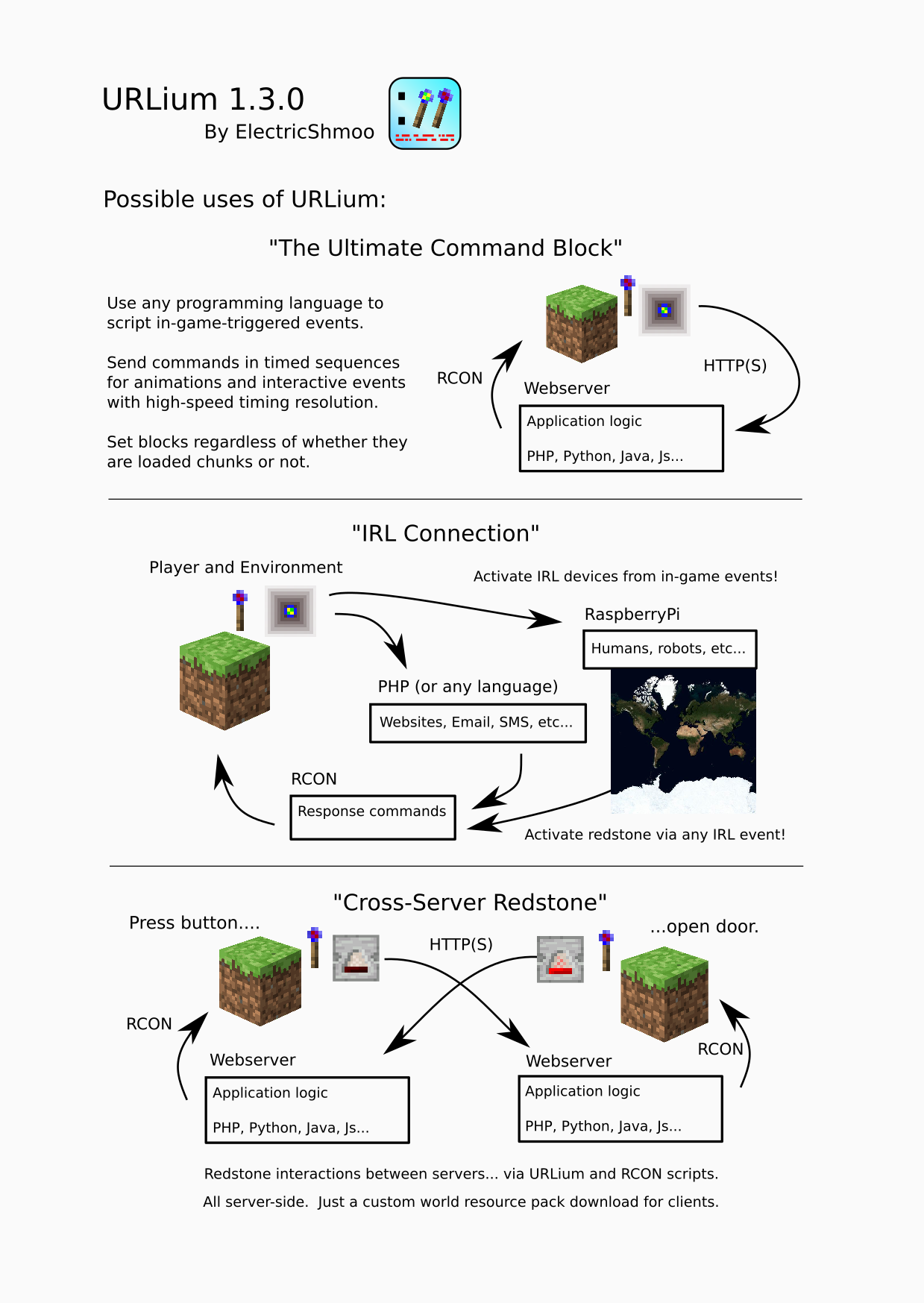
- RCON-accessible command to query and set block data for remote webserver RCON response
- allows external server to perform lightweight query and get raw (‘F3+i’ debug query) block data
- forces block loading / generation if unloaded
- specify dimension (unlike regualr /setblock)
- silent execution
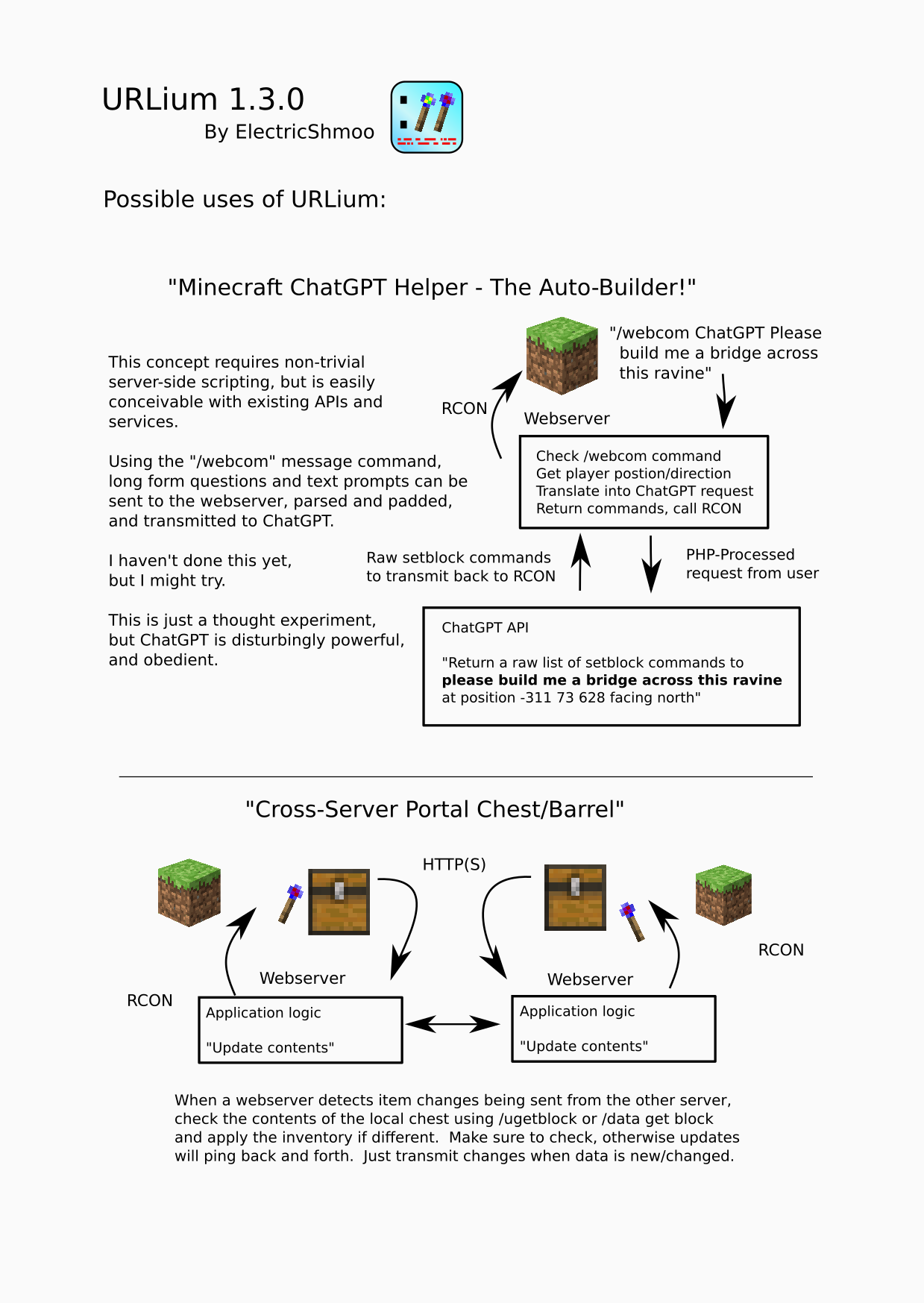
- webserver application/game logic can be written in ANY web language that can respond via RCON
- PHP, Python, Java, JS, Go, C#… anything!
- “/webcom” Commands
- Users may send message to webserver with “/webcom …message text…”
- Set command name (“webcom”) in config file to any unused command name
- Up to 3 custom commands!
Respond to the Minecraft server via RCON to complete the circuit of input/output.
Possible uses:
- server-to-server redstone circuitry
- compare written book text for a quiz show competition
- get interactive I/O from the web:
- audience voting survival competition
- public HTML browser-viewable scoreboards
- update your player’s status on a website from text on a hanging sign
- treasure-hunt
- with a reporting-enabled chest to see who collects items first
- with a Post Wand to see who can click the blocks first
- water real-life plants from in-game events triggering a RaspberryPi plant-watering system
- Anything That Can Be Done Via HTTP
Dependencies:
- Polymer 0.5.18 for Fabric 1.20.1
- Polymer 0.6.2 for Fabric 1.20.2
- Be sure to run ‘/polymer generate-pack’ to produce the client-side resource pack and update the SHA1 key in server settings or URLium items will not be visible.
Config:
- set URL in /config/urlium.properties:
- target=https://my.web.server/full/path/
- agent=optional_user_agent_name
- messageCommand=webcom
- securityToken=secret_token (token is included in Authentication: Bearer header)
Sample PHP Webserver Response Script:
https://github.com/JacobMunoz/urlium_1_20_1_public/blob/master/doc/php/index.php
Sample Golang Script:
https://github.com/JacobMunoz/urlium_1_20_1_public/blob/master/doc/golang/urlium.go
Sample Python Script:
https://github.com/JacobMunoz/urlium_1_20_1_public/blob/master/doc/python/urlium.py
See the docs for more:
<img src="https://github.com/JacobMunoz/urlium_1_20_1_public/blob/master
/doc/urlium1_a.png?raw=true” />
<img src="https://github.com/JacobMunoz/urlium_1_20_1_public/blob/master
/doc/urlium1_b.png?raw=true” />

<img src="https://github.com/JacobMunoz/urlium_1_20_1_public/blob/master
/doc/urlium1_d.png?raw=true” />


<img src="https://github.com/JacobMunoz/urlium_1_20_1_public/blob/master
/doc/urlium1_i.png?raw=true” />
常见问题
URLium 支持哪些 Minecraft 版本?
URLium 支持 Minecraft Java 版 1.20.1–1.20.2,共 2 个版本,可用的加载器:Fabric。下载时注意选择和你游戏版本一致的文件。
URLium 怎么安装?
先用 PCL2 或 HMCL 启动器安装对应版本的 Fabric,再把下载的 .jar 文件放进游戏目录的 mods 文件夹,重新启动游戏即可。开启了版本隔离的,mods 文件夹在 versions/版本名 下面。运行环境:仅服务端。
评论
登录后评论和评分