
Universal Dyeing
作者:StaticLabs
Easily re-dye beds, glass, shulker boxes, and more in the crafting grid—no more wasting resources on the wrong color!
截图


介绍
中文介绍正在准备中,下面暂时显示原文。
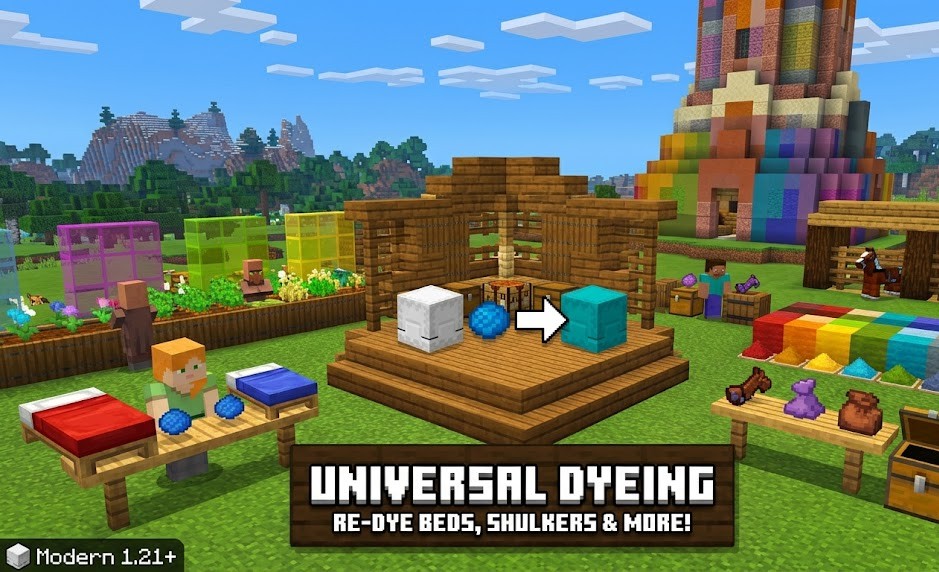
🎨 Universal Dyeing (Vanilla+)
- Have you ever crafted a stack of Red Glass only to realize Blue would look better? Or found a Pink Bed in a village when your base is themed Green? Universal Dyeing fixes one of Minecraft’s most frustrating limitations by allowing you to re-color almost any dyed block or item directly in your crafting grid.
- This datapack is designed to feel like a feature Mojang forgot to add. It’s lightweight, survival-friendly, and perfect for builders who change their minds!
✨ Key Features
- Shapeless Re-dyeing: Simply place any colored item + a new dye in your crafting grid to change its color.
- 100% Performance Friendly: Uses the native 1.21.1 recipe system. Zero tick-loop lag.
- Total Coverage: Supports over 300+ item and block variants.
- Bleaching: Use a Water Bucket or Bone Meal in the crafting grid to return items to their “uncolored” or “white” base state.
📦 Supported Items
- Furniture: Beds, Carpets, Wool, Banners, and Candles.
- Building: Stained Glass (Blocks & Panes), Terracotta, Glazed Terracotta, Concrete, and Concrete Powder.
- Utility: Bundles (1.21!), Shulker Boxes, and Wolf Armor.
- Gear: Leather Armor and Leather Horse Armor.
🛠 Technical Details
- Version: Minecraft 1.21+
- Installation: Drop the .zip file into your world’s datapacks folder.
- Multiplayer: Fully compatible with servers and other “Vanilla+” datapacks.
常见问题
Universal Dyeing 支持哪些 Minecraft 版本?
Universal Dyeing 支持 Minecraft Java 版 1.21–26.1.2,共 15 个版本,可用的加载器:Fabric / Forge / NeoForge / Quilt。下载时注意选择和你游戏版本一致的文件。
Universal Dyeing 怎么安装?
先用 PCL2 或 HMCL 启动器安装对应版本的 Fabric / Forge / NeoForge / Quilt,再把下载的 .jar 文件放进游戏目录的 mods 文件夹,重新启动游戏即可。开启了版本隔离的,mods 文件夹在 versions/版本名 下面。运行环境:客户端 / 服务端。
StaticLabs 的其他作品
查看全部 →
Craftable Bells
by StaticLabs
A mod that makes bells craftable in minecraft.
5.6万
1 个月前
CurseForge
Instant Smelt
by StaticLabs
Quality-of-Life mod that smelts all raw ores instantly upon mining, letting you skip the smelting queue
4.9万
4 天前
CurseForge

Instant Smelt
by StaticLabs
A simple quality-of-life mod that smelts all raw ores instantly upon mining, letting you skip the smelting queue.
4.1万
5 个月前
Modrinth

Advanced Tool Stats
by StaticLabs
Real-time, high-precision durability tracking directly in your action bar—no F3+H required.
9,529
7 个月前
Modrinth
评论
登录后评论和评分