
截图
介绍
Universal Config
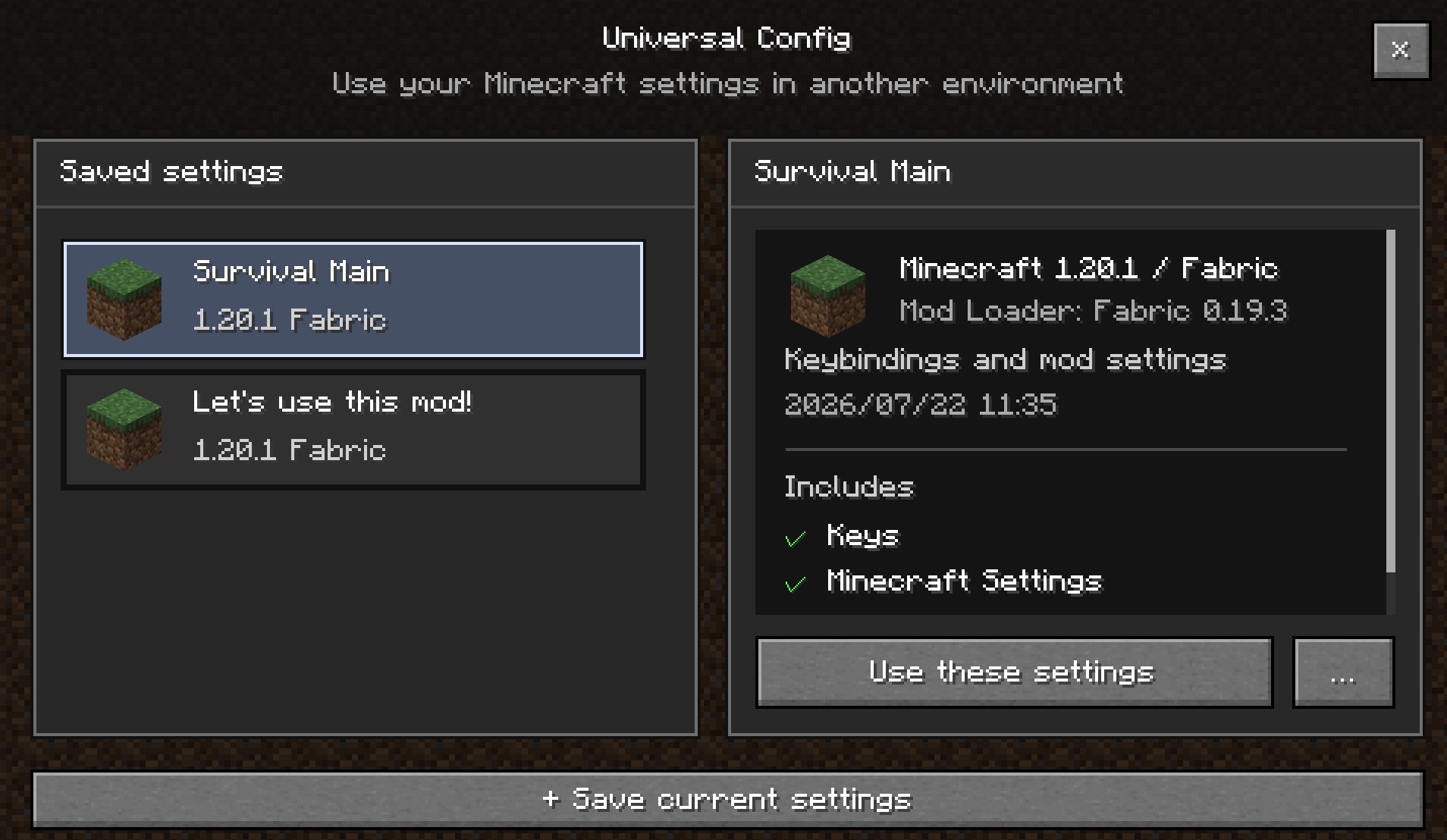
Universal Config is a client-side mod that lets you save your Minecraft settings, keybinds, and mod configuration files as reusable profiles and share them across different instances and Minecraft versions.
You no longer need to reconfigure your keybinds and mod settings every time you create a new instance.
Features
- Create and save multiple profiles
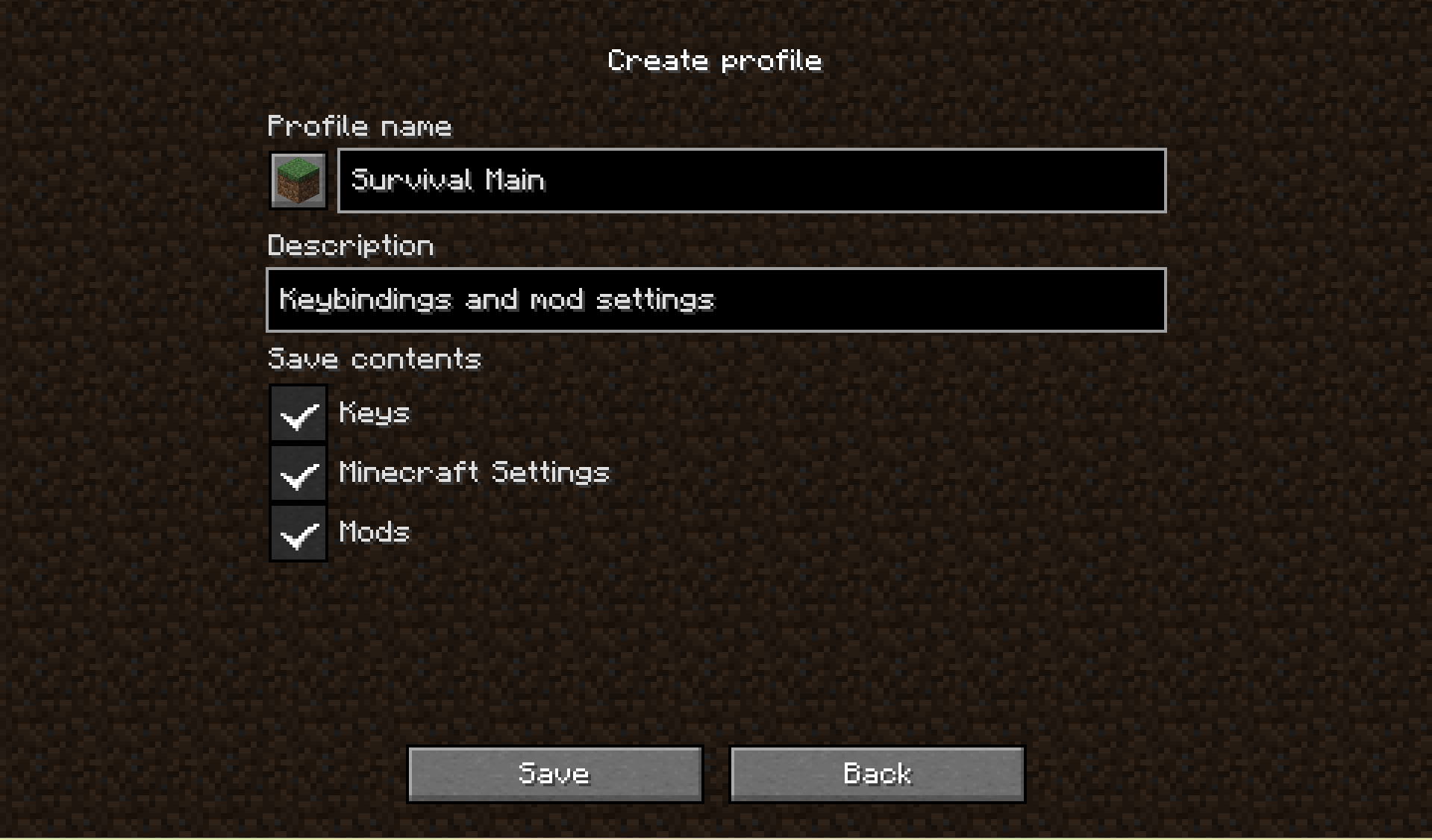
- Save your current settings as a profile
- Store keybinds and other
options.txtsettings - Store mod configuration files from the
configfolder - Browse saved profiles from an in-game interface
- Review profile contents before applying them
- Duplicate, export, and delete profiles
- Set a default profile
- Restore previous settings from a backup
Safe Profile Application
Universal Config does not simply overwrite your entire options.txt file.
Instead, saved settings are merged into your current configuration individually, allowing settings that only exist in the current instance to remain untouched.
Keybinds are also handled separately for better compatibility.
What Is Not Included
Universal Config is not designed to copy an entire Minecraft instance.
The following data is not included in profiles:
- Mods
- Worlds
- Logs
- Crash reports
- Resource packs
- Shader packs
- Screenshots
Universal Config is specifically designed for sharing and reusing Minecraft configurations.
Version Compatibility
Profiles can be used across different Minecraft versions and instances.
However, full compatibility cannot always be guaranteed, as it depends on the mods being used and their configuration formats.
Some settings may not work correctly if the required mod is not installed or if a mod update has changed its configuration format.
Support for additional Minecraft versions and mod loaders will continue to expand over time. Stay tuned!
How to Use
Open Universal Config from the Minecraft title screen.
From the profile screen, you can:
- Save your current settings as a new profile
- Browse existing profiles
- Select a profile saved from another instance
When you select a profile, you can review the following information before applying it:
- The Minecraft version the profile was created with
- Mod loader
- Whether the profile contains keybinds, Minecraft client settings, and/or mod configuration files
- Compatibility warnings
Once confirmed, the selected profile is scheduled to be applied the next time Minecraft starts.
Your current configuration is backed up beforehand, and the profile is merged into your settings before Minecraft loads them.
Default Profile
When a profile is set as the default profile, it will be automatically applied the first time Minecraft is launched.
This allows new instances to start with your preferred configuration without manually applying a profile.
Profile Management
Profiles can be:
- Created
- Duplicated
- Opened in their folder
- Deleted
- Set as the default profile
Profiles are stored in the portable .ucp format and can be moved to another PC or shared with other players.
Profile Storage
By default, shared profiles are stored in the following locations:
Windows
%APPDATA%\.universal-config\
macOS / Linux
~/.universal-config/
You can change the profile storage location from the Universal Config screen, but using the default location is recommended for most users.
常见问题
Universal Config 支持哪些 Minecraft 版本?
Universal Config 支持 Minecraft Java 版 1.7.10–26.3,共 18 个版本,可用的加载器:Fabric / Forge / NeoForge。下载时注意选择和你游戏版本一致的文件。
Universal Config 怎么安装?
先用 PCL2 或 HMCL 启动器安装对应版本的 Fabric / Forge / NeoForge,再把下载的 .jar 文件放进游戏目录的 mods 文件夹,重新启动游戏即可。开启了版本隔离的,mods 文件夹在 versions/版本名 下面。运行环境:仅客户端。
评论
登录后评论和评分