
截图
介绍
—
## 🛠️ Umoh Extension
**An enhancement mod for the UMOH modpack – dimensional artifacts, trophies, and progression rewards.**
—
### 🔮 **What is Umoh Extension?**
**Umoh Extension** is an addon mod tailored specifically for the **UMOH modpack**, introducing a lightweight progression system through **dimension-themed orbs** and a **final trophy**. This mod gives players tangible goals and collectible items that represent their journey through the pack.
—
### 🧱 Features
#### 🪐 **Dimension Orbs – Craftable Essence of Realms**
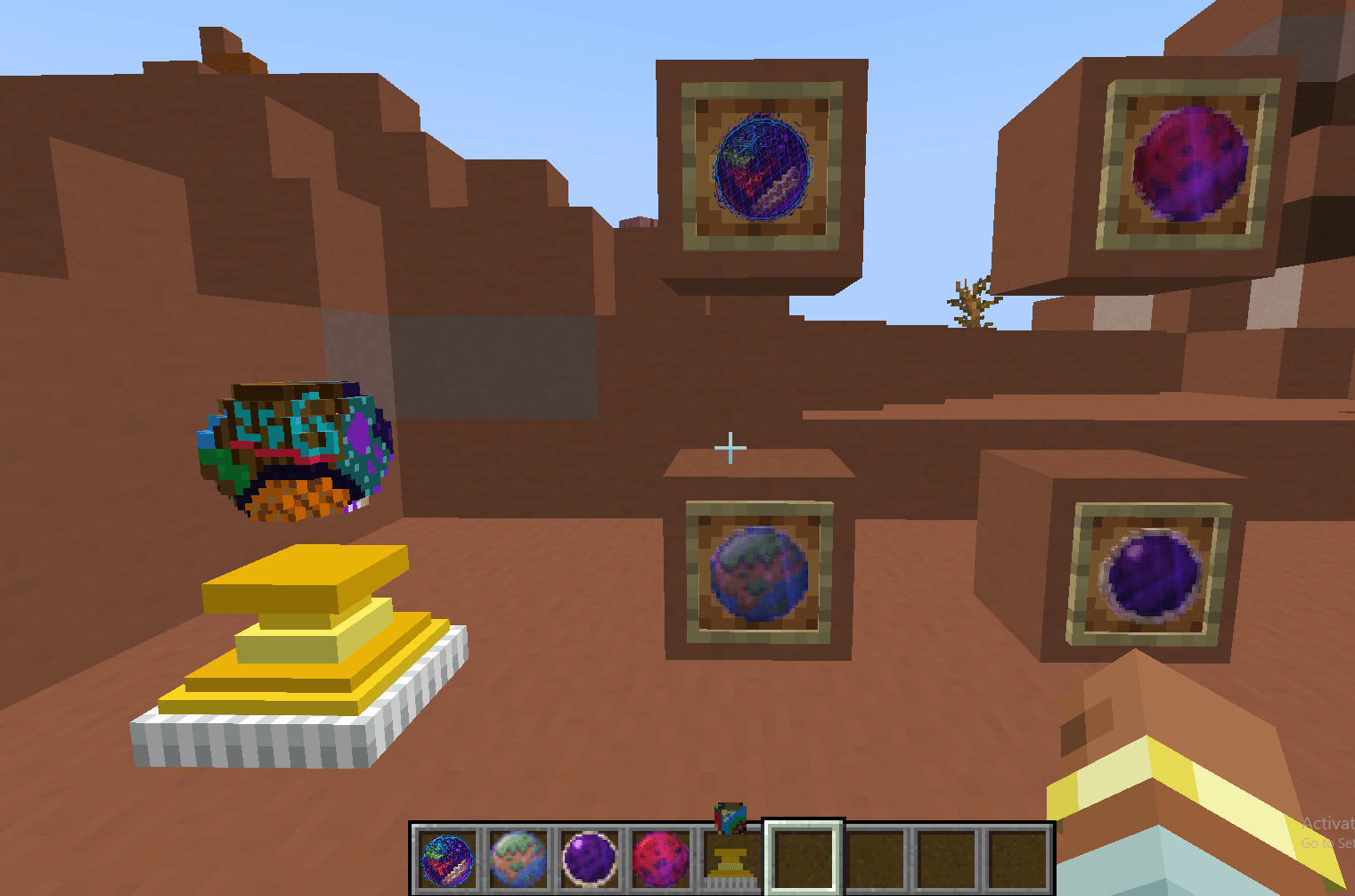
* Collect and craft powerful **dimensional orbs** representing the major worlds of Minecraft:
* 🌍 **Overworld Orb**
* 🔥 **Nether Orb**
* 🪐 **End Orb**
* 🌌 **Galactic Final Orb of Umoh** (crafted from all others)
* Each orb is a symbolic crafting item, serving as a **progress milestone** and potential **ingredient for endgame recipes** *(modpack-dependent)*.
#### 🏆 **Final Trophy – The Ultimate Reward**
* Unlock and craft the **Umoh Trophy** after completing the core objectives of the modpack.
* Designed as a **decorative proof of mastery** for players who reach the final stages of progression.
—
### ⚙️ Compatibility & Use
* ✔️ Designed exclusively for the **UMOH modpack**
* ⚠️ Not intended for standalone use
* 🧩 Fully data-driven – easy to expand with datapacks (e.g., add custom recipes, advancements)
—
### 🎯 Purpose
* Give players **goals**, **visual rewards**, and **incentives to explore all dimensions**
* Provide **crafting hooks** for pack creators to integrate into late-game content
—
### 🧾 License & Source
This is a **lightweight utility mod** created for gameplay enhancement and thematic immersion.
Source: *(optional)*
License: All rights reserved
—
常见问题
Umoh extension 支持哪些 Minecraft 版本?
Umoh extension 支持 Minecraft Java 版 1.21.1,可用的加载器:NeoForge。下载时注意选择和你游戏版本一致的文件。
Umoh extension 怎么安装?
先用 PCL2 或 HMCL 启动器安装对应版本的 NeoForge,再把下载的 .jar 文件放进游戏目录的 mods 文件夹,重新启动游戏即可。开启了版本隔离的,mods 文件夹在 versions/版本名 下面。
deo_oh 的其他作品
查看全部 →
Ultimate Craft OF Hope (UCOH)
UCOH Is what if ATM9 have met Cisco's Ultimate Medieval Experience
ucoh expansion
mod add only 2 armors and missing recipes

UMOH
its about tech and magic

(ULOP) Ultimate Leveling Of Power
fight epic bosses, explore and do science stuffs
评论
登录后评论和评分