
截图
介绍
UltraSkin — HD Custom Skin for Multiplayer
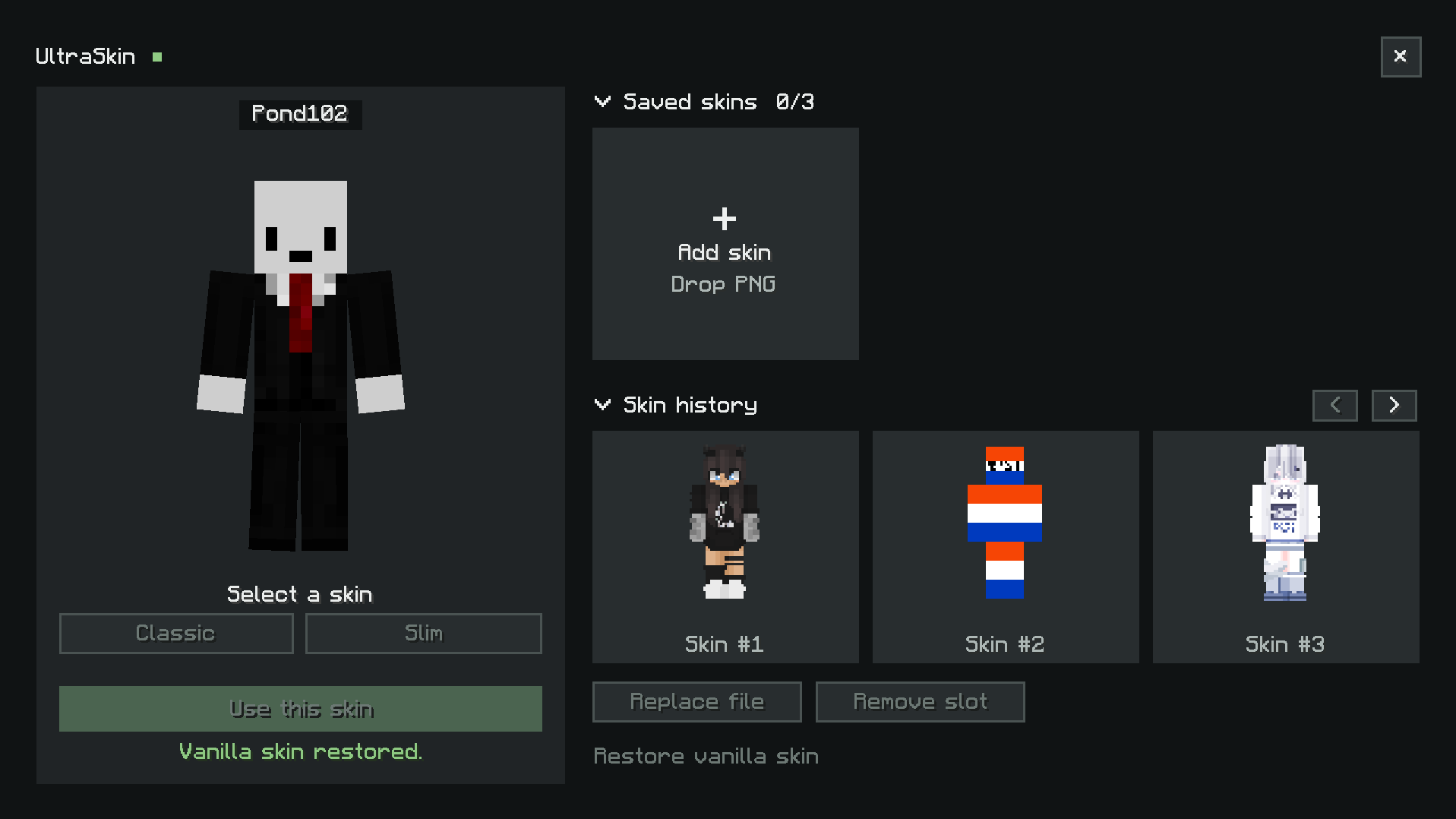
UltraSkin lets you wear any custom skin in Minecraft multiplayer — even at resolutions far beyond the vanilla limit. Upload a PNG file from your computer or paste an image URL, and other players on the same server will see your skin automatically in real time.
- ✨ Features
3 Skin Slots Store up to 3 different skins at once and switch between them anytime. Each slot remembers your skin so you can hot-swap looks without re-uploading.
Drag & Drop Upload Open the UltraSkin menu and drag a PNG file directly into any skin box — no file picker needed. The mod validates your file instantly and shows a live preview before you apply it.
HD Resolution Support Supports skin textures up to 2048×2048 pixels, delivering crisp, ultra-detailed looks that vanilla Minecraft cannot display.
URL Skin Support Prefer hosting your skin online? Paste an image URL and UltraSkin will fetch and apply it automatically.
Classic & Slim Model Each skin slot has its own model toggle. Switch between Classic (Steve) and Slim (Alex) arms independently per slot.
Multiplayer Sync Skins are synced server-side so every player on the server sees each other’s UltraSkin textures automatically when they join — no client configuration required on their end.
Persistent Storage Your skin choice is saved on the server and restored the next time you log in. You won’t need to re-upload after a restart.
- 🎮 How to Use
- Press the UltraSkin keybind to open the skin menu
- Drag a PNG skin file into one of the 3 boxes (max 2048×2048)
- Choose Classic or Slim model
- Click Use — your skin is applied and synced to all players instantly
- ⌨️ Commands
UltraSkin also supports chat commands for setting skins directly without opening the GUI.
/skins url <link>             — Set skin from URL (Classic arms)
/skins url classic <link>     — Set skin with Classic arms
/skins url slim <link>        — Set skin with Slim arms
/skins clear                  — Remove your skin and return to vanilla
/skins clear <player>         — Clear another player's skin (OP only)
/skins toggle                 — Enable or disable UltraSkin for yourself
/skins toggle <player>        — Toggle UltraSkin for another player (OP only)
/skins list                   — Show all active skins on the server
/skins history                — View your last 10 skin history entries
/skins applyhistory <index>   — Re-apply a skin from your history (index 0–9)
/skins reload                 — Reload all skins from saved data (OP only)
常见问题
UltraSkin 支持哪些 Minecraft 版本?
UltraSkin 支持 Minecraft Java 版 1.21.1,可用的加载器:NeoForge。下载时注意选择和你游戏版本一致的文件。
UltraSkin 怎么安装?
先用 PCL2 或 HMCL 启动器安装对应版本的 NeoForge,再把下载的 .jar 文件放进游戏目录的 mods 文件夹,重新启动游戏即可。开启了版本隔离的,mods 文件夹在 versions/版本名 下面。
评论
登录后评论和评分