Transparent Chat
作者:yngwatt
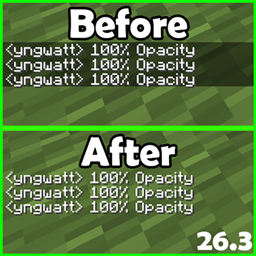
Transparent Chat removes the dark background behind in-game chat messages and adds its own settings screen, reachable from a key of your choice in the game's control options, where you can fine-tune how transparent the chat is with a slider.
介绍
中文介绍正在准备中,下面暂时显示原文。
Transparent Chat
Overview
Transparent Chat removes the dark background behind in-game chat messages and adds its own settings screen, reachable from a key of your choice in the game’s control options, where you can fine-tune how transparent the chat is with a slider.
Features
- Removes the dark chat background so messages float over the game world.
- Adds a new key binding (“Open Chat Settings”, default F10) under the Transparent Chat section in Options → Controls.
- The settings screen includes a Chat background opacity slider (0–100%), so you can choose between fully invisible and partially see-through chat.
- Changes apply instantly while the slider is moved — no restart needed.
- Works both in the faded background chat and the full chat screen you open with T.
How to Use
- Press F10 in game (or rebind it in Options → Controls under “Transparent Chat”).
- Drag the opacity slider: left for fully transparent chat, right for more background.
- Click Done to close the menu; your setting stays until you change it again.
- Open chat with T as usual — messages now appear without a dark box behind them.
Tips & Tricks
- 0% is great for screenshots and recordings; bump it up slightly if you struggle to read chat over bright terrain.
- The vanilla “Chat Text Background Opacity” option in Minecraft’s chat settings still works — this mod multiplies with it, so you can layer both for fine control.
- The slider default is 50%; press it once before adjusting if you want a known starting point.
Known Limitations
- The setting is kept for the current game session only; it resets to 50% when you restart the game.
- In very crowded modded interfaces, the extra key binding may need rebinding if another mod already uses F10.
- No textures, models, or other art assets are added by this mod — everything is drawn with the game’s built-in UI styles.
常见问题
Transparent Chat 支持哪些 Minecraft 版本?
Transparent Chat 支持 Minecraft Java 版 26.3,可用的加载器:Fabric。下载时注意选择和你游戏版本一致的文件。
Transparent Chat 怎么安装?
先用 PCL2 或 HMCL 启动器安装对应版本的 Fabric,再把下载的 .jar 文件放进游戏目录的 mods 文件夹,重新启动游戏即可。开启了版本隔离的,mods 文件夹在 versions/版本名 下面。
评论
登录后评论和评分