
截图
介绍
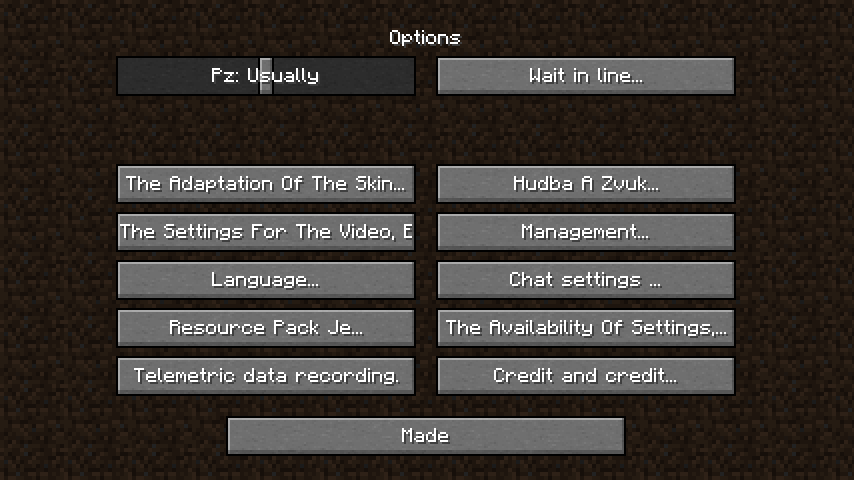
Translater takes all the text in minecraft and runs it through Google Translate 5 times (configurable).
This leaves the text in a state that is still partially understandable but hilarious to play with.
The mod caches all responses from Google Translate to reduce loading times as creating the cache can take up to 3 hours for vanilla (~5000 pieces of text)
This allows it to have no major impact on loading/performance after generating the cache.
In fact, a pre-generated name cache is even contained in the mod and will be used if possible.
You can also download the additional file with pre-cached responses for most mods to improve speeds at the cost of a bit more disk space.
Please note that generating the additional file takes some time, so it might not be available right after an update
This should work fine with most other mods that use the vanilla system for translation.
You can configure the following things:
- The amount of times all text should be translated (defaults to 10, requires cache recreation)
- Whether to use random languages as source languages (this causes most text to be unrecognizable, requires cache recreation)
- The target language for translations, should also equal the games language. You can use “auto” to attempt automatic detection
- Progress indicators for translations to watch over the initial generation
Note: you may need to increase the throttleMillis in the libjf-translate-v1 config to avoid rate limiting from your service

常见问题
Translater 支持哪些 Minecraft 版本?
Translater 支持 Minecraft Java 版 1.16.5–26.3,共 35 个版本,可用的加载器:Fabric。下载时注意选择和你游戏版本一致的文件。
Translater 怎么安装?
先用 PCL2 或 HMCL 启动器安装对应版本的 Fabric,再把下载的 .jar 文件放进游戏目录的 mods 文件夹,重新启动游戏即可。开启了版本隔离的,mods 文件夹在 versions/版本名 下面。运行环境:仅客户端。



评论
登录后评论和评分