
Trade Upgrade
Adds a new late game recipe for increasing the max trade limit of villagers, and recipes for villager spawn eggs.
截图
介绍
Are you _tired_ of the villagers’ trade limit holding back your progress? Trade Upgrade offers a solution! This data pack introduces a new late-game item that significantly increases the maximum trade limit of villagers, eliminating the _tedious_ process of endlessly shuffling villagers. This project was my first full data pack, born out of the frustration of managing villager trades and a desire for a more streamlined experience.
Key Features
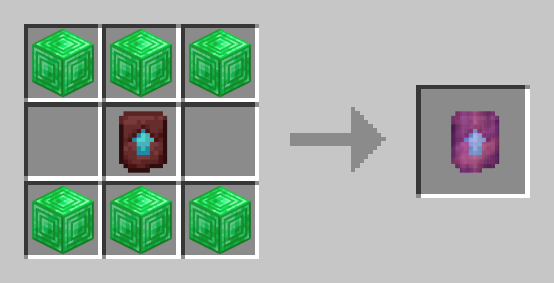
- Craft a Trade Upgrade using emerald blocks and a Netherite Upgrade Template.
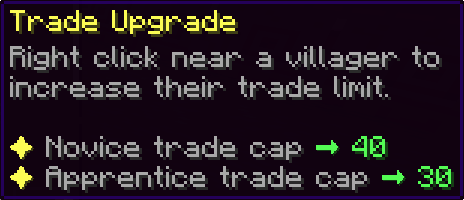
- Use the Trade Upgrade on a villager to dramatically increase their max trade cap:
- Novice trade cap -> 40
- Apprentice trade cap -> 30
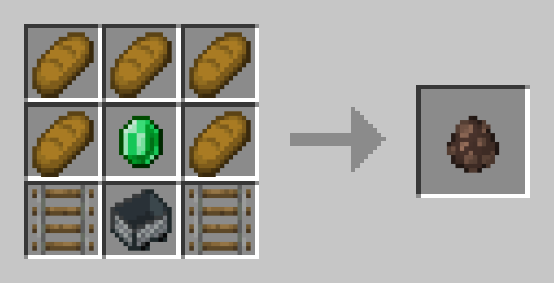
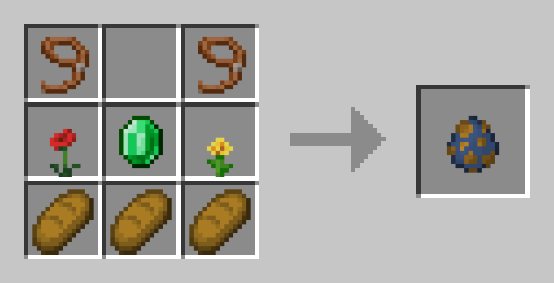
- Includes recipes for Villager and Wandering Trader spawn eggs, providing a more convenient way to obtain villagers without relying on lengthy transportation.
- Features helpful in-game error messages to prevent accidental upgrades on ineligible villagers (e.g., baby villagers or nitwits).
How to use the Trade Upgrade
Once you have a Trade Upgrade in hand, right-clicking within 5 blocks of an eligible villager will apply the upgrade to the one closest to you. Upgraded villagers will have their novice and apprentice trade maximums significantly increased.
Note: Novice villagers, baby villagers, and nitwits cannot be upgraded.
Custom Recipes
Trade Upgrade Recipe
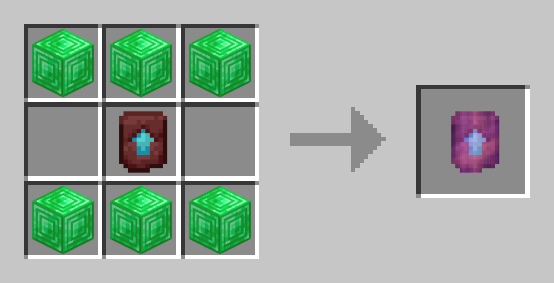
| Villager Spawn Egg | Wandering Trader Spawn Egg |
| – | – |
| 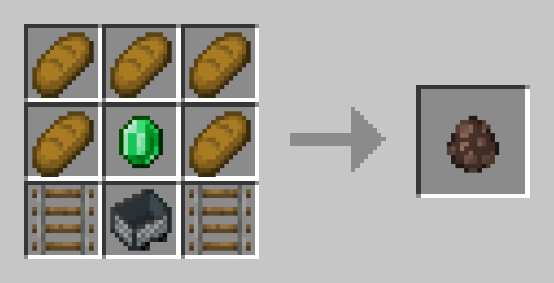 |
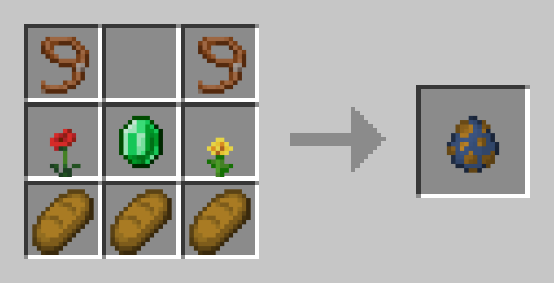 |
Find a Bug?
If you encounter any issues or have suggestions for improvements, please submit them using the “Report issues” tab on the side of this page.
Like this Project?
If you’re feeling generous and want to support my work, you can buy me a coffee.
Thank you! 🧡
常见问题
Trade Upgrade 支持哪些 Minecraft 版本?
Trade Upgrade 支持 Minecraft Java 版 1.21.4–1.21.5,共 2 个版本,可用的加载器:Fabric / Forge / NeoForge / Quilt。下载时注意选择和你游戏版本一致的文件。
Trade Upgrade 怎么安装?
先用 PCL2 或 HMCL 启动器安装对应版本的 Fabric / Forge / NeoForge / Quilt,再把下载的 .jar 文件放进游戏目录的 mods 文件夹,重新启动游戏即可。开启了版本隔离的,mods 文件夹在 versions/版本名 下面。运行环境:客户端 / 服务端。
burnttoastdev 的其他作品
查看全部 →
Practical PvP
Adds combat logging and other balencing changes to prevent players from escaping a fight. Perfect for PvP servers!
Trade Upgrade
Adds a new late game recipe for increasing the max trade limit of villagers, and recipes for villager spawn eggs.

Vanilla Loot+
Tierd of boring loot? This data pack adds over 12 unique items to that are each found in different loot tables.

Elytra Eraser
Replace those pesky Elytra's with a useless leather chestplate!
评论
登录后评论和评分