
TPS Reforged
A simple TPS and MSPT monitor for Minecraft servers, with global and per-dimension performance display, configurable colors, formatting, and actionbar support.
截图
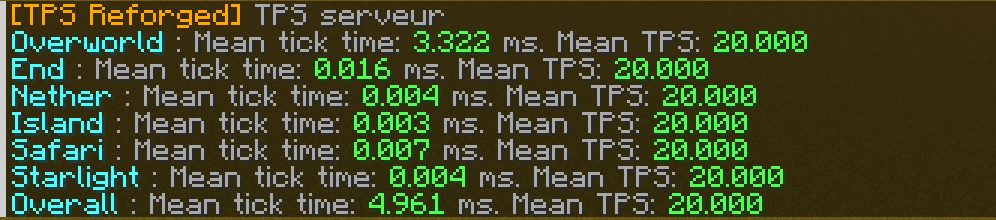
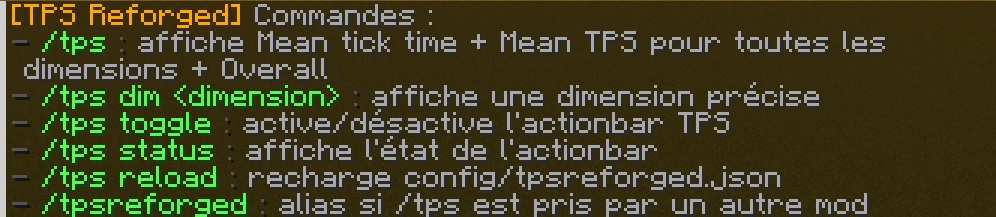

介绍
TPS Reforged
TPS Reforged is a lightweight Minecraft utility mod that displays server TPS and MSPT in a clean and configurable way.
The mod is designed for server owners and modpack creators who want a simple command to quickly check server performance, including global tick time and per-dimension tick information.
Features
- Display global server TPS and MSPT
- Display TPS/MSPT per dimension
- Compact one-line display per dimension
- Custom display names for dimensions
- Automatically add unknown dimensions to the config
- Hide specific dimensions from the output
- Custom dimension ordering
- Configurable line format
- Configurable colors
- Optional actionbar TPS display
- Reloadable config with
/tps reload - Help command with
/tps help
Commands
/tpsDisplays TPS/MSPT for all visible dimensions and the overall server.
/tps dim <dimension>Displays TPS/MSPT for one specific dimension.
/tps toggleToggles the actionbar TPS display for the player.
/tps statusShows whether the actionbar display is enabled for the player.
/tps reloadReloads the configuration.
/tps helpShows the available commands.
Configuration
TPS Reforged includes a configurable JSON file where you can customize:
- Prefix
- Colors
- TPS/MSPT thresholds
- Dimension display names
- Dimension order
- Hidden dimensions
- Output line format
- Actionbar format
Notes
TPS Reforged is not a full profiler.
It is made to quickly show server TPS/MSPT and identify which dimensions are heavier.
For advanced profiling such as entity cost, block entity cost, chunk analysis or method sampling, use a dedicated profiler such as Spark.
常见问题
TPS Reforged 支持哪些 Minecraft 版本?
TPS Reforged 支持 Minecraft Java 版 1.21.1,可用的加载器:Fabric。下载时注意选择和你游戏版本一致的文件。
TPS Reforged 怎么安装?
先用 PCL2 或 HMCL 启动器安装对应版本的 Fabric,再把下载的 .jar 文件放进游戏目录的 mods 文件夹,重新启动游戏即可。开启了版本隔离的,mods 文件夹在 versions/版本名 下面。运行环境:客户端和服务端都要装。
CallMeLoxy 的其他作品
查看全部 →
CobbleSpawnAlert Reforged
为 Cobblemon 添加生成提醒、可点击的聊天操作、捕获通知、传送辅助功能,以及 Discord webhook 支持。

CobbleSpawnAlert Reforged
为 Cobblemon 添加生成提醒、可点击的聊天操作、捕获通知、传送辅助功能,以及 Discord Webhook 支持。

CobblePCEnhanced
Enhances the Cobblemon PC with upgrade tiers, automatic type-based box organization, smarter box mapping, and quality-of-life controls for managing Pokémon storage.

CobblePCEnhanced
Enhances the Cobblemon PC with upgrade tiers, automatic type-based box organization, smarter box mapping, and quality-of-life controls for managing Pokémon storage.
评论
登录后评论和评分