TotemCore
Keep a totem within reach: pick a hotbar slot, and while your inventory is open the mod moves totems you hover over into your offhand and that slot. Client-side only, no server mod required.
截图
介绍
TotemHelper
A client-side quality-of-life mod that keeps a totem of undying in the slot you chose.
You tell TotemHelper which hotbar slot your totem belongs in. From then on it makes sure a totem actually ends up there — and in your offhand — instead of you dragging it around by hand every time you pick a new one up.
What it does
- It keeps the totem in your hand when you leave a container. Whenever you open your inventory, a chest, or any other container, the hotbar selector moves to the slot holding your totem. If the totem is in the slot you configured, it goes there; if it is somewhere else in the hotbar, the selector follows it. Close the screen and the totem is in your hand.
- It puts totems in place when you hover over them. While a container screen is open, move the mouse over a totem of undying and the mod moves it for you:
If your offhand does not hold a totem, it goes there first. That is the slot that actually triggers on death, so it takes priority.
Otherwise, if your configured hotbar slot does not hold a totem, it goes there.
If both already hold a totem, nothing happens.
One totem moves per hover, so picking up a stack of totems from a chest fills the offhand first and the hotbar slot on the next one.
- It stays out of your way. The mod does nothing while you are carrying an item on the cursor, does nothing when it is switched off, and does nothing outside of container screens.
How it works, in plain terms
TotemHelper does not add items, blocks, or recipes, and it does not change any game rule. It performs ordinary inventory clicks — the exact same swap action you would perform by pressing F over a slot — and sends the same packets the vanilla client sends. Everything happens on your machine.
Controls
Action Result
Press Ü Open the settings screen
Click a slot button 1–9 Choose the hotbar slot for your totem
Open any container Hotbar selector moves to your totem
Hover a totem in an open container Totem moves to offhand or your chosen slot
The Ü key is a normal Minecraft key binding. It shows up under Options → Controls → Key Binds in the category TotemHelper and can be rebound to anything you like. The default is the physical key that carries Ü on a German keyboard layout; on other layouts the same physical key is [.
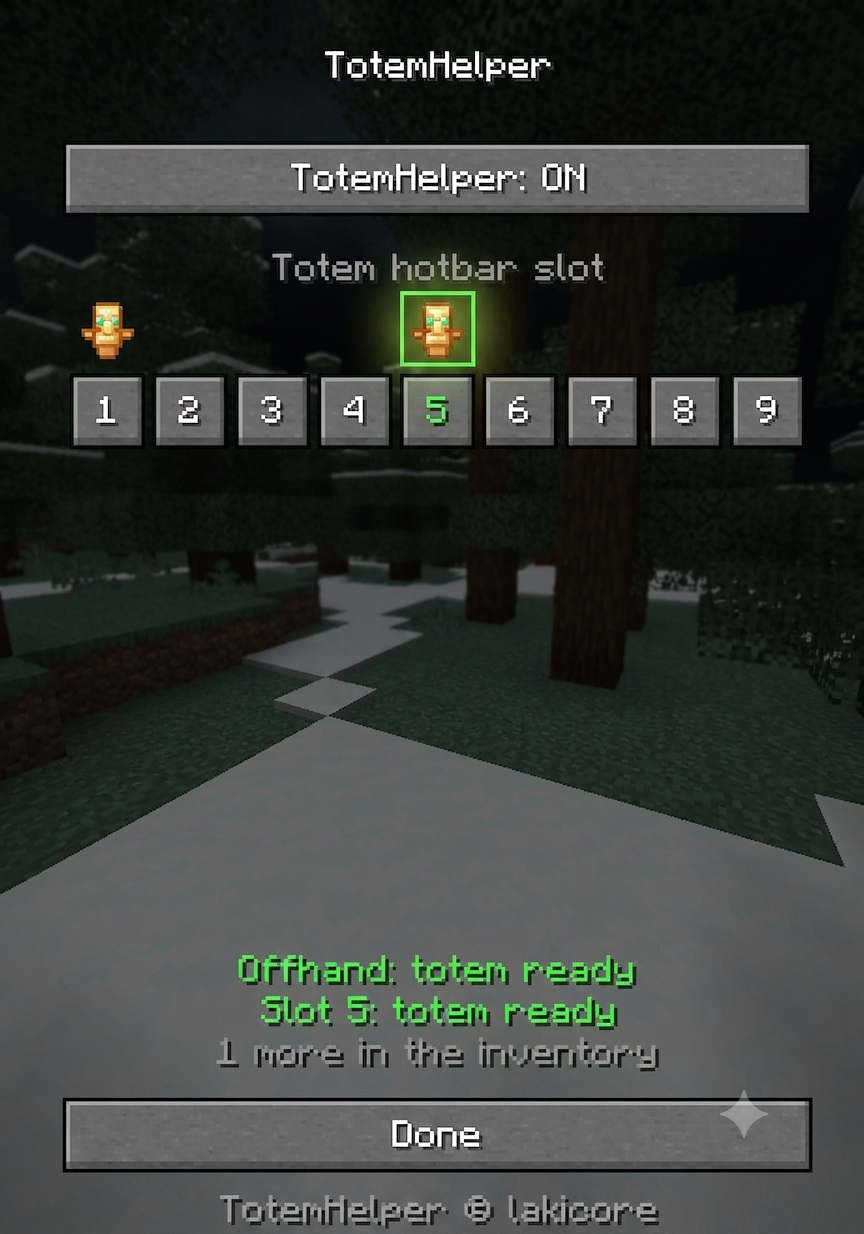
The settings screen
On/off toggle — turn the whole mod off without uninstalling it
Slot picker 1–9 with a live preview of what each hotbar slot currently holds, so you can see where your totem actually is
Status lines — whether your offhand and your chosen slot hold a totem, and how many spare totems are left in your inventory
Configuration
Settings are saved to config/totemhelper.json as soon as you change them:
{
“enabled”: true,
“hotbarSlot”: 4
}
hotbarSlot is zero-based — 4 is the slot labelled 5 in the settings screen.
Requirements
Minecraft 1.21.11
Mod loader Fabric
Dependency Fabric API (required)
Java 21
Server nothing to install — this is a client-side mod
Installation
Install Fabric Loader for 1.21.11
Put Fabric API into your mods folder
Put totemhelper-1.0.0.jar next to it
Launch the game
Things you should know before installing
Moving a totem is a swap, not a copy. If your offhand holds something else — a shield, for example — that item is swapped into the inventory slot the totem came from. Nothing is lost, but the shield does leave your offhand.
This mod automates inventory actions. It clicks for you. Some servers, especially PvP and anarchy servers, consider that unfair automation regardless of the fact that it only uses vanilla packets. Check your server’s rules, and ask staff if you are unsure. Use the on/off toggle when you play somewhere it is not allowed.
It only reacts to totems of undying. No other item is touched.
Source and licence
MIT licensed. TotemHelper © lakicore.
常见问题
TotemCore 支持哪些 Minecraft 版本?
TotemCore 支持 Minecraft Java 版 1.21.5–1.21.11,共 7 个版本,可用的加载器:Fabric。下载时注意选择和你游戏版本一致的文件。
TotemCore 怎么安装?
先用 PCL2 或 HMCL 启动器安装对应版本的 Fabric,再把下载的 .jar 文件放进游戏目录的 mods 文件夹,重新启动游戏即可。开启了版本隔离的,mods 文件夹在 versions/版本名 下面。运行环境:仅客户端。
评论
登录后评论和评分