介绍
Toasty
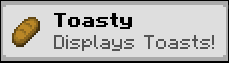
Toasty is a Minecraft Mod that allows you to display toasts after certain events happen in game.

Toasty is fully clientside.
Adding custom toasts
A custom toast can be added using a resourcepack and placing a JSON file under assets/<namespace>/toasts.
A toast file looks like this:
{
  "toast": {
    "factory": {
      //optional, defaults to true
      "display_once": true,
      //optional, defaults to 5000, or 5 secs
      "display_time_in_milliseconds" : 5000,
      //The item to display on the left corner
      "item": "minecraft:bread",

      //Text and title are required Component fields. This means they can be translated,
      //colored and styled just like any other text you can see in game.
      "text": "Display toasts after certain actions are performed. Fully clientside!",
      "title": "Toasty helps customising your pack!"
    },
    //As of now, only this factory exists
    "toast_factory": "toasty:simple"
  },
  //A toast source is the way through which a player sees the Toast.
  //A toast source's targets are heavily dependant on the source.
  "toast_source": [
    {
      "source_id": "toasty:on_login",
      "targets": ["toasty:on_login"]
    }
  ]
}
Toast Factories
As of now, the only type of factory enabled is toasty:simple.
Toast Sources
toasty:on_login– Displays the toast when logging into a world. Requires a non-emptytargetslist.toasty:item_pickup– Displays the toast after picking up an item in the world. A target is the ResourceLocation that identifies the item. For example,minecraft:iron_pickaxe.toasty:entity_kill– Displays the toast after killing a certain entity type. A target is the ResourceLocation that identifies the entity type. For example,minecraft:chicken.
Saved locations
Toasty is fully clientside and uses the toasty folder at the root of your minecraft instance to keep
track of the toasts you have seen throughout your playthrough.
Future plans
- A screen to create toasts in game.
- CraftTweaker support
常见问题
Toasty 支持哪些 Minecraft 版本?
Toasty 支持 Minecraft Java 版 1.21.1,可用的加载器:Fabric / NeoForge。下载时注意选择和你游戏版本一致的文件。
Toasty 怎么安装?
先用 PCL2 或 HMCL 启动器安装对应版本的 Fabric / NeoForge,再把下载的 .jar 文件放进游戏目录的 mods 文件夹,重新启动游戏即可。开启了版本隔离的,mods 文件夹在 versions/版本名 下面。运行环境:仅客户端。
Witixin 的其他作品
查看全部 →
ArmoreableMobs
允许你在实体生成时使用 Craftweaker 给予其盔甲和物品,并支持游戏阶段!

PackMode
用于切换 PackModes 的简易整合包工具
Anvil Repairing
允许玩家修复破损和受损的铁砧。

WanderingFighters
Don't provoke a Wandering Trader! They have training and weapons!
评论
登录后评论和评分