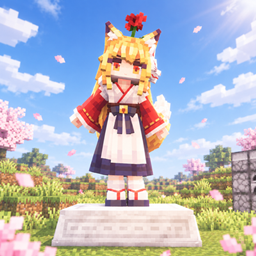
TLM: Statue Animation
TLM: Statue Animation — add-on for TLM × Yes Steve Model. Aim at a maid statue, press a hotkey to open its YSM action wheel and play animations. With MoreAnimation, right-click the statue via the Action Terminal to control emotes/actions. TLM skins too.
介绍
Touhou Little Maid: Statue Animation
A joint add-on mod for Touhou Little Maid × Yes Steve Model.
Aim your crosshair at a maid statue/figurine and press the hotkey to open the action wheel of the YSM model used by that statue, allowing the statue to play animations. After installing MoreAnimation, you can also right-click the statue with its Action Control Terminal to control expressions and actions. TLM skin pack statues are supported as well.
Features
- Statue Action Wheel: Aim at a statue/figurine and press the hotkey (must be bound in Settings → Controls; unbound by default) to open the animation wheel specific to the statue’s current model.
- MoreAnimation Integration: Hold MoreAnimation’s “Action Control Terminal” (
expression_item) and right-click a statue/figurine to control its expressions, actions, and forms. - Sneak + Right-click (either the terminal or a vanilla stick works): Does not open the interface; directly toggles the statue between standing/sitting postures. Sitting posture randomly switches between vanilla sitting postures or the new sitting postures added by moreanimation.
- Right-click a statue with Wenwen’s camera: Can freeze the statue’s animation; right-click again to restore it.
Requirements
| Dependency | Version |
|---|---|
| Minecraft | 1.20.1 |
| Forge | 47+ |
| Touhou Little Maid | Required (1.5.x) |
| Yes Steve Model | Required (2.x) |
| JiuHu MoreAnimation (moreanimation) | Optional (integration features) |
车万女仆:雕像动画(Touhou Little Maid: Statue Animation)
车万女仆(TouhouLittleMaid)× Yes Steve Model 共同附属 mod。
准星对着女仆雕像/手办按快捷键,即可打开该雕像所用 YSM 模型的动作轮盘,让雕像播放动作。安装酒狐更多动画(moreanimation)后,还可用其动作控制终端右键雕像,控制表情与动作,TLM 皮肤包雕像同样生效。
功能特性
- 雕像动作轮盘:对准雕像/手办按下快捷键(需在 设置→控制 中绑定,默认未绑定),弹出该雕像当前模型专属的动画轮盘
- moreanimation 联动:手持酒狐更多动画的”动作控制终端”(expression_item)右键雕像/手办,即可控制其表情、动作与形态
- 蹲下 + 右键(终端或原版木棍均可):不打开界面,直接切换雕像的站姿/坐姿;坐姿会随机切换原版坐姿或 moreanimation 新增坐姿
- 使用文文的相机右键雕像:可以定格雕像的动画,再次右键恢复
环境要求
| 依赖 | 版本 |
|---|---|
| Minecraft | 1.20.1 |
| Forge | 47+ |
| 车万女仆 Touhou Little Maid | 必需(1.5.x) |
| Yes Steve Model | 必需(2.x) |
| 酒狐更多动画 moreanimation | 可选(联动功能) |
常见问题
TLM: Statue Animation 支持哪些 Minecraft 版本?
TLM: Statue Animation 支持 Minecraft Java 版 1.20.1–1.21.1,共 2 个版本,可用的加载器:Forge / NeoForge。下载时注意选择和你游戏版本一致的文件。
TLM: Statue Animation 怎么安装?
先用 PCL2 或 HMCL 启动器安装对应版本的 Forge / NeoForge,再把下载的 .jar 文件放进游戏目录的 mods 文件夹,重新启动游戏即可。开启了版本隔离的,mods 文件夹在 versions/版本名 下面。
评论
登录后评论和评分