Timber Workstations
Wood variants for Minecraft's workstations, with full vanilla functionality and optional wood-themed interfaces
截图
介绍
Timber Workstations
Minecraft has a lot of different wood types, but many of its workstations still only come in one style.
Timber Workstations adds matching wood variants for several vanilla work blocks, so they can actually fit the builds they’re placed in.
Build with Spruce? Use a Spruce Crafting Table.
Making a Cherry workshop? The Loom, Smithing Table and the rest can match it too.
The goal is to keep everything simple and vanilla-friendly rather than turn the workstations into completely new machines.
Workstations
Timber Workstations currently adds variants for:
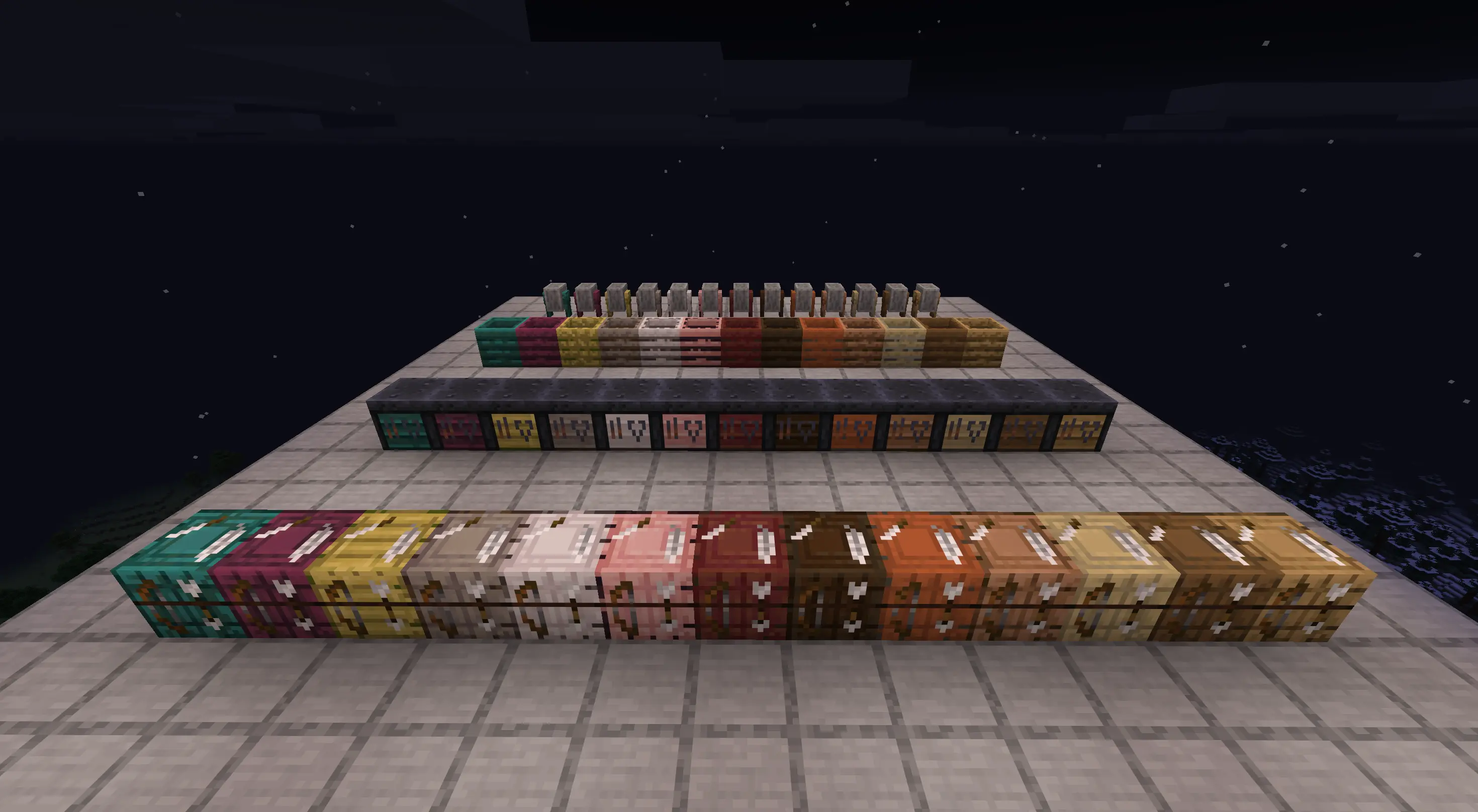
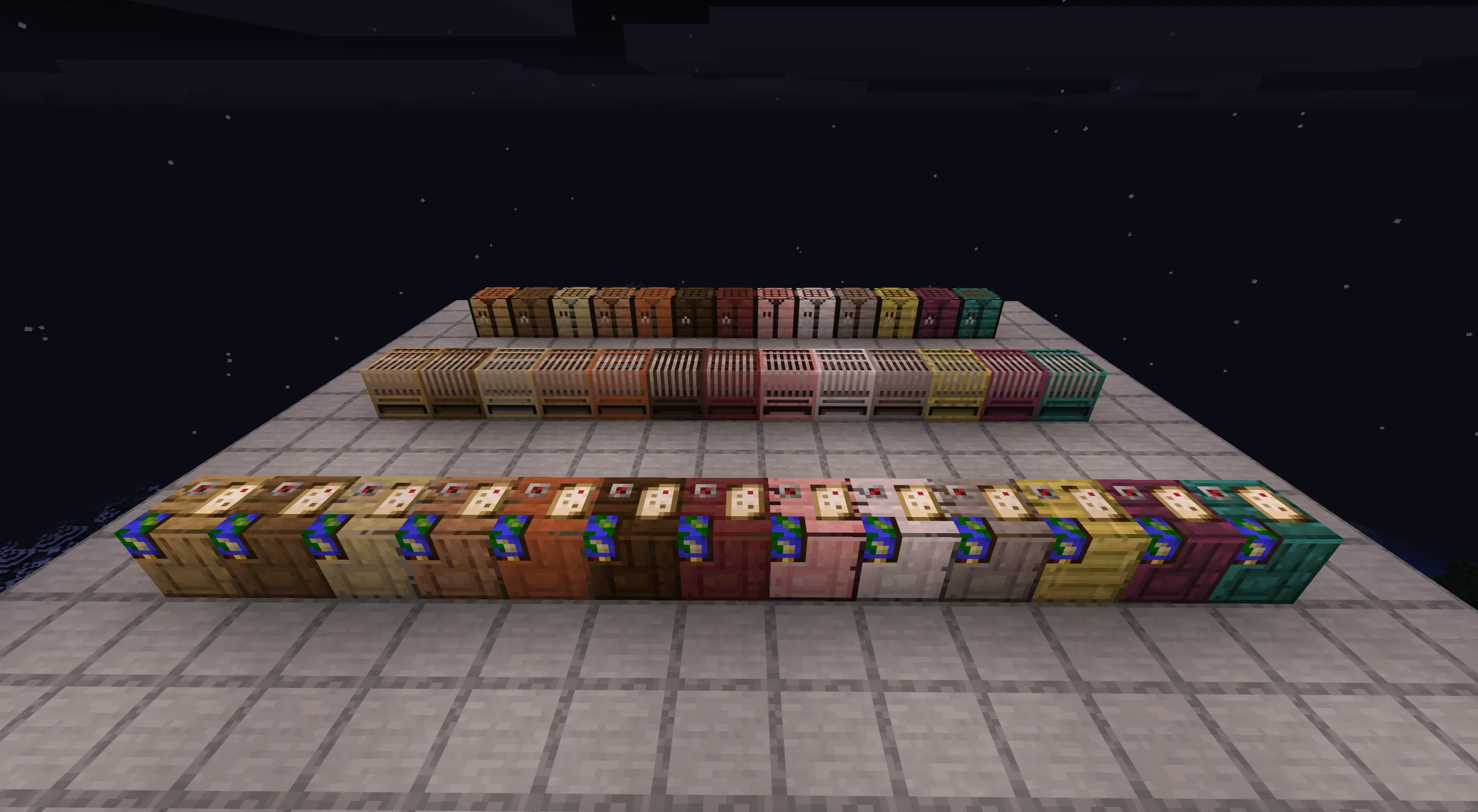
- Crafting Tables
- Looms
- Cartography Tables
- Fletching Tables
- Smithing Tables
- Composters
- Grindstones
Every vanilla wood family in Minecraft 26.3 is supported:
- Oak
- Spruce
- Birch
- Jungle
- Acacia
- Dark Oak
- Mangrove
- Cherry
- Pale Oak
- Poplar
- Bamboo
- Crimson
- Warped
Some vanilla workstations already fit a particular wood family well, so those are reused instead of adding unnecessary duplicate blocks.
For example, the normal Crafting Table fills the Oak slot, while the vanilla Cartography Table and Grindstone are used for Dark Oak.
They still work like vanilla
These aren’t decorative copies.
Each variant keeps the behavior of the vanilla block it is based on.
Crafting Tables still open the normal 3×3 crafting menu. Looms still work with banners. Cartography Tables still handle maps. Smithing Tables still use normal smithing recipes. Composters still support composting, Redstone and automation, and Grindstones still repair and disenchant items.
Villagers also recognise the new blocks as their normal job sites.
That means a Spruce Loom can be used by a Shepherd, a Cherry Composter by a Farmer, a Warped Grindstone by a Weaponsmith, and so on.
Optional wood-themed interfaces
By default, Timber Workstations keeps Minecraft’s normal workstation interfaces.
If you want the inside of the workstation to match the wood type too, you can enable the optional Themed interface style.
Themed interfaces are available for:
- Crafting Tables
- Looms
- Cartography Tables
- Smithing Tables
- Grindstones
To change the interface style, use:
/timberworkstations settings
On NeoForge, the same settings screen can also be opened from the mod’s Config button.
Available options:
- Vanilla — uses Minecraft’s standard workstation interfaces
- Themed — uses interfaces matching the workstation’s wood family
The setting is completely client-side and does not affect gameplay.
Vanilla-first design
Timber Workstations doesn’t add new materials, progression systems or custom crafting mechanics.
The idea is simply to fill a gap in the vanilla wood sets while keeping the blocks familiar to use.
Recipes follow the wood family where appropriate, mixed-wood recipes keep sensible vanilla fallback behavior, and Crimson and Warped variants retain their non-flammable properties.
Compatibility
Minecraft: 26.3
Loaders: Fabric and NeoForge
Version: 1.0.0
Fabric and NeoForge contain the same player-facing content.
常见问题
Timber Workstations 支持哪些 Minecraft 版本?
Timber Workstations 支持 Minecraft Java 版 26.3,可用的加载器:Fabric / NeoForge。下载时注意选择和你游戏版本一致的文件。
Timber Workstations 怎么安装?
先用 PCL2 或 HMCL 启动器安装对应版本的 Fabric / NeoForge,再把下载的 .jar 文件放进游戏目录的 mods 文件夹,重新启动游戏即可。开启了版本隔离的,mods 文件夹在 versions/版本名 下面。
tima4ka1 的其他作品
查看全部 →
Mini Workers
Tiny workers, smart pipes, farming, mining, ranching, and compact automation for your Minecraft world

Timber Chests
Vanilla-style wooden chests, trapped chests, chest boats, rafts, and chest minecarts for every Minecraft wood family

Dappled Understory
Makes Minecraft's Dappled Forest larger, richer, and more interesting to explore while keeping its vanilla feel
Hotbar Restock
Automatically replaces empty hotbar stacks with matching items from your inventory
评论
登录后评论和评分