
The Sequel Parrot
A Sophisticated Minecraft mod that bridges between Minecraft and Discord
截图

介绍
The Sequel Parrot
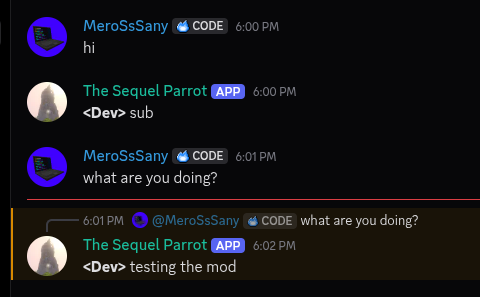
A sophisticated Minecraft server-side mod that bridges Minecraft chat and a Discord channel.
This was built for our SMP, but we decided to release it to the public.
Features
- Seamless Minecraft Discord: Relays all messages smoothly between both platforms.
- Relay Deaths and Advancements: Broadcasts player deaths and earned achievements directly to Discord.
- Reply to Discord Messages: Clicking a Discord message in Minecraft chat autofills the
/replycommand. - Mention Discord Users: Use the
/mentioncommand or@discord_namedirectly in chat to ping users. - Custom Mention Messages: Trigger custom, role-specific notification templates when using
/mentionwithout a message payload. - Quark Compatibility: Seamlessly forwards shared items from Quark’s Share Item feature to Discord.
- Reply Context: Hover over mirrored Discord messages in Minecraft to see what message is being replied to.
- Anti-Mass Mention: Prevents spam by timing out and auto-kicking players who exceed configurable mention thresholds per minute.
- Anti-Clutter: Strips newlines from chat messages into single lines and prevents executed commands from leaking into the relay channel.
- Easy Mention: Click any Discord username in Minecraft chat to automatically prepare a
/mentioncommand.
Commands
Minecraft Commands
/reply <message_id> <message>– Replies to a specific Discord message by ID./mention <user_name> [message]– Pings a Discord user directly or sends a preset custom mention message.
Discord Commands
/ping– Checks bot responsiveness and latency./players– Displays a list of currently online Minecraft players./mention <role> <message>– Sets a custom mention template string for a specified role.
Custom Mention System
The default mention format is: (Minecraft) has mentioned you, (Discord).
Server admins or role holders can configure dynamic notification formats via Discord using /mention.
Placeholder Syntax
<@>– Replaced by the sender’s Minecraft Username.(@)– Replaced by the recipient’s Discord Display Name.
Examples
<@> has mentioned you, (@).Attention needed! <@> requests (@) for help!
Note: Custom mention templates are triggered when a player runs
/mention <user_name>without providing an extra message argument.
Setup Guide
1. Creating the Discord Bot
- Navigate to the Discord Developer Portal and create a new application.
- Customize your bot’s name and avatar.
- Go to the Bot tab in the sidebar.
- Click Reset Token and copy your new bot token (keep this private).
- Scroll down to Privileged Gateway Intents and enable:
- Server Members Intent
- Message Content Intent
- Under Bot Permissions (or via the OAuth2 -> URL Generator with the
botscope), grant the following permissions:
- Send Messages
- Manage Messages
- Embed Links
- Invite the bot to your Discord server.
2. Configuring the Mod
- Boot your Minecraft server once with the mod installed to generate configuration files.
- Open your server’s
configfolder and locatemessager_bot-server.toml. - Open the file and paste your Bot Token into the designated field.
3. Binding the Discord Channel
- In Discord, open User Settings -> Developer.
- Enable Developer Mode.
- Right-click your desired chat relay channel in Discord and select Copy Channel ID.
- Paste the Channel ID into
messager_bot-server.toml. - Restart or reload your server.
Credits (The Sequel Team)
- MeroSsSany – Lead Developer
- Guardian – Security Tester
- Cattopy – Tester
- Sanys – Logo Design
常见问题
The Sequel Parrot 支持哪些 Minecraft 版本?
The Sequel Parrot 支持 Minecraft Java 版 1.21.1–1.21.11,共 11 个版本,可用的加载器:NeoForge。下载时注意选择和你游戏版本一致的文件。
The Sequel Parrot 怎么安装?
先用 PCL2 或 HMCL 启动器安装对应版本的 NeoForge,再把下载的 .jar 文件放进游戏目录的 mods 文件夹,重新启动游戏即可。开启了版本隔离的,mods 文件夹在 versions/版本名 下面。运行环境:仅服务端。
MeroSsSany 的其他作品
查看全部 →
Startup Music Tone
Plays any music during the game's loading screen

VoskLib
A library mod that ports VOSK to Minecraft

WhisperLib
A fork of VoskLib that uses WhisperAI instead of VOSK for voice recognition

Slip of a Tongue: Whisper Edition
A fork of Slip of a Tongue that uses WhisperLib instead of VoskLib. Put words in list so when players say the word (via mic), a series of commands will be run.
评论
登录后评论和评分