
The Nameless Watcher
The Nameless Watcher is a horror entity that stalkers and kills...
截图

介绍
The Nameless Watcher
Something is watching you.
The Nameless Watcher is a Minecraft horror mod for Forge 1.20.1 that adds a mysterious masked entity that stalks the player from a distance before beginning a dangerous chase.
At first, you may only see him standing far away, hiding near trees, buildings, caves, or other dark places. He may disappear, move closer, whisper warnings, or tell you to leave. Eventually, the screen becomes dark, the music begins, and the Watcher starts hunting you.
Features
- Creepy stalking encounters
- Darkness and screen effects
- Custom horror sounds and voice lines
- Chase music
- Fast pursuit AI
- Can climb walls of any height
- Attacks players during the chase
- Different damage depending on armor
- 100 hearts of health, making him difficult but possible to kill
- Despawns after one minute if he does not kill the player
- Does not attack Creative or Spectator players
- Custom transparent PNG appearance
- Natural survival encounters
- No GeckoLib or additional dependencies required
Armor Damage
- No armor or weak armor: 3 hearts
- Full iron armor: 2.5 hearts
- Full diamond armor: 2 hearts
- Full netherite armor: 1 heart
Requirements
- Minecraft Java Edition 1.20.1
- Commands
Start an immediate chase:
/function nameless:chaseTest the Watcher’s appearance:
/function nameless:debug/visualStart the full demo encounter:
/function nameless:settings/demoReset the current encounter:
/function nameless:resetThe Nameless Watcher is designed to create suspense instead of relying only on constant jumpscares. You may see him long before he attacks—but once the chase begins, running may not be enough.
常见问题
The Nameless Watcher 支持哪些 Minecraft 版本?
The Nameless Watcher 支持 Minecraft Java 版 1.20.1,可用的加载器:Forge。下载时注意选择和你游戏版本一致的文件。
The Nameless Watcher 怎么安装?
先用 PCL2 或 HMCL 启动器安装对应版本的 Forge,再把下载的 .jar 文件放进游戏目录的 mods 文件夹,重新启动游戏即可。开启了版本隔离的,mods 文件夹在 versions/版本名 下面。
VoidStriker404 的其他作品
查看全部 →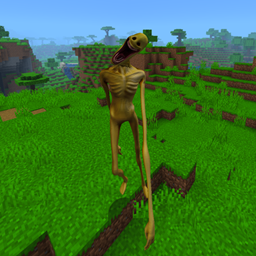
Verity Better Body & Animations
这个模组全面改造了 Verity 的怪物形态外观,并加入了更流畅的动画。**务必同时安装 Verity JE!**动画由 Narek 制作,特此致谢!

Jester PNG
这款模组加入了小丑恐怖内容。视频里那些都是假的,但这个是真的!欢迎订阅我的频道:https://www.youtube.com/@blitz_prod4 也可以下载我另一款更棒的小丑模组!https://www.curseforge.com/minecraft/mc-mods/the-jester
XRAYVision
a simple easy xray texture pack

Creepy Mickey
A Forge 1.20.1 horror mod that adds a disturbing Mickey-inspired stalker with custom animations, unpredictable encounters, creepy music, and aggressive chase AI.
评论
登录后评论和评分