
截图

介绍
🇹🇭 Thai Alphabet Block
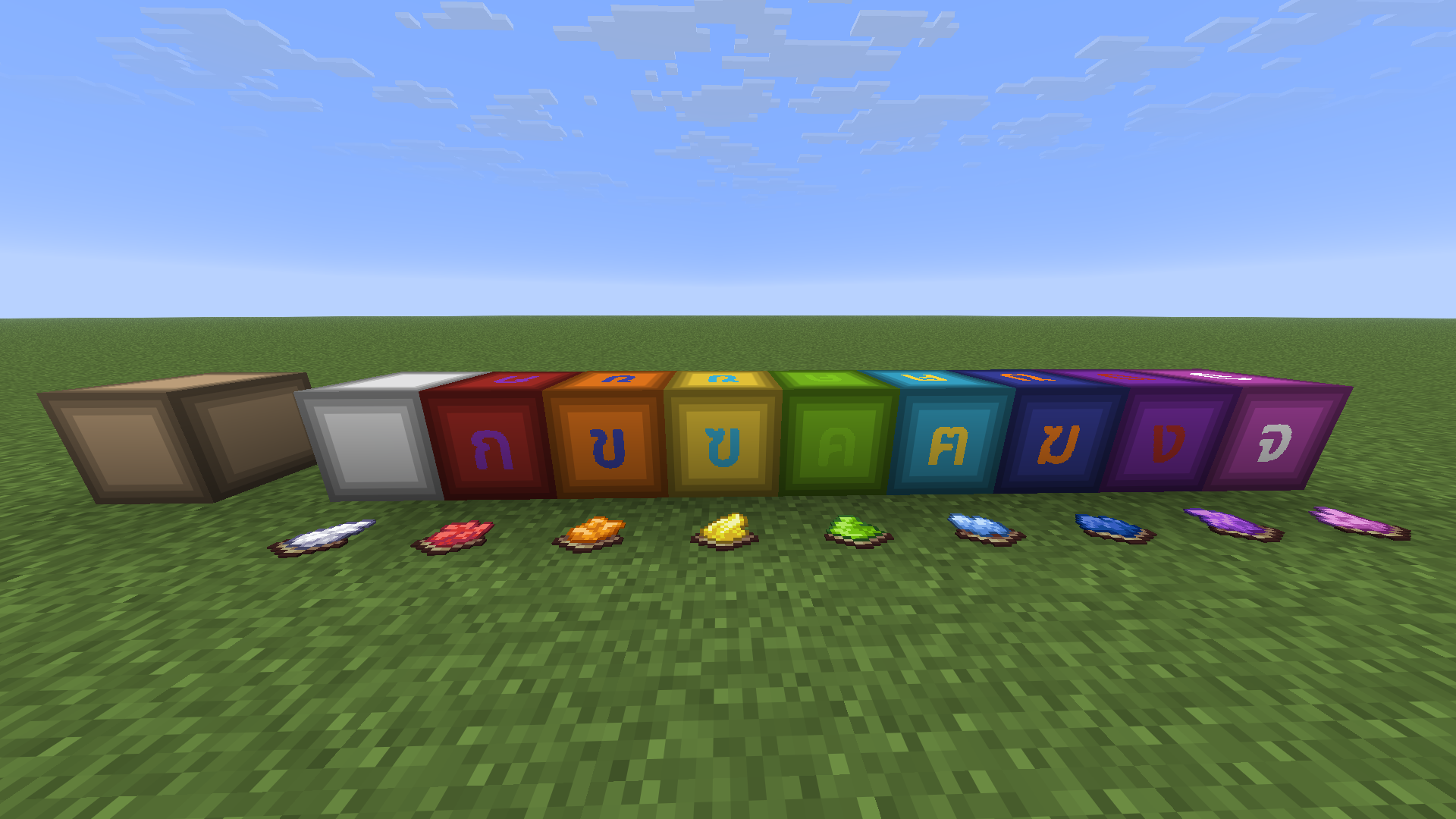
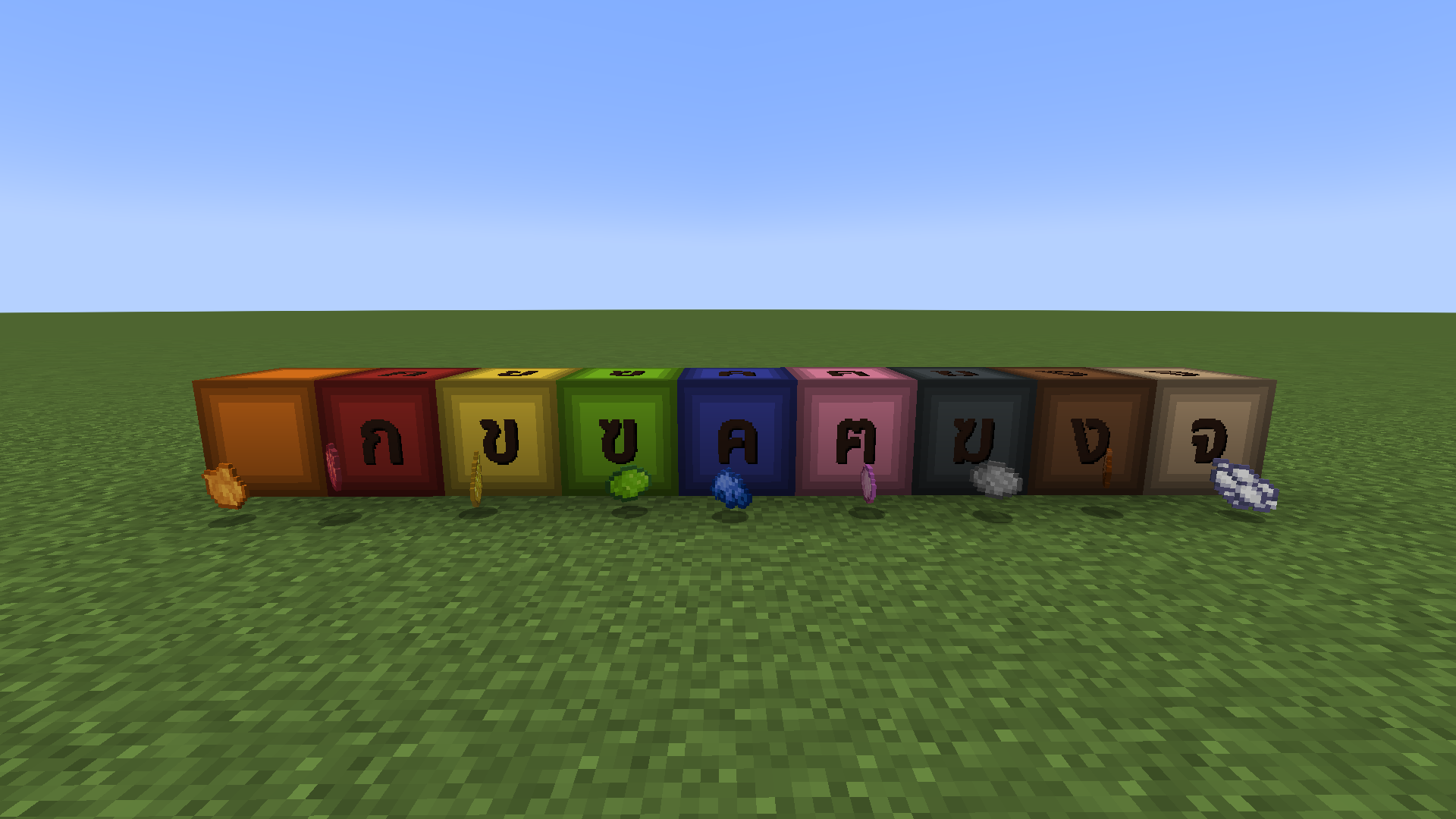
A Minecraft mod that adds beautiful Thai alphabet blocks to the game! Perfect for building signs, decorating schools, creating word-guessing games, or designing Thai-themed worlds.


✨ Features
- 69 Thai Character Blocks: Includes all major consonants (ก-ฮ), vowels, and tone marks as placeable full blocks.
- Color Customization (Dyeable!): Right-click any Thai alphabet block with any of the 16 Minecraft Dyes to customize the background color. The background will shift color while keeping the wood panel design and making the characters stand out cleanly.
- Improved Visuals: Rendered using high-quality cutout layers (1.21.11+) ensuring sharp glyph edges and perfect transparency.
- Dedicated Creative Tab: Organized beautifully in a custom creative tab for easy search and access.
- Universal Loader Support: Compiles and runs natively across Fabric, Forge, and NeoForge for Minecraft versions
1.20.1,1.21.1,1.21.4,1.21.11, and26.2.
🎨 How to Dye Blocks
- Place down any Thai Alphabet Block.
- Hold any Minecraft Dye (16 colors available) in your hand.
- Right-click the block to apply the dye! The background panel changes color instantly.
📥 Installation
- Ensure you have installed the correct Mod Loader for your Minecraft version:
- _(For Fabric users)_ Install the required Fabric API.
- Download the mod version matching your Minecraft version ~~~~from GitHub Releases or Modrinth.
- Place the downloaded
.jarfile in your.minecraft/modsdirectory. - Launch the game and enjoy!
🇹🇭 ภาษาไทย (Thai)
ม็อด Minecraft ที่เพิ่มบล็อกตัวอักษรภาษาไทยเข้ามาในเกม! เหมาะสำหรับนำไปสร้างป้ายข้อความ ตกแต่งโรงเรียน ทำกิจกรรมทายคำ หรือสร้างสรรค์สิ่งก่อสร้างในธีมไทยอันแสนอบอุ่น
✨ ฟีเจอร์เด่น
- บล็อกอักษรไทย 69 ตัวอักษร: ครอบคลุมทั้งพยัญชนะ (ก-ฮ) สระ และวรรณยุกต์ทั้งหมดในเกมเป็นบล็อกเต็มตัว
- ย้อมสีพื้นหลังได้อิสระ (Dyeable!): ใช้สีย้อม (Dye) ทั้ง 16 สีในเกมคลิกขวาที่ตัวบล็อกเพื่อย้อมสีพื้นหลังได้ทันที โดยจะเปลี่ยนสีเฉพาะแผ่นไม้ด้านหลัง และตัวอักษรจะยังคงเด่นชัดสวยงาม
- การแสดงผลที่คมชัดยิ่งขึ้น: ใช้ Render Layer แบบ Cutout (สำหรับ 1.21.11+) หมดห่วงเรื่องขอบบล็อกโปร่งใสเพี้ยนหรือขอบหยัก
- หน้าต่าง Creative Tab แยกเฉพาะ: จัดหมวดหมู่อย่างเป็นระเบียบ ค้นหาและใช้งานได้ง่ายในโหมดสร้างสรรค์
- รองรับครอบคลุมทุก Mod Loader: รองรับการใช้งานทั้งบน Fabric, Forge, และ NeoForge สำหรับเวอร์ชัน
1.20.1,1.21.1,1.21.41.21.11, และ26.2.
🎨 วิธีย้อมสีบล็อก
- วางบล็อกตัวอักษรไทยในจุดที่ต้องการ
- ถือ สีย้อม (Dye) สีใดก็ได้ที่คุณชื่นชอบในมือ
- คลิกขวา ที่บล็อกนั้น! สีพื้นหลังของแผ่นไม้จะถูกเปลี่ยนเป็นสีย้อมนั้นทันที
📥 วิธีติดตั้งม็อด
- ตรวจสอบให้แน่ใจว่าติดตั้ง Mod Loader สำหรับ Minecraft เวอร์ชันที่ต้องการเรียบร้อยแล้ว:
- _(สำหรับผู้ใช้ Fabric)_ จำเป็นต้องติดตั้งม็อด Fabric API ร่วมด้วย
- ดาวน์โหลดไฟล์
.jarของม็อดที่ตรงกับเวอร์ชันตัวเกมของคุณจากหน้า GitHub Releases หรือ Modrinth - นำไฟล์
.jarที่ดาวน์โหลดมา ไปวางไว้ในโฟลเดอร์modsของโฟลเดอร์ตัวเกม - เริ่มเกมและสนุกกับตัวอักษรไทยได้เลย!
📝 License
This project is licensed under the Apache License 2.0.
常见问题
Thai Alphabet Blocks 支持哪些 Minecraft 版本?
Thai Alphabet Blocks 支持 Minecraft Java 版 1.20.1–26.3,共 11 个版本,可用的加载器:Fabric / Forge / NeoForge。下载时注意选择和你游戏版本一致的文件。
Thai Alphabet Blocks 怎么安装?
先用 PCL2 或 HMCL 启动器安装对应版本的 Fabric / Forge / NeoForge,再把下载的 .jar 文件放进游戏目录的 mods 文件夹,重新启动游戏即可。开启了版本隔离的,mods 文件夹在 versions/版本名 下面。运行环境:客户端和服务端都要装。
ArtZakura 的其他作品
查看全部 →
Colored Alphabet blocks
An English letter blocks mod with dyable colors support for Minecraft.

JustFriends Client Fabric
JustFriends Client is game server client for JustFriend SMP

IXSMP Client
IXSMP Client is Optimize and Game Client For Server IXSMP
评论
登录后评论和评分