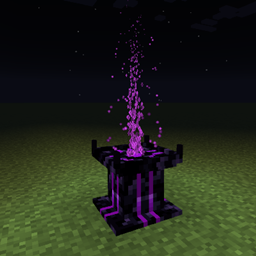
Teleport++
Build a fast-travel network. Teleport yourself, mobs and other players using area teleports.
截图


介绍
Teleport++ is an easy to use and versatile teleportation system.
The mod adds 3 new items:
1. Teleport
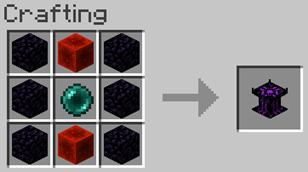
After placing it on the ground you need to give it a unique name.
Right-click a teleport to select a destination. You can browse through all available teleports or start typing to quickly find the one you want.
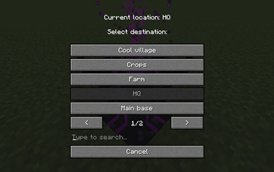
2. Area Teleport
This is an upgraded version of standard Teleport which teleports all living entities within it’s range (9×9). You can teleport animals, hostile mobs and other players!
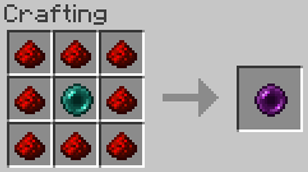
To craft an Area Teleport you need a standard Teleport and 4 redstone torches.
You can use crafting table for that…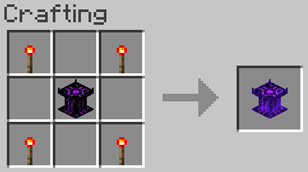
..or upgrade existing Teleport directly in the world by placing 4 redstone torches so they form a 9×9 square with the teleport in the center. Torches are destroyed after successful upgrade.
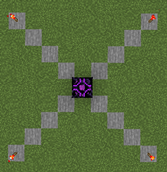
You can distinguish an Area Teleport from a standard one by particle effect within area of effect.
3. Personal Teleporter
This is a multiple-use item which creates a temporary portal when used on the ground. It’a active for 90 seconds (after that the portal dissapears). During that time you can use the item again to teleport back to previously set destination.
Personal Teleporter can also be used to teleport nearby creatures and players (in 9x9x9 area). To do that you need to charge it while teleporting (hold right mouse button for 2 sec. until it starts glowing). Any living entity in range will get a special particle effect to easly tell if you are close enough to teleport it.
You can do different stuff with Personal Teleporter:
– create a “safe point” when scouting dangerous places (caves, underwater structures etc.)
– easly transport animals
– teleport mobs into a trap
– catch fish 🙂
– and many more…
Other notes:
– Teleport and Area Teleport can be harvested with a diamond pickaxe
– While selecting a Teleport destination you will see only teleports from the current dimension. This way you can have a separate fast travel network in each dimension.
– Make sure to leave enough free space around a destination teleport while teleporting together with other players and mobs. Otherwise some of you may end up in different place than expected 😉
Update 1.1.0:
– added possibility to set teleport travel cost (disabled by default)
– teleport can “consume” items, health points, XP levels or XP points
– any item can be used as “currency” (also from other mods – just make sure to provide correct name in config file)
– tip: setting cost type to “ITEM” and cost to “0” will allow to travel only if you have specified item but it won’t consume it (so it can work as a multi-use “key”)
– if cost type is set to “HEALTH” teleport will not kill the player even if doesn’t have enough HP. In such case player health will be set to 1HP (half heart)
– cost can be constant (e.g 1 emerald per use) or based on travel distance (e.g. 1 gold ingot per 10 chunks)
– for distance-based cost you can set a maximum limit (e.g. 10 XP points per chunk but no more than 5000 in total)
– costs are ignored in creative mode
– config can be found in <world_directory>/serverconfig/teleportmod-server.toml (I suggest to reconnect to server after changing something)
– mod now works on Dedicated Servers
Update 1.1.3:
– added option to disable possibility of upgrading Teleport with redstone torches (canUpgradeWithTorches setting in server config file)
常见问题
Teleport++ 支持哪些 Minecraft 版本?
Teleport++ 支持 Minecraft Java 版 1.15.2–1.16.5,共 6 个版本,可用的加载器:Forge。下载时注意选择和你游戏版本一致的文件。
Teleport++ 怎么安装?
先用 PCL2 或 HMCL 启动器安装对应版本的 Forge,再把下载的 .jar 文件放进游戏目录的 mods 文件夹,重新启动游戏即可。开启了版本隔离的,mods 文件夹在 versions/版本名 下面。

评论
登录后评论和评分