
Teleport Command
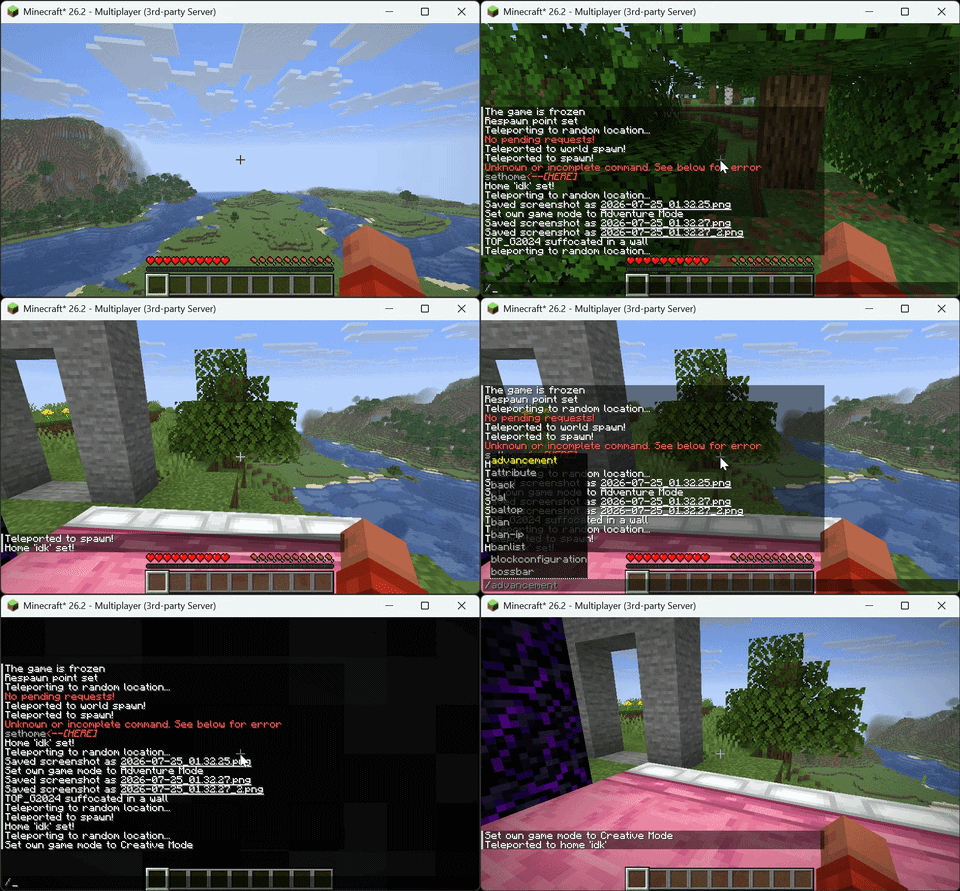
Teleport Commands is a high-performance, Server-Side ONLY teleportation suite for Minecraft. It provides a complete set of player-friendly teleport commands with safety checks, configurable delays, and persistent data storage—no client mods required.
截图
介绍
Teleport Command
A server-side Fabric mod that adds teleportation commands for players. No client mod is required. Vanilla clients can use every feature. The mod only needs to be installed on the server.
Installation
- Install Fabric Loader for your Minecraft version.
- Install Fabric API.
- Download the mod JAR that matches your game version and place it in the server
modsfolder. - Restart the server. The config file is generated at
config/teleport_commands.jsonon first run.
Supported versions
| Mod version | Game versions | Loader |
|—|—|—|
| 1.0.3 | 1.21 – 1.21.11 | Fabric |
| 1.0.3 | 26.1 – 26.1.2 | Fabric |
| 1.0.3 | 26.2 | Fabric |
| 1.0.3 | 26.3 | Fabric |
Commands
| Command | Description |
|—|—|
| /sethome <name> | Save your current position as a personal home. |
| /home <name> | Teleport to one of your homes. With no argument, teleports to the home named home, or your first home if none has that name. |
| /delhome <name> | Delete one of your homes. |
| /homes | List your homes. Click a name to teleport to it, click [X] to delete it. |
| /defaulthome <name> | Verify a home exists and confirm it with a message. |
| /setwarp <name> | Create a warp at your position. Operators create global warps usable by everyone, other players create personal warps. |
| /warp <name> | Teleport to a warp. With no argument, lists all warps available to you. |
| /delwarp <name> | Delete a warp. Operators can delete any warp, other players can only delete their own personal warps. |
| /renamewarp <old> <new> | Rename a warp. Operators can rename any warp. |
| /tpa <player> | Send a teleport request to a player. Player names autocomplete when pressing tab. |
| /tpahere <player> | Ask a player to teleport to your position. |
| /tpaaccept [player] | Accept a teleport request. With no argument, accepts the oldest pending request. |
| /tpadeny [player] | Deny a teleport request. With no argument, denies the oldest pending request. |
| /back | Return to your last death location. |
| /spawn | Teleport to your bed respawn point, or the world spawn if you have none. |
| /worldspawn | Teleport to the world spawn point. |
| /rtp | Random teleport to safe ground within the configured radius. The search runs over several server ticks so it never freezes or kicks players. |
| /wild [dimension] | Random teleport with a wider radius. Accepts an optional dimension such as minecraft:the_nether. Can be disabled in the config. |
Teleport requests show clickable green [ACCEPT] and red [DENY] buttons in chat, so the target player never has to type a command. Sending a teleport request has a 10 second cooldown per player.
Configuration
The file config/teleport_commands.json is created on first run. Delete it and restart the server to regenerate the defaults. Every command section supports the following options:
| Setting | Default | Description |
|—|—|—|
| enabled | true | Set to false to disable the command entirely. Used for example to turn off /wild. |
| teleport_delay_seconds | 0 | Reserved setting, currently has no effect. |
| default_safety_check | true | Check that the destination has solid ground, free space and no lava, fire or fluids before teleporting. If the spot is unsafe, the nearest safe spot is used instead. |
The rtp and wild sections have additional options:
| Setting | RTP default | Wild default | Description |
|—|—|—|—|
| min_distance | 1000 | 2000 | Minimum horizontal distance from the world origin for random locations, in blocks. |
| max_distance | 5000 | 10000 | Maximum horizontal distance from the world origin for random locations, in blocks. |
| preload_chunks | true | true | Reserved setting, currently has no effect. |
| safe_mode | true | false | When true, only locations with solid non-water, non-lava ground pass the safety check, so oceans are skipped. When false, the surface height is used directly, which can be a water surface. |
Full default config:
{
  "global": {
    "global_cooldown_seconds": 0
  },
  "commands": {
    "worldspawn": { "enabled": true, "teleport_delay_seconds": 0, "default_safety_check": true },
    "back": { "enabled": true, "teleport_delay_seconds": 0, "default_safety_check": true },
    "home": { "enabled": true, "teleport_delay_seconds": 0, "default_safety_check": true },
    "warp": { "enabled": true, "teleport_delay_seconds": 0, "default_safety_check": true },
    "rtp": {
      "enabled": true,
      "teleport_delay_seconds": 0,
      "default_safety_check": true,
      "min_distance": 1000,
      "max_distance": 5000,
      "preload_chunks": true,
      "safe_mode": true
    },
    "wild": {
      "enabled": true,
      "teleport_delay_seconds": 0,
      "default_safety_check": true,
      "min_distance": 2000,
      "max_distance": 10000,
      "preload_chunks": true,
      "safe_mode": false
    },
    "spawn": { "enabled": true, "teleport_delay_seconds": 0, "default_safety_check": true },
    "tpa": { "enabled": true, "teleport_delay_seconds": 0, "default_safety_check": true }
  }
}
Data storage
Homes, warps and death locations are saved as JSON files under config/teleport-commands/storage/ (homes.json, warps.json, back_locations.json, tpa_requests.json) and survive server restarts.
常见问题
Teleport Command 支持哪些 Minecraft 版本?
Teleport Command 支持 Minecraft Java 版 1.21–26.3,共 17 个版本,可用的加载器:Fabric。下载时注意选择和你游戏版本一致的文件。
Teleport Command 怎么安装?
先用 PCL2 或 HMCL 启动器安装对应版本的 Fabric,再把下载的 .jar 文件放进游戏目录的 mods 文件夹,重新启动游戏即可。开启了版本隔离的,mods 文件夹在 versions/版本名 下面。运行环境:仅服务端。
Fabric Server Essentials 的其他作品
查看全部 →
Vein Miner
Viper Vein Miner is a lightweight, Server-Side vein-mining mod. Break one ore or log and mine its connected vein in a single action

Viper AntiXray
ViperAntiXray is an ultra-high-performance, 100% server-side Fabric utility engineered to secure server economies by completely blinding client-side X-Ray radars.

Custom Dimensions
Server-side Fabric mod for persistent custom dimensions and two-way portals.
Custom Dimensions
Server-side Fabric mod for persistent custom dimensions and two-way portals.
评论
登录后评论和评分