介绍
介绍由机器翻译自 CurseForge 原页面,仅供参考。
Titan Team Shifters
快速入门
- 合成一台泰坦通讯器,然后使用它打开英雄选择界面。
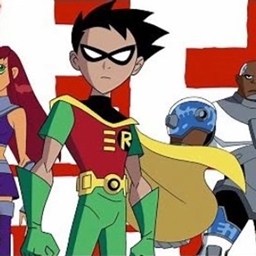
- 选择 Robin、Starfire、Raven、Beast Boy、Cyborg 或 Kid Flash。你的玩家外观会变成对应英雄的样子。
- 按下 G(默认的使用英雄能力键)来发动能力。你可以在 Minecraft 的「控制」设置中更改按键。能力冷却时间为五秒。
- 合成装置并手持使用:投掷鸟镖、发射星火发射器、挥舞泰坦法杖,或将抓钩瞄准方块或生物。
概览
选择一位少年泰坦,获得其专属被动加成和标志性能力。泰坦通讯器可以让你随时切换形态;选择之后无需穿戴或手持它。你的形态和声望会被保存。
新增内容
本模组包含六种英雄形态、一个形态选择器、五种可合成装置,以及基于声望的团队等级显示。
使用方法
使用泰坦通讯器打开选择界面,点击英雄名称,然后关闭界面。按下G使用当前英雄的能力。未选择形态时按下G,系统会提示你选择形态。
你也可以对另一名玩家使用通讯器,与其建立团队连接。这样会获得 1 点声望,并使另一名玩家短暂获得生命恢复效果。
合成与获取
所有五种物品都可以在工作台中合成。下方的配方图标展示了各物品;将鼠标悬停在图标上或点击图标即可查看完整配方。
| 物品 | 配方 |
|---|---|
| 泰坦通讯器 | <button class="mx-1 inline-flex h-7 items-center gap-1 border border-border bg-muted/50 px-1.5 align-middle text-muted-foreground transition hover:border-foreground/30 hover:bg-muted hover:text-foreground focus:outline-none focus:ring-2 focus:ring-ring focus:ring-offset-1" type="button" aria-label="View full recipe for Birdarang" aria-haspopup="dialog" aria-expanded="false" aria-controls="radix-_r_1tf_" data-state="closed"> </button> |
| 鸟镖 | <button class="mx-1 inline-flex h-7 items-center gap-1 border border-border bg-muted/50 px-1.5 align-middle text-muted-foreground transition hover:border-foreground/30 hover:bg-muted hover:text-foreground focus:outline-none focus:ring-2 focus:ring-ring focus:ring-offset-1" type="button" aria-label="View full recipe for Grapple Line" aria-haspopup="dialog" aria-expanded="false" aria-controls="radix-_r_1tg_" data-state="closed"> </button> |
| 抓钩 | <button class="mx-1 inline-flex h-7 items-center gap-1 border border-border bg-muted/50 px-1.5 align-middle text-muted-foreground transition hover:border-foreground/30 hover:bg-muted hover:text-foreground focus:outline-none focus:ring-2 focus:ring-ring focus:ring-offset-1" type="button" aria-label="View full recipe for Starbolt Emitter" aria-haspopup="dialog" aria-expanded="false" aria-controls="radix-_r_1th_" data-state="closed"> </button> |
| 星火发射器 | <button class="mx-1 inline-flex h-7 items-center gap-1 border border-border bg-muted/50 px-1.5 align-middle text-muted-foreground transition hover:border-foreground/30 hover:bg-muted hover:text-foreground focus:outline-none focus:ring-2 focus:ring-ring focus:ring-offset-1" type="button" aria-label="View full recipe for Titan Communicator" aria-haspopup="dialog" aria-expanded="false" aria-controls="radix-_r_1ti_" data-state="closed"> </button> |
| 泰坦法杖 | <button class="mx-1 inline-flex h-7 items-center gap-1 border border-border bg-muted/50 px-1.5 align-middle text-muted-foreground transition hover:border-foreground/30 hover:bg-muted hover:text-foreground focus:outline-none focus:ring-2 focus:ring-ring focus:ring-offset-1" type="button" aria-label="View full recipe for Titans Staff" aria-haspopup="dialog" aria-expanded="false" aria-controls="radix-_r_1tj_" data-state="closed"> </button> |
能力与机制
每种形态都会定期刷新其被动效果。能力每五秒可以使用一次。
| 形态 | 被动效果 | 按下 G |
|---|---|---|
| Robin | 速度 I 和跳跃提升 I | 获得更强的速度和跳跃提升效果,为附近的玩家队友加速,并攻击周围可攻击的生物。 |
| Starfire | 抗性 I、力量 I、缓降和飞行 | 起飞,获得缓降效果,发射星能弹;在白天且能看见天空时还可以治疗。 |
| Raven | 夜视 | 朝你注视的方块进行影跃;如果没有瞄准方块,则向前影跃。获得短暂的漂浮、生命恢复和隐身效果,并显现附近的生物。 |
| Beast Boy | 夜视和速度 I | 获得生命恢复 II、速度 II,以及持续时间更长的夜视效果。 |
| Cyborg | 抗性 I 和急迫 II | 获得力量 II 和抗性 II,标记附近的生物,并发射能量光束。 |
| Kid Flash | 速度 II 和急迫 I | 前方有空间时向前穿行,获得更强的速度和急迫效果并恢复生命;还会在附近掀起旋风,也能治疗受伤的玩家队友并为他们加速。 |
范围攻击可以伤害并击退附近的生物。用这些范围攻击击败生物会提升声望;显示的队伍等级从 1 级开始,并随声望提升。
小工具
手持小工具时使用;适用时请瞄准目标。
- 飞镖: 右键将其投向生物。命中时造成伤害;在创造模式以外投出后会消失。
- 抓钩: 瞄准生物时右键,可将自己拉向目标;瞄准方块时右键,则会把自己拉向该位置。
- 星能发射器: 右键向视线范围内的生物发射光束。
- 泰坦法杖: 右键攻击附近的生物;还会短暂提升你的速度。
抓钩、星能发射器和泰坦法杖在使用时会损失耐久度。
常见问题
Teen titans 支持哪些 Minecraft 版本?
Teen titans 支持 Minecraft Java 版 1.20.1,可用的加载器:Fabric。下载时注意选择和你游戏版本一致的文件。
Teen titans 怎么安装?
先用 PCL2 或 HMCL 启动器安装对应版本的 Fabric,再把下载的 .jar 文件放进游戏目录的 mods 文件夹,重新启动游戏即可。开启了版本隔离的,mods 文件夹在 versions/版本名 下面。
评论
登录后评论和评分