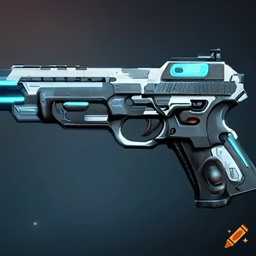
Technologi alfa Gun – 01
高级强大的混合武器可用于对抗各种类型的怪物,无论它们有多强,都有更强的武器来对抗它们。但其制造昂贵且困难,因为资源难以收集........
介绍
Technologi Gun alfa-1 – Advanced Weaponry for Minecraft Combat
Take your Minecraft battles to the next level with Technologi Gun alfa-1, a mod that introduces cutting-edge firearms and tactical combat mechanics inspired by modern technology. Whether you’re fighting mobs or engaging in PvP, this mod transforms the way you experience combat.
⚙️ Key Features:
- High-Tech Firearms: Includes a variety of guns such as rifles, snipers, shotguns, and heavy weapons—each with unique models, sounds, and effects.
- Ammo and Upgrades: Weapons require specific ammunition and can be upgraded to enhance damage, reduce reload time, or add special effects.
- Visual and Audio Effects: Realistic shooting animations, muzzle flashes, and explosive sounds create an immersive battlefield atmosphere.
- Balanced Gameplay: Carefully tuned to maintain fairness and challenge, making it suitable for both survival and multiplayer modes.
🎮 How It Enhances Gameplay:
- Strategic Combat: Players must choose the right weapon for each situation, adding depth and planning to every encounter.
- Immersive Experience: The mod brings a sense of realism and intensity to Minecraft’s combat system.
- Multiplayer Fun: Perfect for server-based PvP matches, team battles, or custom war scenarios.
🧪 What Players Can Expect:
- Snipe zombies from a distance with precision rifles.
- Defend your base using rapid-fire machine guns.
- Explore the world in search of rare ammo and weapon upgrades.
- Host epic PvP tournaments with futuristic gear.
Whether you’re a solo adventurer or a server host looking to spice up gameplay, Technologi Gun alfa-1 offers a thrilling, tech-driven combat experience. Download now and gear up for a new era of Minecraft warfare!
常见问题
Technologi alfa Gun – 01 支持哪些 Minecraft 版本?
Technologi alfa Gun – 01 支持 Minecraft Java 版 1.20.1,可用的加载器:Forge。下载时注意选择和你游戏版本一致的文件。
Technologi alfa Gun – 01 怎么安装?
先用 PCL2 或 HMCL 启动器安装对应版本的 Forge,再把下载的 .jar 文件放进游戏目录的 mods 文件夹,重新启动游戏即可。开启了版本隔离的,mods 文件夹在 versions/版本名 下面。
评论
登录后评论和评分