TeamPins – FTB Teams Map Integration
Sync FTB Teams pins and claims instantly across JourneyMap and Xaero's maps, with owner and claim-age details.
介绍
TeamPins
TeamPins connects FTB Teams and FTB Chunks with JourneyMap and Xaero’s maps.
Share persistent pins with your entire FTB team, display claimed territories directly on your preferred map, and keep team colors and claim changes synchronized instantly.
Screenshots
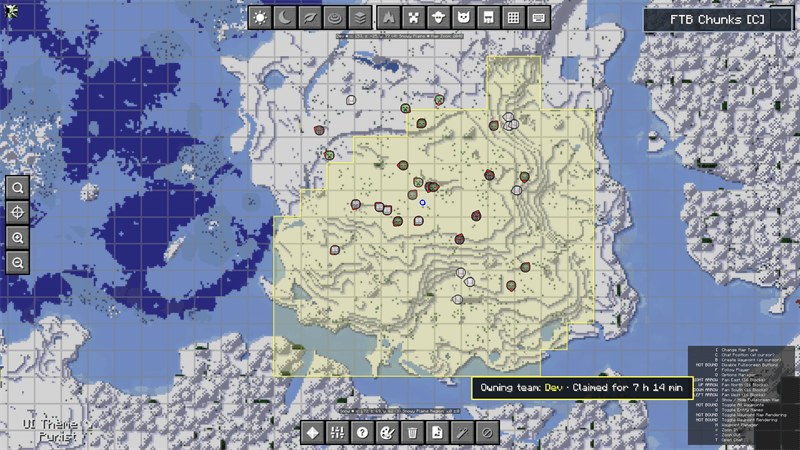
JourneyMap
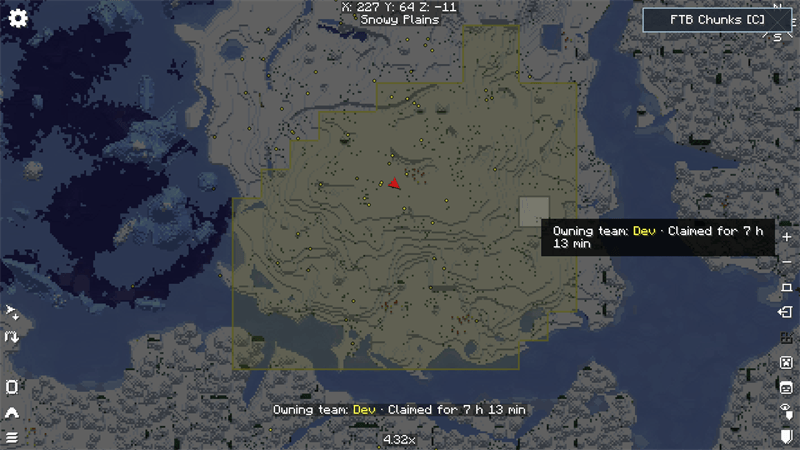
Xaero’s World Map
Features
- Shared and persistent map pins for every member of an FTB team
- Full support for both JourneyMap and Xaero’s maps
- FTB Chunks territories displayed as clean, continuous areas
- Instant claim, unclaim, and team-color updates
- Claim information showing the owning team and claim age
- Force-loaded chunks displayed with a stronger overlay
- Live teammates and mutual allies on JourneyMap
- Direct FTB Chunks button on the JourneyMap and Xaero fullscreen maps
- Press C from either supported map to open the FTB Chunks claim manager
- Server-side team permissions for creating and removing pins
- Lightweight integration with no custom blocks, items, models, or textures
Supported Maps
TeamPins supports:
- JourneyMap 6.0.x
- Xaero’s Minimap
- Xaero’s World Map
Players only need to install the map integration they want to use.
Commands
/teampins add <name>— Create a team pin at your current position/teampins list— List every pin owned by your team/teampins remove <uuid>— Remove one pin/teampins clear— Remove every pin owned by your team/teampins sync— Request an immediate synchronization
Pin creation and removal permissions are validated by the server. Team owners and officers can manage their team’s shared pins.
Requirements
- Minecraft 1.21.1
- NeoForge
- FTB Teams
- FTB Library
- Architectury API
Optional Integrations
- FTB Chunks — Required for claim and force-loaded chunk overlays
- JourneyMap — JourneyMap integration
- Xaero’s Minimap — Shared pins and player tracking
- Xaero’s World Map — Fullscreen Xaero map integration
TeamPins can be installed on a server without JourneyMap or Xaero. Each player can use their preferred supported map.
Compatibility
TeamPins automatically prevents duplicate claim overlays or player markers when compatible integration mods are already installed.
Claim privacy is inherited from FTB Chunks. TeamPins only displays information that FTB Chunks has already synchronized with the player.
Installation
- Install NeoForge for Minecraft 1.21.1.
- Install TeamPins and its required dependencies.
- Install JourneyMap or Xaero’s maps.
- Install FTB Chunks if you want claimed territories to appear on the maps.
- Install TeamPins on both the server and participating clients.
License
TeamPins is released under the MIT License.
TeamPins is an unofficial community addon and is not affiliated with Feed The Beast, TeamJM, or Xaero.
常见问题
TeamPins – FTB Teams Map Integration 支持哪些 Minecraft 版本?
TeamPins – FTB Teams Map Integration 支持 Minecraft Java 版 1.21.1,可用的加载器:NeoForge。下载时注意选择和你游戏版本一致的文件。
TeamPins – FTB Teams Map Integration 怎么安装?
先用 PCL2 或 HMCL 启动器安装对应版本的 NeoForge,再把下载的 .jar 文件放进游戏目录的 mods 文件夹,重新启动游戏即可。开启了版本隔离的,mods 文件夹在 versions/版本名 下面。
NoxCrafted 的其他作品
查看全部 →
Create: FPS Optimizer
优化机械动力的机械装置、工厂和视觉效果,让 FPS 更流畅。
Create: Avionics — ComputerCraft for Aeronautics – Reforged
Create: Avionics 的非官方 NeoForge 1.21.1 版本,可让 CC:Tweaked 电脑与 Create Aeronautics 载具互联。
Create: Shader Fixes
修复使用 Iris 时 Create、Create Aeronautics 和 Simulated 中与光影相关的画面异常。

GPUBooster – Reforged
透明的 OpenGL 优化,让画面渲染更流畅,同时不改变视觉效果。
评论
登录后评论和评分