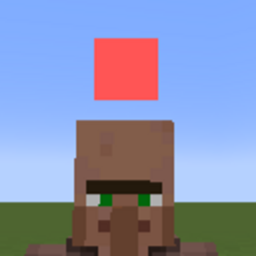
Team Dot Highlight
You can display a dot of the color assigned by the /team command above your head.
截图

介绍

Team Dot Highlight Mod (Forge 1.20.1)
Add a clear, color-coded indicator above every entity based on their team! This lightweight client-side mod makes it easy to spot allies and enemies at a glance.
Features:
- Colored dots above entities according to their team.
- Can show or hide your own team, other teams, or both.
- Distance-based scaling: dots shrink as they move farther from the player.
- Easily toggle the mod on/off in-game.
- Configurable via client-side settings and in-game commands.
Commands:
/teamhighlight enable <true|false> //You can enable and disable this mod.
/teamhighlight dotsize <min> <max> //You can change dot size.
/teamhighlight distantScale <scale> //You can change dot scaling by distance from the layer.
/teamhighlight default dotsize //You can reset dot size.
/teamhighlight default distantScale //You can reset dot scaling by distance from the layer.
/teamhighlight showsameteam <true|false> //You can choose to show dots on the same team mobs.
/teamhighlight showotherteam <true|false> //You can choose to show dots on the other team’s mobs.
常见问题
Team Dot Highlight 支持哪些 Minecraft 版本?
Team Dot Highlight 支持 Minecraft Java 版 1.20.1,可用的加载器:Forge。下载时注意选择和你游戏版本一致的文件。
Team Dot Highlight 怎么安装?
先用 PCL2 或 HMCL 启动器安装对应版本的 Forge,再把下载的 .jar 文件放进游戏目录的 mods 文件夹,重新启动游戏即可。开启了版本隔离的,mods 文件夹在 versions/版本名 下面。
评论
登录后评论和评分