
TargetHud Purple
作者:V0idZadas
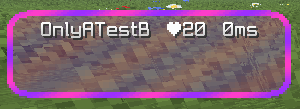
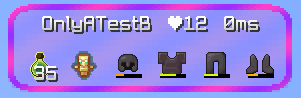
Shows the name, health, held items and armor durability of the player you're aiming at.
截图
介绍
中文介绍正在准备中,下面暂时显示原文。
Target HUD
A lightweight, client-side HUD that shows info about the player you’re aiming at, right on your screen — no need to open inventory or press F3.
✨ What it shows
While you’re aiming at another player (within interaction range), a panel appears with:
- 👤 Player name
- ❤️ Current health
- 🗡️ Main hand item
- 🔥 Off-hand item
- 🛡️ Helmet, chestplate, leggings and boots durability (Minecraft’s native bar)
🎨 Look
- Compact, horizontal panel on the left side of the screen
- Rounded corners
- Animated RGB border, smoothly shifting between purple and pink
- Semi-transparent background with a flowing color wave effect
⌨️ Controls
| Key | Action |
|—|—|
| H | Toggle the HUD on/off anytime |
📋 Requirements
- Minecraft 1.21.11
- Fabric Loader
0.19.3or higher - Fabric API
0.141.6+1.21.11or higher
ℹ️ Notes
- Client-side only mod — no need to install it on the server, just on your own client.
- The HUD only shows up when you’re directly aiming at another real player (doesn’t work on mobs or on yourself).
- Compatible with any Fabric or vanilla server, since it doesn’t change gameplay logic, only rendering.
🐛 Found a bug or have a suggestion?
Feel free to open an issue or leave a comment on the project page.
常见问题
TargetHud Purple 支持哪些 Minecraft 版本?
TargetHud Purple 支持 Minecraft Java 版 1.21.11,可用的加载器:Fabric。下载时注意选择和你游戏版本一致的文件。
TargetHud Purple 怎么安装?
先用 PCL2 或 HMCL 启动器安装对应版本的 Fabric,再把下载的 .jar 文件放进游戏目录的 mods 文件夹,重新启动游戏即可。开启了版本隔离的,mods 文件夹在 versions/版本名 下面。运行环境:仅客户端。
评论
登录后评论和评分