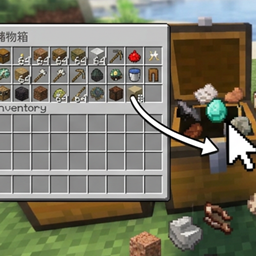
Tap Deposit
Left-click containers to deposit your held item, or hold Shift to deposit all matching items.
介绍
Quick Deposit is a lightweight Fabric mod that lets you quickly store items into containers with a single left-click.
# Features
– Left-click a container to deposit your held item directly into it.
– Hold Shift and left-click to deposit all matching items from your inventory and hotbar.
– Press G to toggle between deposit modes (held item only / matching items already in the container).
– Works with chests, barrels, and double chests (both halves are merged automatically).
– Excludes tools and equipment (swords, pickaxes, axes, shovels, hoes, bows, crossbows, fishing rods, shields, flint and steel, shears) so you don’t accidentally store them.
– Does not trigger in Creative mode, so you can still break blocks normally.
# How to Use
1. Walk up to a chest or barrel.
2. Hold the item you want to store in your main hand.
3. Left-click the container to deposit it.
4. Hold Shift while left-clicking to deposit all matching items.
5. Press G to switch deposit modes.
# Compatibility
– Minecraft 26.2 / 26.3
– Fabric Loader
– Fabric API
# Notes
– Tools and equipment are excluded by default.
– Creative mode is not affected.
“Unlike other mods that require opening the chest GUI, Quick Deposit lets you simply left-click on a chest or barrel in the world to store your items. Hold Shift to deposit all matching items, and press G to toggle deposit modes.”
常见问题
Tap Deposit 支持哪些 Minecraft 版本?
Tap Deposit 支持 Minecraft Java 版 26.2–26.3,共 2 个版本,可用的加载器:Fabric。下载时注意选择和你游戏版本一致的文件。
Tap Deposit 怎么安装?
先用 PCL2 或 HMCL 启动器安装对应版本的 Fabric,再把下载的 .jar 文件放进游戏目录的 mods 文件夹,重新启动游戏即可。开启了版本隔离的,mods 文件夹在 versions/版本名 下面。
评论
登录后评论和评分