
TabTPS
作者:Algebrafreak
Minecraft server mod/plugin to show TPS, MSPT, and other information in the tab menu, boss bar, and action bar.
介绍
中文介绍正在准备中,下面暂时显示原文。
Features
Live information displays
-
Configure what information will be shown using display configs (
/plugins/TabTPS/display-configs/)- Each display config has a permission associated, and players with that permission will use that display config.
- The default display config uses the permission
tabtps.defaultdisplay, and allows for using all three display types. - Only one display config can be assigned to each player, even if they have permission for multiple. Set priorities for different display configs in the main config (
plugins/TabTPS/main.conf)
- The default display config uses the permission
- Each display config has a permission associated, and players with that permission will use that display config.
-
Configure colors for displays using theme configs (
/plugins/TabTPS/themes/)
Tab menu
- Command:
/tabtps toggle tab 
Action bar
- Command:
/tabtps toggle actionbar 
Boss bar
- Command:
/tabtps toggle bossbar 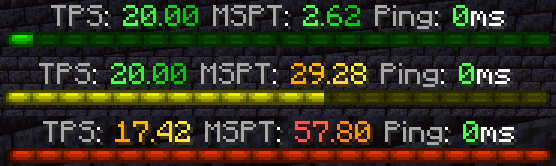
Commands
Improved TPS command
- Command:
/tickinfoor/mspt - Permission required:
tabtps.tps 
Memory command
- Command:
/memory,/mem, or/ram - View information about the current memory pools of the server jvm.
- Note: the output and usefulness of this command varies depending on the type of garbage collection used, garbage collection settings, and many other factors.
- Permission required:
tabtps.tps 
Ping command
- Commands:
/ping,/ping [username], or/pingall - View the ping of yourself, or another user.
/pingallwill show a summary of all connected player’s pings. - Permissions:
tabtps.pingto view your own ping,tabtps.ping.othersto view other users ping and the ping summary. 

Reload command
- Command:
/tabtps reload - Permission required:
tabtps.reload
常见问题
TabTPS 支持哪些 Minecraft 版本?
TabTPS 支持 Minecraft Java 版 1.16.5–26.1.2,共 20 个版本,可用的加载器:Fabric / NeoForge。下载时注意选择和你游戏版本一致的文件。
TabTPS 怎么安装?
先用 PCL2 或 HMCL 启动器安装对应版本的 Fabric / NeoForge,再把下载的 .jar 文件放进游戏目录的 mods 文件夹,重新启动游戏即可。开启了版本隔离的,mods 文件夹在 versions/版本名 下面。
评论
登录后评论和评分