
TabChannel
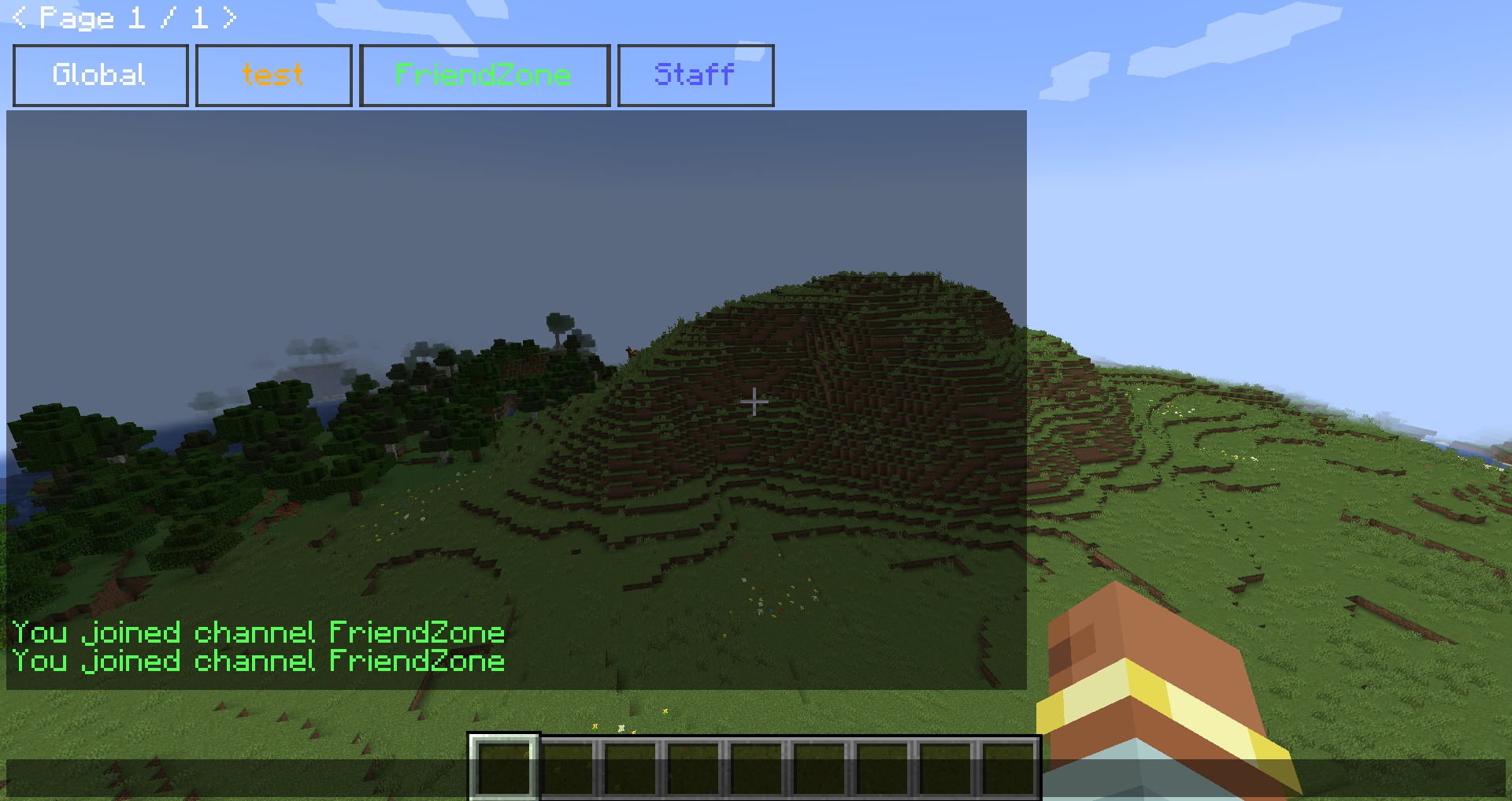
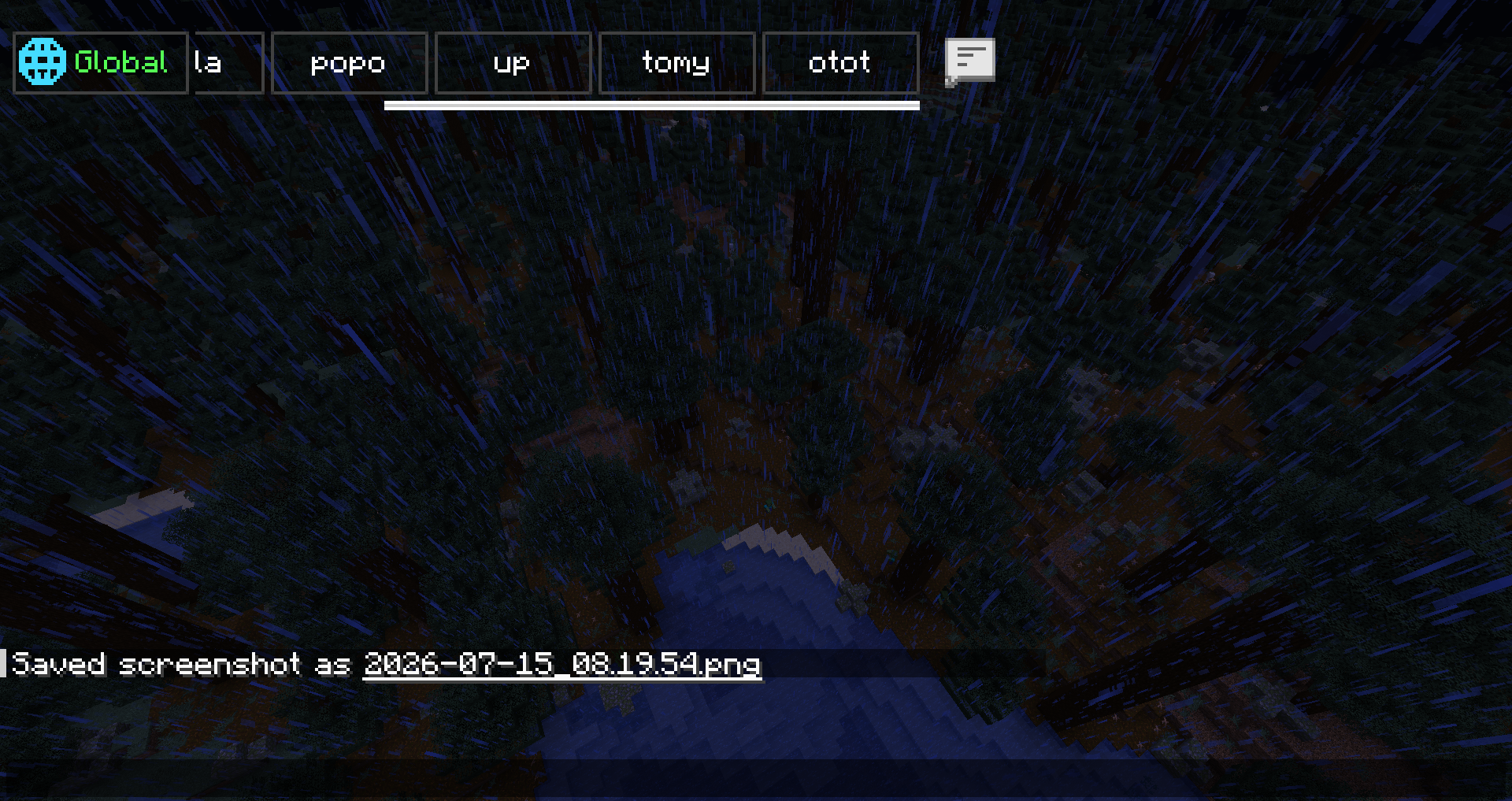
Create public or private chat channels, manage staff discussions, organize faction communication, and improve multiplayer communication with a modern tab-based chat system inspired by large community servers.
截图
介绍
TabChannel
Minecraft 1.21.x · Tabbed chat channels, TabColor, PMs, staff tools, log search, client HUD, and optional Twitch stream overlay (client-only).
TabChannel Version 1.0.4
 | Add New Optionel Dependencies
| modId |Nom affiché |
| ——————— |——————— |
| luckperms |LuckPerms |
| nochatreports |No Chat Reports |
| emojiful |Emojiful |
| odyssey_factions_rise |Odyssey Factions Rise |
| factionwar |Faction War |
Compatibility
| Setup | Result |
|——-|——–|
| Fabric client + Fabric server with TabChannel | Channels, tab sync, server commands |
| NeoForge on Youer | NeoForge jar on both server and client |
| LuckPerms | Compatible and optional |
TabColor — all colors
Chat colors is # exemple #Red or #FF000
Commands: /tabchannel color <channel> <COLOR> or /setchannel tabcolors <channel> <COLOR>
Use the exact name in UPPERCASE (underscores).
Standard
BLACK · DARK_BLUE · DARK_GREEN · DARK_AQUA · DARK_RED · DARK_PURPLE · GOLD · GRAY · DARK_GRAY · GREEN · AQUA · LIGHT_PURPLE · YELLOW · WHITE · ORANGE · PINK · MAGENTA · CYAN · LIME · BROWN · SILVER · NAVY · TEAL · OLIVE · MAROON · INDIGO · VIOLET · TURQUOISE · SKY_BLUE · MINT · SALMON · CORAL · CRIMSON · BEIGE · IVORY · CHARCOAL · EMERALD · RUBY · AMBER · BRONZE · ROSE · HOT_PINK · DEEP_PINK · FUCHSIA · LAVENDER · PLUM · ORCHID · SCARLET · FIRE_RED · BLOOD_RED · CHERRY · ICE_BLUE · BABY_BLUE · OCEAN_BLUE · ROYAL_BLUE · MIDNIGHT_BLUE · FOREST_GREEN · DARK_FOREST · MOSS_GREEN · JADE · SUNSET_ORANGE · TANGERINE · PEACH · APRICOT · LEMON · CANARY · HONEY · COFFEE · CHOCOLATE · CARAMEL · SAND · SNOW · PEARL · SMOKE · ASH · OBSIDIAN · VOID · NIGHT
“Premium” theme (no admin restriction in the mod)
ELECTRIC_BLUE · LASER_GREEN · TOXIC_GREEN · RADIOACTIVE · GALAXY_PURPLE · COSMIC_PINK · MANA_BLUE · ENDER_PURPLE · DIAMOND · RUBY_RED · SAPPHIRE · TOPAZ · AMETHYST · EMERALD_GREEN
Admin only (OP 2 or tabchannel.admin)
BLUE · RED · NEON_GREEN
Commands
Root aliases: /tabchannel, /tc, /tb, /channel, /ch
| Command | Description |
|———|————-|
| /channel create <name> <public\|private\|prive\|faction> | Create (staff channel = admin) |
| /channel join <channel> | Join |
| /channel leave <channel> | Leave |
| /channel list | List |
| /channel delete <channel> | Delete |
| /channel color <channel> <TabColor> | Tab color |
| /channel invite <player> <channel> | Invite |
| /channelcreate <name> <type> | Create (shortcut) |
| /channeljoin <channel> | Join (shortcut) |
| /channellist | List (shortcut) |
/setchannel
| Command | Description |
|———|————-|
| /setchannel delete <channel> | Delete |
| /setchannel tabcolors <channel> <TabColor> | Tab color |
| /setchannel invite <channel> <player> | Invite |
| /setchannel leave <channel> | Leave |
| /setchannel perm add\|remove <channel> <player> <perm> | Member permissions |
| /setchannel rules <channel> <text> | Rules |
| /setchannel warn <channel> on\|off | Profanity filter |
| /setchannel kick <channel> <days> <hours> <sec> <player> | Kick + timed mute |
| /setchannel ban <channel> <player> | Channel ban |
| /setchannel f <channel> <faction> | Link faction |
PMs and logs
| Command | Description |
|———|————-|
| /mp <player> <message> | Private message |
| /r <message> | Reply to last PM |
| /mp block <player> | Block |
| /mp unblock <player> | Unblock |
| /mp socialspy | SocialSpy (permission) |
| /chatsearch <text> | Log search (25 max) |
| /chat search <text> | Search alias |
Admin
| Command | Description |
|———|————-|
| /tabchanneltploc <dimension> <x> <y> <z> | Teleport (OP 2) |
Built-in channels: global (vanilla / global chat), staff channel (creation: admin, access: staff).
Mentions: @staff, @admin, @mod, @modo in messages (configurable anti-spam).
Client commands
| Command | Description |
|———|————-|
| /channel position · position default | Channel HUD position |
| /channel resize · resize default | Channel HUD size |
Twitch stream (client, optional)
| Command | Description |
|———|————-|
| /streamchat connect | Connect (set Twitch username in config) |
| /streamchat disconnect | Disconnect |
| /streamchat toggle | Show / hide |
| /streamchat position · position default | Overlay placement |
| /streamchat resize · resize default | Resize overlay |
| /streamchat config | Config screen |
| /streamchat clear · test · reload | Utilities |
Stream does not change Minecraft chat; Twitch only (no YouTube).
LuckPerms
TabChannel — LuckPerms permissions (reference)
LuckPerms is compatible and optional. Without LuckPerms: OP level 2 for some actions, per-member permissions on each channel, and default Bukkit permissions on Youer / Paper (HybridBukkitPermissions).
Global roles
| Permission | Description |
|————|————-|
| tabchannel.admin | Mod admin (bypass, staff channel, admin TabColor colors, etc.) |
| tabchannel.staff | Staff (staff channel, staff invites, staff mentions) |
Private messages (PM)
| Permission | Description |
|————|————-|
| tabchannel.mp.browse | See all online players in the PM UI |
| tabchannel.mp.socialspy | /mp socialspy |
| tabchannel.mp.bypasscooldown | Ignore PM cooldown |
Chat styling (optional)
| Permission | Description |
|————|————-|
| tabchannel.chat.color | Classic colors (&) |
| tabchannel.chat.hex | Hex colors |
| tabchannel.chat.format | Formatting (bold, italic, etc.) |
| tabchannel.chat.style | Bundles color + hex + format |
Per-channel permissions (setchannel.*)
| Permission | Usage |
|————|——–|
| setchannel.create | Create a channel |
| setchannel.delete | Delete |
| setchannel.invite | Invite |
| setchannel.leave | Leave |
| setchannel.perm | Manage member rights |
| setchannel.rules | Rules |
| setchannel.warn | Profanity filter |
| setchannel.kick | Kick / mute (duration via /setchannel kick) |
| setchannel.ban | Ban from channel |
| setchannel.tabcolors | Change TabColor |
| setchannel.f | Link a faction |
Bypass
| Permission | Description |
|————|————-|
| setchannel.bypass.join | Join without restrictions |
| setchannel.bypass.private | View / join private channels |
| setchannel.bypass.ban | Ignore channel bans |
TabColor — admin-only colors
Only these names require OP 2 or tabchannel.admin:
BLUEREDNEON_GREEN
All other TabColor names in the mod can be used without that restriction (still subject to channel rights for /setchannel tabcolors).
LuckPerms example (YAML)
tabchannel.admin:
  description: TabChannel admin
  default: op

tabchannel.staff:
  description: TabChannel staff
  default: false

tabchannel.mp.socialspy:
  default: false

setchannel.create:
  default: true

setchannel.tabcolors:
  default: true
Dependencies
- NeoForge: NeoForge 1.21.x build
- LuckPerms: no jar required
常见问题
TabChannel 支持哪些 Minecraft 版本?
TabChannel 支持 Minecraft Java 版 1.21.1–26.1.2,共 2 个版本,可用的加载器:Fabric / NeoForge。下载时注意选择和你游戏版本一致的文件。
TabChannel 怎么安装?
先用 PCL2 或 HMCL 启动器安装对应版本的 Fabric / NeoForge,再把下载的 .jar 文件放进游戏目录的 mods 文件夹,重新启动游戏即可。开启了版本隔离的,mods 文件夹在 versions/版本名 下面。运行环境:客户端和服务端都要装。
MickDev 的其他作品
查看全部 →
Blocklings Revival
A Community-driven project to revived the famous Blocklings Mod for modern versions!

Echoes of the World
Echoes of the World transforms Minecraft into a living world that reacts to your actions. With an echo system, dynamic events, and erupting volcanoes, every game becomes unique.

Necromency
sew your own unholy Minions together and create your Abimination

Ropes+
Hookshot and 3D Ziplines! and mutch Arrow
评论
登录后评论和评分