
Tab Info
Shows useful player stats like deaths, kills, playtime, position, and current dimension to everyone through a compact, configurable readout in the player list.
截图

介绍
Tab Info
Shows useful player stats like deaths, kills, playtime, position, and current dimension to everyone through a compact, configurable readout in the player list.
The readout rotates every 2 seconds, works in multiplayer and singleplayer, and is fully server-side, so players do not need to install anything.
Perfect for PvP servers, local worlds with friends, and more.
Installation
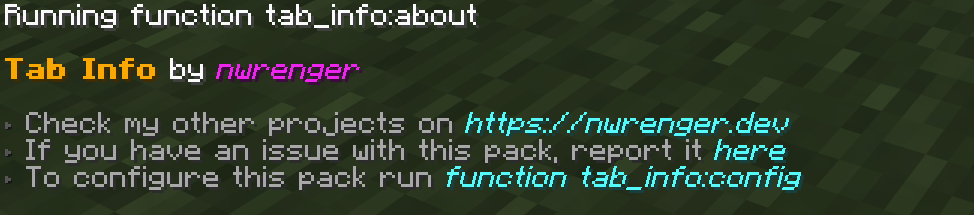
After adding the data pack/mod to your world or server, you should be able to open the about panel, which is fully controllable with the mouse:
/function tab_info:about
Configuration
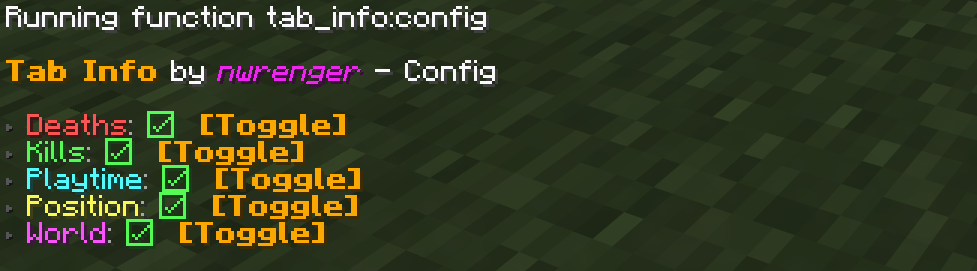
Open the configuration panel by the following command:
/function tab_info:config
From here, you can toggle each info entry on or off. If every entry is disabled, Tab Info is hidden from the player list.
Uninstallation
To remove the vacant entry inside the player list after disabling/removing the data pack/mod, run the following command:
/scoreboard objectives setdisplay listContributing & Issues
I warmly welcome:
- Bug reports
- Feature requests
- Pull requests
Please open issues or PRs on GitHub.
License
This project is licensed under the LGPLv3 License. See LICENSE for details.
常见问题
Tab Info 支持哪些 Minecraft 版本?
Tab Info 支持 Minecraft Java 版 1.21–26.3,共 17 个版本,可用的加载器:Fabric / Forge / NeoForge / Quilt。下载时注意选择和你游戏版本一致的文件。
Tab Info 怎么安装?
先用 PCL2 或 HMCL 启动器安装对应版本的 Fabric / Forge / NeoForge / Quilt,再把下载的 .jar 文件放进游戏目录的 mods 文件夹,重新启动游戏即可。开启了版本隔离的,mods 文件夹在 versions/版本名 下面。运行环境:客户端 / 服务端。
nwrenger 的其他作品
查看全部 →
Disable Dimensions
A hard-to-break, grief-resistant solution for preventing players from entering The Nether, The End, and any further custom dimensions, with optional per-dimension conditions.

Disable Dimensions
A hard-to-break, grief-resistant solution for preventing players from entering The Nether, The End, and any further custom dimensions, with optional per-dimension conditions.

Improved Happy Ghast
Allows players to create a not-wandering, faster, smaller, silenced Happy Ghast, get damage alerts and even summon it back in survival using items.
More Heads
Adds survival-friendly access to mob heads and player heads, using intentional hoe-based drops to avoid farm pollution and preserve vanilla progression.
评论
登录后评论和评分