
SyncTimeCode
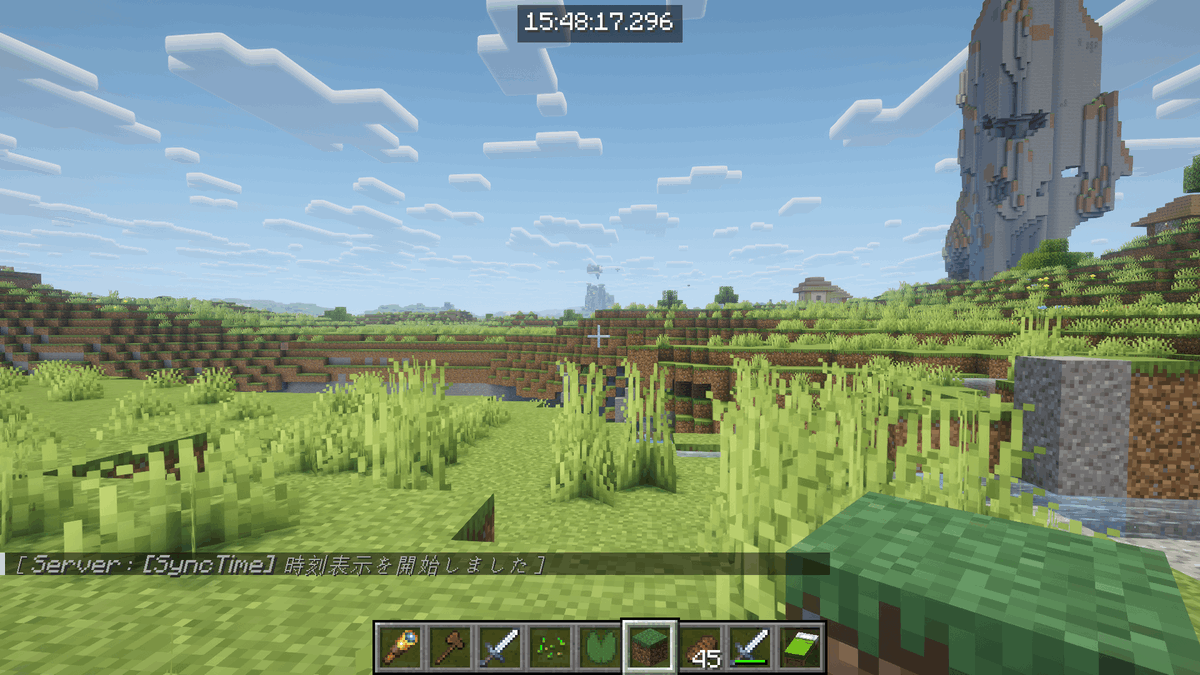
This mod displays a synchronized server time in milliseconds on all players' screens to easily synchronize video and audio perspectives during multiplayer recordings.
截图
介绍
SyncTimeCode
SyncTimeCode is a highly useful utility mod designed specifically for Minecraft content creators and YouTubers. It completely eliminates the hassle of synchronizing multiple video and audio tracks during multiplayer recording sessions.
By displaying a highly precise, server-synchronized timestamp (down to the millisecond) on every player’s screen, editing multiple perspectives together becomes incredibly easy—acting as a digital clapperboard for your videos!
✨ Key Features
- Perfect Synchronization: Displays the exact server system time in
HH:mm:ss.SSSformat on all connected players’ screens simultaneously. - Smooth Rendering: Intelligent client-side interpolation prevents any timer stuttering caused by network lag, ensuring a silky-smooth millisecond display.
- Global Toggle: Server Operators (OPs) have full control. Turn the HUD display on for everyone when recording starts, and turn it off when you’re done to save resources.
- Clapperboard Effect (Optional): Trigger a visual flash and an auditory cue (bell sound) across all clients instantly for a definitive, undeniable sync point during editing.
- Zero Overhead When Off: When the timer is toggled off, all packet transmission stops completely, ensuring zero impact on your server’s performance.
🎮 Commands
Only players with OP permissions can execute these commands:
/synctime on– Activates the synchronization loop and displays the time HUD on all players’ screens./synctime off– Deactivates the synchronization loop and hides the HUD for everyone./synctime clap– Triggers a brief screen flash and plays a bell sound for all players. Perfect for marking an exact sync point right before you start recording!
⚙️ Requirements
- This mod must be installed on BOTH the server and the client to function correctly.
常见问题
SyncTimeCode 支持哪些 Minecraft 版本?
SyncTimeCode 支持 Minecraft Java 版 1.21.11,可用的加载器:Fabric。下载时注意选择和你游戏版本一致的文件。
SyncTimeCode 怎么安装?
先用 PCL2 或 HMCL 启动器安装对应版本的 Fabric,再把下载的 .jar 文件放进游戏目录的 mods 文件夹,重新启动游戏即可。开启了版本隔离的,mods 文件夹在 versions/版本名 下面。
评论
登录后评论和评分