
截图




介绍



This mod transforms Minecraft into a true Sword Art Online experience. The default inventory system is completely disabled (except in Creative Mode).
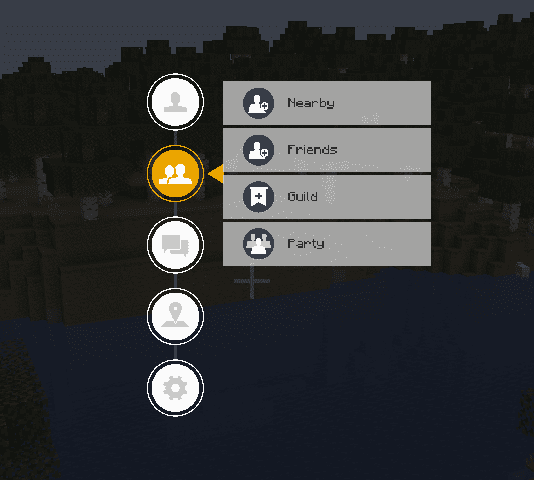
Instead, players interact with a custom SAO-inspired interface. Only the hotbar remains available, while inventory management, menus, and other systems are handled through the SAO UI, just like in the anime.
A full list of features can be found below. Be sure to check the images to see how the mod changes the look and feel of your game.

- Equipment, Items, Storage and (Skills – Coming Soon)
- Friends, Guilds and Partys
- Messages (Write to Friends, Guilds or Partys)

- Compatability with EpicFight (For Skills)
- Compatability with CustomNPCs (For Quests)
- Compatability with JourneyMap (For the Map)
GET 25% OFF YOUR FIRST PURCHASE USE CODE “AOG-STUDIO” at BISECTHOSTING
常见问题
Sword Art Online: UI 支持哪些 Minecraft 版本?
Sword Art Online: UI 支持 Minecraft Java 版 1.20.1–1.20.6,共 6 个版本,可用的加载器:Forge。下载时注意选择和你游戏版本一致的文件。
Sword Art Online: UI 怎么安装?
先用 PCL2 或 HMCL 启动器安装对应版本的 Forge,再把下载的 .jar 文件放进游戏目录的 mods 文件夹,重新启动游戏即可。开启了版本隔离的,mods 文件夹在 versions/版本名 下面。运行环境:客户端和服务端都要装。
0TIME0 的其他作品
查看全部 →
Attack on Titan: Minecraft
《进击的巨人:MC》是一款主要以角色扮演为核心的RPG游戏。

AOT:MC – Resourcepack
aotmc-resourcespack

Miraculous: Minecraft
in our game you can live a normal life but you can also become a super hero... or maybe a super villain?

Sword Art Online: Minecraft
Sword Art Online: MMORPG in Minecraft
评论
登录后评论和评分