
Swapping Double Hotbar
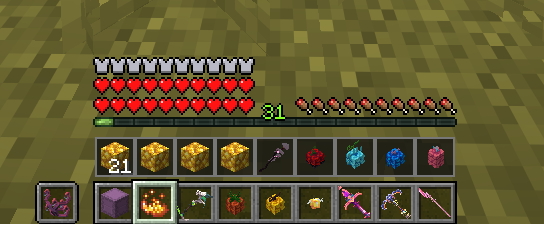
Adds a second hotbar row to Minecraft, letting you quickly swap item rows or swap individual slots with configurable controls. Includes in-game settings and enable/disable commands. Built for Fabric on Minecraft 26.1.2
截图
介绍
Swapping Double Hotbar
Swapping Double Hotbar adds a second hotbar to Minecraft, giving you quick access to an additional row of nine item slots.
Features
- Extra HUD row: Displays the additional inventory row above the normal hotbar.
- R key: Swaps the full hotbar with the extra inventory row.
- Hold R: Swaps only the currently selected slot, when enabled.
- Number keys 1–9: Double-press swapping, with a global ON/OFF switch.
- Double Hotbar ON/OFF: Enables or disables the mod’s functionality.
- Hold R ON/OFF: Enables or disables the hold-to-swap feature.
- Swap Sounds ON/OFF: Mutes or restores swapping sounds.
Settings menu:
Opens with /doublehotbar or /dhb.
Saved settings:
Your configuration persists through the properties file.
Commands
/doublehotbar or /dhb — Open the settings screen.
/doublehotbar on or /dhb on — Enable the mod.
/doublehotbar off or /dhb off — Disable the mod.
Requirements
Minecraft 26.1.2
Fabric Loader
Fabric API
License
Swapping Double Hotbar is open source under the **MIT License**.
常见问题
Swapping Double Hotbar 支持哪些 Minecraft 版本?
Swapping Double Hotbar 支持 Minecraft Java 版 26.1.2,可用的加载器:Fabric。下载时注意选择和你游戏版本一致的文件。
Swapping Double Hotbar 怎么安装?
先用 PCL2 或 HMCL 启动器安装对应版本的 Fabric,再把下载的 .jar 文件放进游戏目录的 mods 文件夹,重新启动游戏即可。开启了版本隔离的,mods 文件夹在 versions/版本名 下面。
评论
登录后评论和评分