
截图
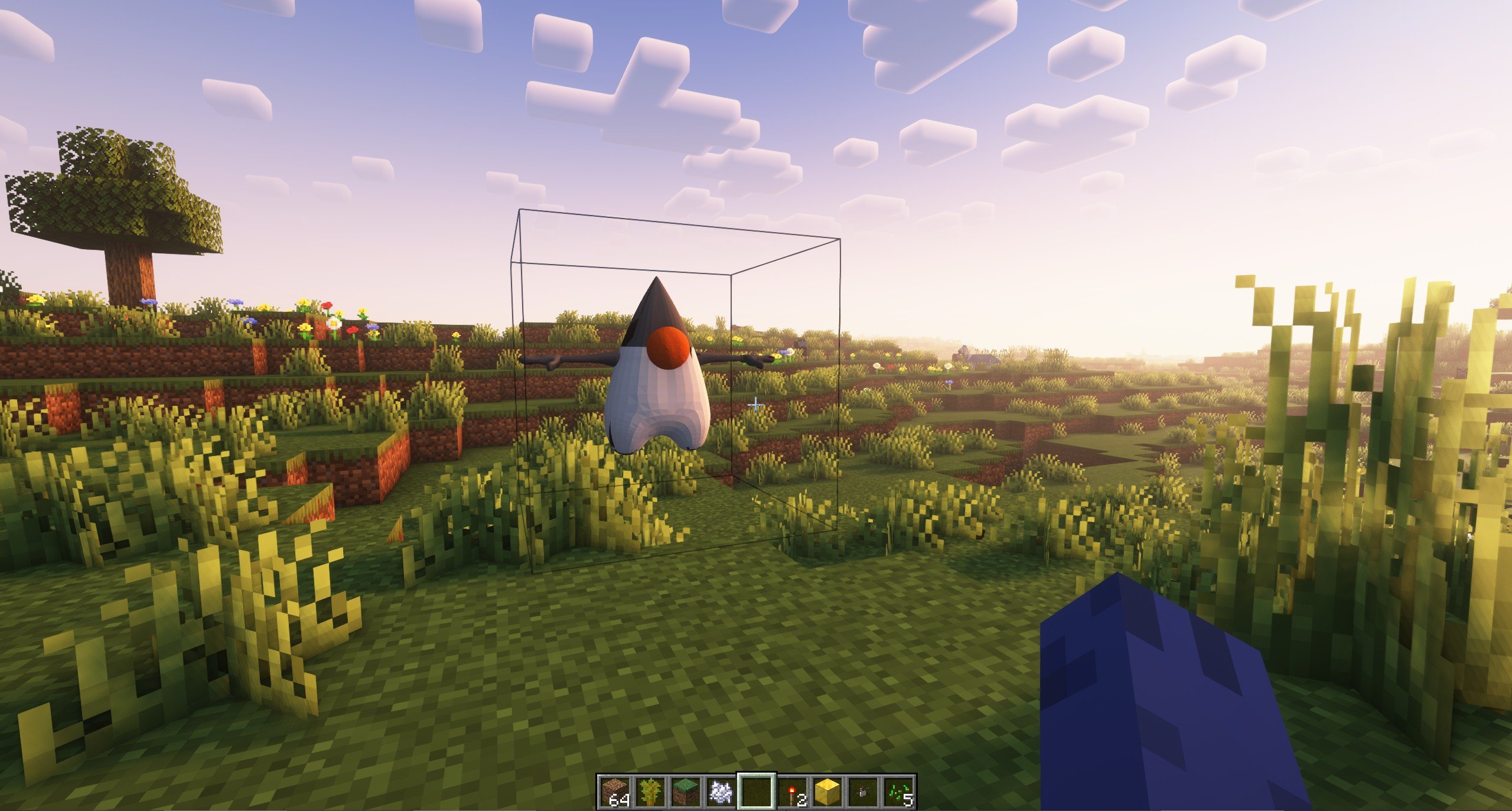
介绍
glTF models for everything
Using frapi (the fabric-rendering API), this mod intercepts requests for block models, and if they refer to glTF files, provides them as static models that get baked into the chunk geometry as normal. Entirely clientside, this mod can be used to power “cursed” resource packs that replace existing blocks with non-cuboid shapes that vanilla can’t make.
It can also be used as an “included” mod to power non-cuboid blocks in your mods.
The Details
The easiest way to create a compatible model is in Blockbench.
- From the app, select “New -> Low Poly / Generic Model” and hit the “Create new model” button.
- Any identifier, UV mode, or other settings are fine.
- When you’re satisfied with your model, hit “File -> Export -> Export glTF Model”.
- Blockbench ignores most of these settings, and the defaults are perfectly fine.
- Find the file you exported and put it where you would normally put a json blockmodel (e.g.
assets/minecraft/models/block) - make a child model which refers to the gltf model as a parent, with a root key-value pair of
"loader": "suspicious_shapes:gltf". You can fill-in texture references and set color indices here too. - Edit the text of the glTF model to replace the texture’s data URL with a texture reference.
The last part there is the hard part. In the file you’ll see something like,
"images":[{"mimeType":"image/png","uri":"data:image/png;base64,iVBORw0KGgoAAAANSUhEUgAAABAAAAAQCAYAAAAf8/9hAAAAr0lEQVQ4y6WTMQrCQBBFt0xtk0YQL+QR0mpnYyk5QbDObTc84YVB0NnFgSGTyf7/5w+bUpJ4LMdaeuI6jzWC5/Vcm0kAAyAleE6Hd00vkn8Fq0oCJv32up9yEg6REPGEQDLemyYR6DS3y7ATp3tQTTCEWqH3U50DcQccRl0b9lKSuAvV0wXG+AQyRTOYiDughkB76bXVgiDr5gkEeYEAu8iuf0L/WiD/Iii94diZ+gZo3N9oOnqLFAAAAABJRU5ErkJggg=="}]This is a base-64 encoded image of the texture you used. Since block models can’t use random textures that aren’t in the atlas, we’ll have to fix that. Replace each of the unreadable strings marked “uri” with a minecraft texture reference, like this
"images":[{"mimeType":"image/png","uri":"minecraft:blocks/stone"}]Or, if you’re making several models with this shape, you can use it as a parent with a texture up-reference like normal:
"images":[{"mimeType":"image/png","uri":"#all"}]Your child model can look something like this:
{
  "parent": "minecraft:block/sphere_all.gltf",
  "loader": "suspicious_shapes:gltf",
  "textures": {
    "all": "minecraft:block/acacia_leaves"
  },
  "colorIndexes": [ 0 ]
}
And that’s it! Load up minecraft or reload resource packs and you should see your model!
常见问题
Suspicious Shapes 支持哪些 Minecraft 版本?
Suspicious Shapes 支持 Minecraft Java 版 1.20–1.21.4,共 7 个版本,可用的加载器:Fabric / Quilt。下载时注意选择和你游戏版本一致的文件。
Suspicious Shapes 怎么安装?
先用 PCL2 或 HMCL 启动器安装对应版本的 Fabric / Quilt,再把下载的 .jar 文件放进游戏目录的 mods 文件夹,重新启动游戏即可。开启了版本隔离的,mods 文件夹在 versions/版本名 下面。运行环境:仅客户端。
falkreon 的其他作品
查看全部 →
Cotton
Common materials for making Fabric mods

Magic Arsenal
Craftable magical artifacts and combat gear

Architecture Extensions
A mod that allows you to make more detailed builds with all kinds of new building blocks and shapes.

Scarves
Comfortable dynamic simulated cloth trinkets
评论
登录后评论和评分