
截图



介绍

Surrounding Indicators







An interesting health indicators mod.
💞 What is this?
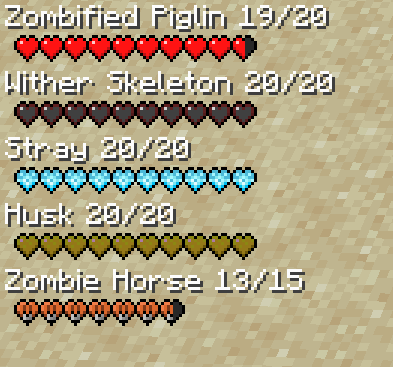
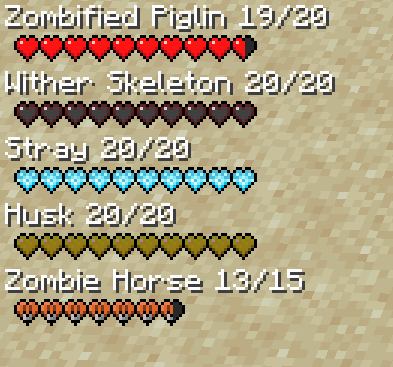
This is a simple lightweight client-side mod that adds health information from any mob within range in the corner of your screen. It should work with any mobs including ones from other mods. Also, it works on multiplayer and displays other Player health information as well!
🧪 Latest Updates
- Updated to support Minecraft 1.19
- Added custom heart visuals for illager mobs, Husks, Strays, Elder Guardians, and mounts in general
Displays Mob and Player Health Information
By default on the left side of your screen this mod will display health information of the mobs and players that are visible to you! You can modify how the hud looks in the config. Read the configuration guide down below.
Team Information
Health information also displays on the right by default of those who are in your scoreboard team. This is useful for multiplayer games.

Configuration Guide
[common]
  #Max amount of health indicators that will be displayed.
   maxIndicatorsDisplayed = 5
   #Max amount of team health indicators that will be displayed.
   maxTeamIndicatorsDisplayed = 7
   #The starting point for the indicator on the x axis.
   indicatorX = 0
   #The starting point for the indicator on the y axis.
  indicatorY = 0
   #Distance the health indicator will detect entities.
   indicatorDistance = 7.0
   #Enables the numerical indicators alongside the mob name.
   enableNumericalIndicator = false
   #The starting point for the team indicator on the x axis. (subtracted from right side)
   teamIndicatorX = 95
   #Determines weather or not only player health indicators should show.
   onlyPlayerIndicators = false
   #Determines weather or not only team health indicators should show.
   enableTeamIndicators = false
   #The starting point for the team indicator on the y axis.
   teamIndicatorY = 0
🤷 FAQ (Frequently Asked Questions)
Can I use this in my modpack?
Yes, you definitely can. Just make to provide credit to all the authors respectively and link back to the CurseForge page.
Can I redistribute this mod onto other platforms?
Yes, but before doing so make sure that all downloads are directly linked to CurseForge and provide credit to all the authors respectively.
🤚 Support: If you have questions or any issues with our mods, read the FAQ! You can also either submit an issue on the issue tracker, or come into our Discord server where we can help you!

常见问题
Surrounding Indicators 支持哪些 Minecraft 版本?
Surrounding Indicators 支持 Minecraft Java 版 1.19.4–26.1.2,共 2 个版本,可用的加载器:Forge / NeoForge。下载时注意选择和你游戏版本一致的文件。
Surrounding Indicators 怎么安装?
先用 PCL2 或 HMCL 启动器安装对应版本的 Forge / NeoForge,再把下载的 .jar 文件放进游戏目录的 mods 文件夹,重新启动游戏即可。开启了版本隔离的,mods 文件夹在 versions/版本名 下面。运行环境:仅客户端。
Modding Legacy 的其他作品
查看全部 →
Aether: Lost Content Addon
一个为《天境》带回并赋予生命的附属模组,收录了许多过去被废弃、未使用,甚至仅停留在概念阶段的内容与功能。

Miner’s Helmet
一个简单添加动态照明头盔的模组。

Lucent
客户端动态光照前置模组

Step
通过这款模组升级原版体验!它新增了一个平衡的踏步附魔,让你可以直接走上整格方块。
评论
登录后评论和评分