
Super Chat : Moderation and practice
Transform your server's chat into a powerful, interactive social hub.
截图





介绍
💬 Super Chat — Forge Mod
Super Chat is a lightweight utility mod for Minecraft Forge that elevates every message beyond plain text. Player names and chat messages become clickable shortcuts, a robust moderation toolkit keeps your community in check, and quality-of-life features like @mentions, public announcements, and private message styling make communication genuinely enjoyable.

✨ Features
🖱️ Interactive Chat
Every message in the chat is now interactive. Click a player’s name to instantly suggest a teleport command (/tpa), or click the message text to pre-fill a private reply (/msg). Both actions are fully configurable in the config file. Roles and prefixes from LuckPerms are fully preserved and displayed normally alongside all interactive features.
🔇 Advanced Mute System
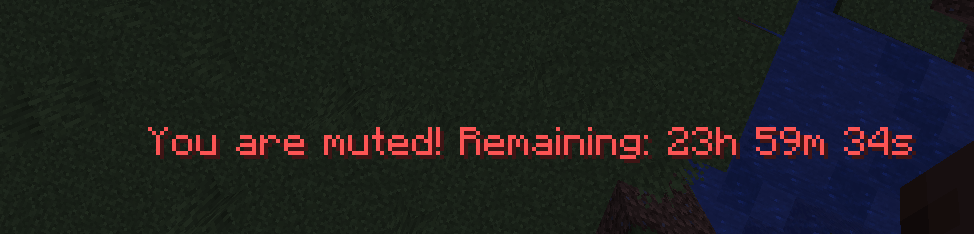
Silence disruptive players with /spchat mute. Mutes survive server restarts — they are saved to disk and automatically expire at the correct time even after a reboot. Muted players receive clear, real-time feedback when they try to speak or use blocked commands.
🚫 Command Blacklist
Define a list of commands that muted players cannot use (e.g. /me, /say, /tell, /msg, /pub). All other commands remain accessible — mutes are surgical, not a blanket ban.
📢 Public Announcements — /pub
Send a highlighted, eye-catching announcement to the entire server. A visual separator frames the message to make it stand out from regular chat. A configurable cooldown (default: 20 minutes) prevents spam, and server operators bypass it automatically.
💌 Styled Private Messages
/msg, /tell, and /w are replaced with a visually distinct format that is easy to distinguish from public chat. Each private message is also clickable to reply instantly. A new /r command lets you reply to your last conversation partner in one keystroke.
🔔 @Mentions
Type @PlayerName anywhere in your message to highlight it in bold yellow and notify the target player with a bell sound and an action-bar alert. Works dynamically with all currently online players.
⏱️ Anti-Spam Cooldown
A configurable delay between messages (default: 5 seconds) prevents chat flooding. Server operators are automatically exempt. The remaining cooldown is shown directly on the player’s action bar.
🔤 Word Filter
Define a list of banned words in the config. They are automatically replaced with a configurable string (default: ***) before the message is broadcast. Filtering is case-insensitive and supports partial matches.
📋 Chat History Log
All chat activity — public messages, private messages, announcements, mutes, and unmutes — is logged to logs/superchat_log.txt with timestamps. Useful for moderation audits.
🗂️ Tab List Sorting (LuckPerms soft-dependency)
Players are automatically sorted in the tab list according to their LuckPerms rank. The order is fully configurable (e.g. Owner → Admin → Moderator → VIP → Default). If you already use a dedicated tab mod (TabTPS, BetterTab, etc.), this feature can be disabled in the config to avoid conflicts.
🛠️ Admin Commands
📜 Commands
| Command | Description | Permission |
/spchat mute <player> <duration> <unit> |
Mutes a player for a specified duration (units: s / m / h / d). |
OP Level 2 |
/spchat unmute <player> |
Immediately lifts a mute from a player. | OP Level 2 |
/pub <message> |
Broadcasts a highlighted global server announcement. | All players (cooldown applies) |
/msg <player> <message> |
Sends a styled private message to another player. | All players |
/tell <player> <message> |
Alias for /msg. |
All players |
/w <player> <message> |
Alias for /msg. |
All players |
/r <message> |
Replies to the last private message . | All players |
⚙️ Configuration (superchat-server.toml)
The configuration file is generated automatically in your server’s config folder on the first launch. You can customize the following settings:
| Default Value | Description | |
click_name_command |
/tpa %player% |
The command suggested in the chat when clicking a player’s name. |
click_message_command |
/msg %player% |
The command suggested in the chat when clicking a message. |
blacklisted_commands |
msg, tell, w, say, me, pub… |
Commands that muted players are strictly blocked from using. |
chat_cooldown_seconds |
5 |
Anti-spam delay (in seconds) required between sending chat messages. |
filtered_words |
(empty) | List of blacklisted words to automatically censor in the chat. |
filter_replacement |
*** |
The replacement string used to hide filtered words. |
pub_cooldown_minutes |
20 |
Cooldown duration (in minutes) required between uses of the /pub command. |
pub_prefix |
📢 [ANNONCE] |
The prefix prefixing all global server announcements. |
pub_color |
§6§l |
The formatting color code applied to announcement texts. |
msg_format_sender |
§8[§dYou §8→ §d{target}§8] §f{message} |
Private message format displayed on the sender’s side. |
msg_format_receiver |
§8[§b{sender} §8→ §bYou§8] §f{message} |
Private message format displayed on the receiver’s side. |
mentions_enabled |
true |
Enables or disables visual @mentions notifications in chat. |
mention_color |
§e§l |
The formatting color code applied to the @mention text. |
chat_log_enabled |
true |
Saves all chat logs and activities into a dedicated server log file. |
tab_sort_enabled |
true |
Enables sorting the player tab list dynamically by LuckPerms weight/rank. |
tab_rank_order |
owner, admin, moderator… |
The custom hierarchy order for the tab list sorting (from top to bottom). |

🔗 Compatibility
- LuckPerms — Soft dependency. Prefixes and rank display are fully preserved. Tab sorting reads LuckPerms groups via reflection (no hard dependency).
- Custom Tab Mods (TabTPS, BetterTab, etc.) — Set
tab_sort_enabled = falseto disable Super Chat’s tab sorting and let your tab mod take over. - EssentialsX / FTB Essentials — Compatible. The
/msgoverride uses Forge’s command priority system; set it as the preferred handler if conflicts arise.
常见问题
Super Chat : Moderation and practice 支持哪些 Minecraft 版本?
Super Chat : Moderation and practice 支持 Minecraft Java 版 1.20.1,可用的加载器:Forge。下载时注意选择和你游戏版本一致的文件。
Super Chat : Moderation and practice 怎么安装?
先用 PCL2 或 HMCL 启动器安装对应版本的 Forge,再把下载的 .jar 文件放进游戏目录的 mods 文件夹,重新启动游戏即可。开启了版本隔离的,mods 文件夹在 versions/版本名 下面。
Truyty 的其他作品
查看全部 →
[ Horrorria ] – The new from the fog creepypasta
在 Horrorria 中求生:面对诡异的 Herobrine、洞穴居民和 Slenderman 脸部跳吓尖叫,沉浸于迷雾笼罩的噩梦世界,体验心理偏执、鲜血、超自然灵体、黑暗、恐怖、都市传说与阴影。

Super HostPromoter – advertise for the Sponsors
Sponsor mod that registers customizable sponsor commands in-game,

Apocalypssia [TACZ] Modern Zombie Apocalypse
在核末日中生存100天,抵御成波变种体、寄生虫与亡灵大军的侵袭。用现代枪械武装自己,加固基地,坚持到底。

[ Spellnomia ] – Iron’s Spells ‘n Spellbooks magic modpack
Master arcane mana and alchemy in this RPG adventure with Iron's Spells, mages, wizards, dragons, bosses, and grimoires. Explore dungeons, dungons, and biomes with opti performance, shaders, and immersive medieval fantasy sorcellerie
评论
登录后评论和评分