
Streaming-Mode
For youtubers / Streamers, Hides / changes username, hides coordinates, hides bedrock, this is only clientsided Has a gui, Overlay to see that its on, you can change the text when using coordinates in gui or in the commands.
截图

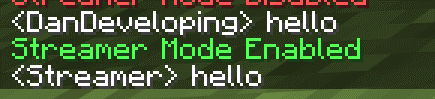

介绍
Main Features
Coordinate Hiding: Streamer Mode hides the coordinates that you see in the game. This means people watching your stream cannot see where you are or where your base is.
Ui Protection: Streamer Mode also helps protect you from sharing private information. It does this by changing the way the chat and other parts of the game look.
Bedrock Camouflage: When you use Streamer Mode it makes the bedrock in the game look like deepslate. This helps keep people from knowing how deep you are in the game.
Rendering Tweaks: Streamer Mode makes some changes to how the game looks so you can stream safely.
Client-Side You do not need to install Streamer Mode on the server to use it. This means you can use Streamer Mode with servers.
Fabric-Based: Streamer Mode is made for the Fabric mod loader. This means it works with versions of Minecraft that use Fabric. [which includes 26.1.1+]
Spoiler
Overall Streamer Mode is, about keeping your Streamer Mode information private and making your stream look cleaner. It does this without changing the way you play Minecraft with Streamer Mode.
常见问题
Streaming-Mode 支持哪些 Minecraft 版本?
Streaming-Mode 支持 Minecraft Java 版 26.1.1–26.1.2,共 2 个版本,可用的加载器:Fabric。下载时注意选择和你游戏版本一致的文件。
Streaming-Mode 怎么安装?
先用 PCL2 或 HMCL 启动器安装对应版本的 Fabric,再把下载的 .jar 文件放进游戏目录的 mods 文件夹,重新启动游戏即可。开启了版本隔离的,mods 文件夹在 versions/版本名 下面。运行环境:仅客户端。
评论
登录后评论和评分