
截图
介绍
Streamer.craft
Trigger Streamer.bot Actions from inside Minecraft! Streamer.bot is a powerful stream automation tool, and this mod allows you to trigger those automations using the in-game chat!
Some examples to provide inspiration:
- Change scenes in OBS when triggering a trap
- Send a message in chat when you hit a target block
- Start a poll when it gets dark at night.
Setup guide
Video setup guide:
Step 1: Install the mod
There are versions of this mod available for NeoForge and Fabric. You can download the latest version of the mod from the versions page
Step 2: Set up Streamer.bot
This mod is designed to work with the stream automation tool Streamer.bot. Download the program and unzip it.
The settings needed to connect Streamer.bot to the mod are as follows:
- Under the “Servers/Clients” tab, click “HTTP Server” and check Start Server (I’d also recommend checking “Auto Start” so the server starts automatically with Streamer.bot)
Take note of the IP and port listed in that menu, if those are changed from the defaults you’ll need to update the mod’s config file.
To connect to a Twitch or YouTube chat, sign in to your account in the Platforms tab.
To connect to OBS, follow these steps to enable OBS’s websocket server and add it to Streamer.bot
Step 3: Make sure it is all working
Once you have Streamer.bot set up, start the program and make sure the HTTP server is running. Then, start Minecraft with the mod installed.
You’ll also want to create at least one Action in Streamer.bot.
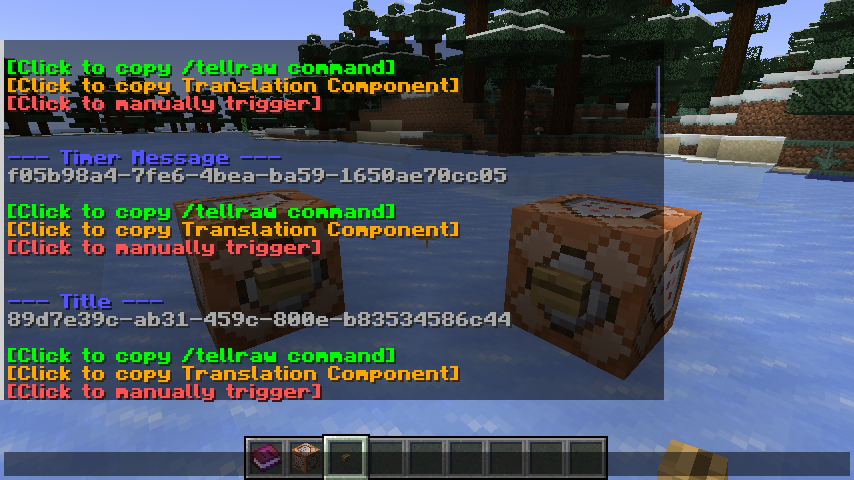
Load a world and type /streamercraft list in the chat. If everything works, you should see a list of Streamer.bot Actions in the chat.
Try pressing the “Click to manually trigger” button to make sure you can trigger actions as well.
All Commands
/streamercraft list– List all available actions/streamercraft list <filter>– List all available actions that contain the filter/streamercraft do <action-id>– Trigger a specific action/streamercraft refresh– Refresh the list of actions
常见问题
Streamer.craft 支持哪些 Minecraft 版本?
Streamer.craft 支持 Minecraft Java 版 1.21–1.21.10,共 9 个版本,可用的加载器:Fabric / NeoForge / Paper。下载时注意选择和你游戏版本一致的文件。
Streamer.craft 怎么安装?
先用 PCL2 或 HMCL 启动器安装对应版本的 Fabric / NeoForge / Paper,再把下载的 .jar 文件放进游戏目录的 mods 文件夹,重新启动游戏即可。开启了版本隔离的,mods 文件夹在 versions/版本名 下面。运行环境:客户端 / 服务端。
MoSadie 的其他作品
查看全部 →
Exponential Power
Adds Exponential power generation for late-game energy production.

EffectMC
Trigger special effects live in-game! Multiple mod loaders supported!
Island Menu
Modifies the Main Menu to be MCC Island themed.
Island Menu
Modifies the Main Menu to be MCC Island themed.
评论
登录后评论和评分