
截图
介绍
✨ Sticky Resources: Living Jellies & Adhesive Wonders!
Adding a touch of ‘stickiness’ to your Minecraft world!
Sticky Resources is a comprehensive expansion that reinvents how you gather and interact with materials. Centered around a vibrant ecosystem of Living Jellies, this mod introduces deep AI behaviors, unique summoning rituals, and a brand-new “Sticky” resource tier that bridges the gap between raw nature and refined industry.
—
🧬 The Star of the Show: Living Jellies
These aren’t your average slimes. Jellies are complex creatures with a modular AI system that makes every
interaction unique:
- Emotional Depth: Jellies experience a wide range of emotions—including Happiness, Anger, Fear, Sadness, and Excitement.
- Visual Cues: Watch for custom particles! Angry Jellies fume, Sad Jellies drip, and Happy Jellies sparkle with joy.
- Alpha Dynamics: Within every herd, an Alpha Jelly may rise! Alphas are natural leaders that emit a calming aura, preventing nearby Jellies from panicking or becoming aggressive.
- Herding Instincts: Jellies are social! They will actively follow their Alpha and stay together as a group.
- Dynamic Transformations: Jellies react to their environment. Strike a default Jelly with lightning to create
an Electric Jelly, or feed them specific items to evolve them into over 30+ variants, from Diamond and Emerald to Obsidian and Ender Pearl.
—
🏗️ The Ancient Altar (Summoning)
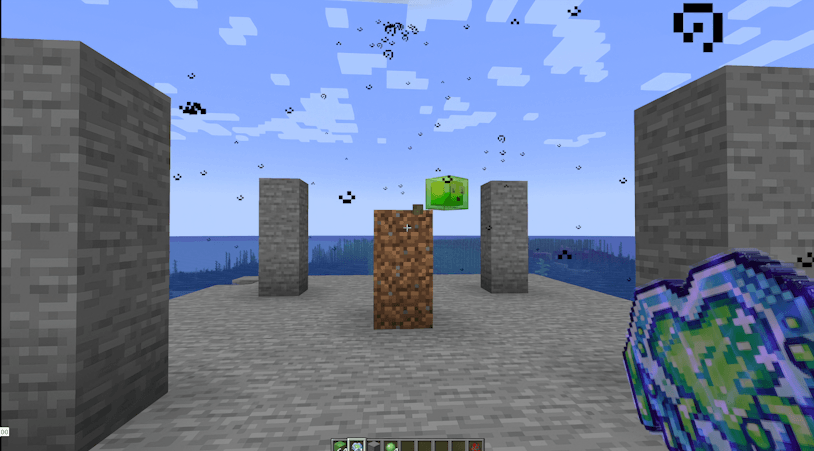
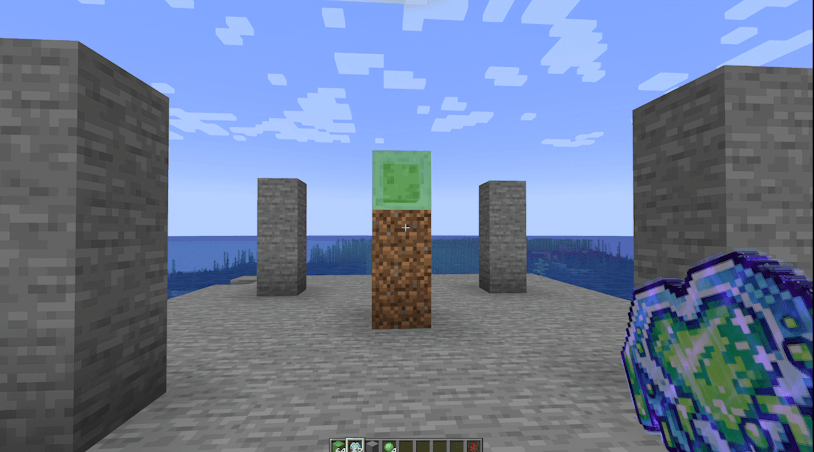
Jellies don’t just appear; they must be called. To begin your journey, you must construct a Summoning Altar:
1. The Base: A 3-block tall pillar of dirt/slime (Dirt base, Slime top).
2. The Pillars: Place 4 stone pillars (3 blocks high) exactly 3 blocks away from each corner of the altar.
3. The Catalyst: Right-click the top Slime Block with a Sticky Catalyst to trigger a lightning strike and bring
your first Jelly to life!
—
💎 Features & Content
- Adhesive Blocks: Discover “Sticky” versions of Cobblestone, Dirt, Glass, and more. Perfect for unique builds and WIP experimental interactions!
- Sticky Resources: Jellies drop “Sticky” versions of essential ores. These aren’t ready for the furnace
yet—they need processing! - The Washing Station: A custom functional block used to clean the slime off your resources, returning them to their pure, usable form.
- Sapphire Tier: Explore the depths of the Overworld, Nether, and End to find Sapphire Ore. Craft powerful tools, trimmable armor, and the Sapphire Staff—a magical tool used to pulse-freeze enemies and force Jellies to drop resources.
- New Crops: Diversify your diet with Corn and Strawberries, featuring custom growth stages and integration with villager trades.
- 📖 JEI Integration: No more guessing! Every summoning ritual, washing recipe, and Jelly transformation is now fully visible via Just Enough Items (JEI).
- The Sound Master: Keep an eye out for a new villager profession dedicated to the art of acoustics!
—
⚙️ Fully Configurable
Take control of your experience! Our extensive config file allows you to:
- Toggle the Custom AI and Emotional Triggers.
- Enable or disable Alpha Dynamics and Herding.
- Adjust Particle Frequencies for emotion cues.
- Fine-tune Drop Rates, Growth Speeds, and Transformation logic.
—
🛠️ Installation
1. Ensure you are running the correct version of Minecraft Forge.
2. Drop the StickyResources.jar into your mods folder.
3. Launch and get sticky!
—
🤝 Credits & Support
Development Team: NFGOdin, NFGAnarchy, narutodin
Found a bug? Report it on our GitHub Issue Tracker (https://github.com/odinj2010/StickyResources).
Ps. This is our first Minecraft mod! We are passionate about creating a unique experience, so please be patient as we polish the WIP features and add even more Jellies to the world.
常见问题
Sticky Resources 支持哪些 Minecraft 版本?
Sticky Resources 支持 Minecraft Java 版 1.20.1,可用的加载器:Forge。下载时注意选择和你游戏版本一致的文件。
Sticky Resources 怎么安装?
先用 PCL2 或 HMCL 启动器安装对应版本的 Forge,再把下载的 .jar 文件放进游戏目录的 mods 文件夹,重新启动游戏即可。开启了版本隔离的,mods 文件夹在 versions/版本名 下面。
评论
登录后评论和评分