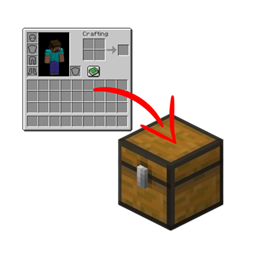
Stashify
Sort your inventory into nearby chests, barrels and shulker boxes with a single key.
介绍
Stashify in action
Stashify
Tired of walking from chest to chest after every mining trip? Stashify sorts your inventory into nearby storage with a single key press.
Press R and every item in your inventory that a nearby container already holds goes straight into it. You get a soft ding, a few green sparkles show which containers received items, and you’re done.
Features
- One key, no menus. Press R (rebindable in Controls) and your items are sorted.
- Smart matching. An item only goes into a container that already contains that item, so nothing ends up in the wrong place.
- Safe by design. Your hotbar is never touched, and only storage blocks are used: chests, trapped chests, barrels and shulker boxes. Furnaces, hoppers, dispensers and similar blocks are ignored.
- Configurable. Change the search radius (1 to 32 blocks, default 8), or turn the sound and the particles off, from the in-game config screen.
- Mod-friendly. Containers from other mods can be added through the
stashify:sortable_containersblock tag, using a data pack.
Requirements
- Minecraft 1.21.1
- NeoForge 21.1.x
- Needed on both the client and the server
Alpha notice
This is the first release (0.1.0). A second sorting mode, which also sorts items by category, is planned for a future version.
Made by PANINI.
常见问题
Stashify 支持哪些 Minecraft 版本?
Stashify 支持 Minecraft Java 版 1.21.1,可用的加载器:NeoForge。下载时注意选择和你游戏版本一致的文件。
Stashify 怎么安装?
先用 PCL2 或 HMCL 启动器安装对应版本的 NeoForge,再把下载的 .jar 文件放进游戏目录的 mods 文件夹,重新启动游戏即可。开启了版本隔离的,mods 文件夹在 versions/版本名 下面。

评论
登录后评论和评分