
截图
介绍
★ Starshadow Menu
Your mods, beautifully organized.
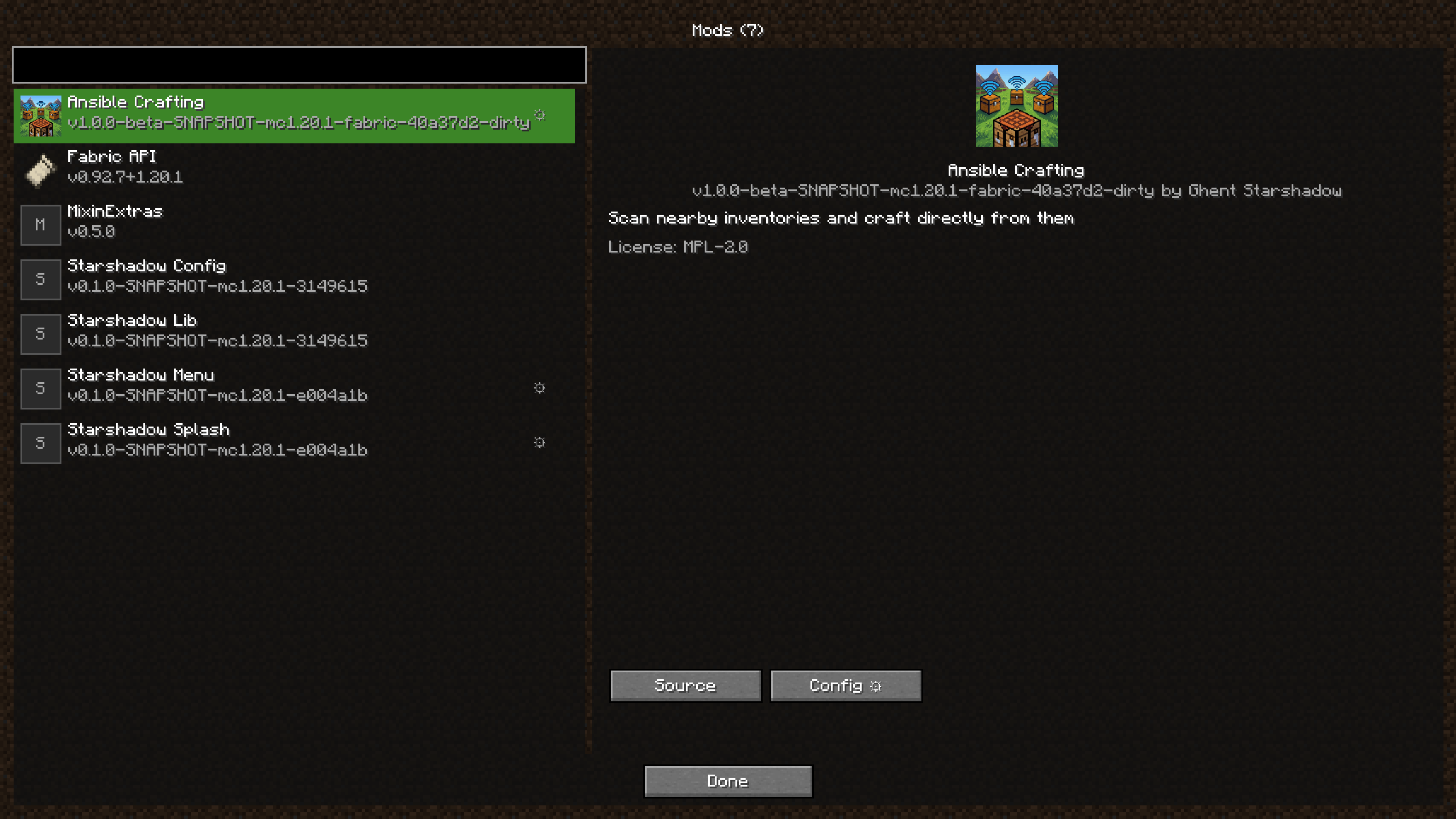
Starshadow Menu replaces the default mod list with a clean, modern screen that makes browsing your installed mods a pleasure. Search, filter, view details, and jump straight into any mod’s config — all from one place.
“Finally, a mod list that doesn’t feel like a spreadsheet.”
🪄 How It Works
- Install the mod and launch Minecraft
- Click “Mods” on the title screen or pause menu — a new button appears automatically
- Browse your mods in a clean, scrollable list with search
- Click any mod to see its details, links, and config button
- Open config screens with a single click — no more hunting through Mod Menu
That’s it. A better mod list, instantly.
✨ Features
📋 Clean Mod List
A beautifully designed mod list screen with each mod displayed as a card showing its name, version, and description. Scroll through your entire modpack effortlessly.
🔍 Instant Search
Type to search across mod names and descriptions. Find any mod in your pack instantly, even with hundreds installed.
📄 Detailed Mod Info
Click any mod to see its full details in a side panel:
- Description, version, and author
- License information
- Links to website, source code, and issue tracker
- One-click config button (when available)
⚙️ Config Screen Discovery
Starshadow Menu automatically discovers config screens from all installed mods. Double-click a mod or hit the config button to jump straight into its settings.
🔘 Dynamic Button Injection
A “Mods” button is automatically added to both the title screen and the pause menu. No extra keybinds needed — the mod list is always one click away.
🔧 Filtering Options
Toggle whether system/builtin mods (Minecraft, Java, Mixin) are shown in the list. Keep it clean and focused on the mods you actually installed.
📥 Get It
Recommended: Modrinth
Download on Modrinth — the preferred platform for Starshadow Menu.
Also available on CurseForge
Download on CurseForge — same mod, same releases.
📦 Installation
From Modrinth (recommended)
- Go to the Starshadow Menu Modrinth page
- Select your Minecraft version (1.20.1, 1.20.4, or 1.21.1)
- Click Install — dependencies are installed automatically if using a compatible launcher
- Launch and click “Mods” on the title screen! 🚀
Manual Install
- Install Fabric Loader for your Minecraft version
- Install Fabric API
- Drop the following into your
mods/folder:
- Starshadow Menu
.jar - Starshadow Config
.jar(required dependency) - Starshadow Lib
.jar(required dependency)
- Launch Minecraft! 🚀
Supported: Minecraft 1.20.1 · 1.20.4 · 1.21.1 — Fabric only
⚙️ Configuration
Settings are accessible via the Starshadow Menu config screen, or by editing config/starshadow-menu.json directly.
| Setting | Default | Options |
|———|———|———|
| Show Builtin Mods | Off | On · Off |
When “Show Builtin Mods” is off (default), system mods like Minecraft, Java, and Mixin are hidden from the list so you only see mods you’ve installed.
🧩 Compatibility
| Mod | Compatibility |
|—–|————-|
| Fabric API | ✅ Required |
| Mod Menu | ✅ Compatible — both can coexist; Starshadow Menu provides its own button |
| Starshadow Splash | ✅ Optional — custom splash feeds into mod list |
| Config mods | ✅ Discovers config screens from any mod that registers them |
📋 Requirements
| Dependency | Required? |
|———–|———–|
| Fabric Loader | ✅ Yes |
| Fabric API | ✅ Yes |
| Starshadow Config | ✅ Yes |
| Starshadow Lib | ✅ Yes |
🌟 Your Mods Deserve a Better Home
Stop scrolling through tiny text lists. Starshadow Menu gives your modpack the mod list it deserves — clean, searchable, and always one click away.
Made with ❤️ by Ghent Starshadow
Licensed under MPL-2.0 — free to use, share, and modify.
常见问题
Starshadow Modlist 支持哪些 Minecraft 版本?
Starshadow Modlist 支持 Minecraft Java 版 1.20.1–1.20.6,共 6 个版本,可用的加载器:Fabric。下载时注意选择和你游戏版本一致的文件。
Starshadow Modlist 怎么安装?
先用 PCL2 或 HMCL 启动器安装对应版本的 Fabric,再把下载的 .jar 文件放进游戏目录的 mods 文件夹,重新启动游戏即可。开启了版本隔离的,mods 文件夹在 versions/版本名 下面。运行环境:客户端和服务端都要装。
Starshadow 的其他作品
查看全部 →
Brrr
**Brrr** is a curated private modpack designed for the **Computers Go Brrr** community. It strikes a balance between technical innovation, culinary exploration, and essential quality-of-life improvements, all while staying true to the vanilla spirit.

Ansible Crafting
A new mod that will allow players to craft using materials located in storages near the player not just from what's available in their inventory.

Starshadow Lib
Starshadow mods library files

Starshadow Splash
Starshadow Splash for the nerd in all of us that wants to see things loading
评论
登录后评论和评分