
截图
介绍
SoundSwitcher
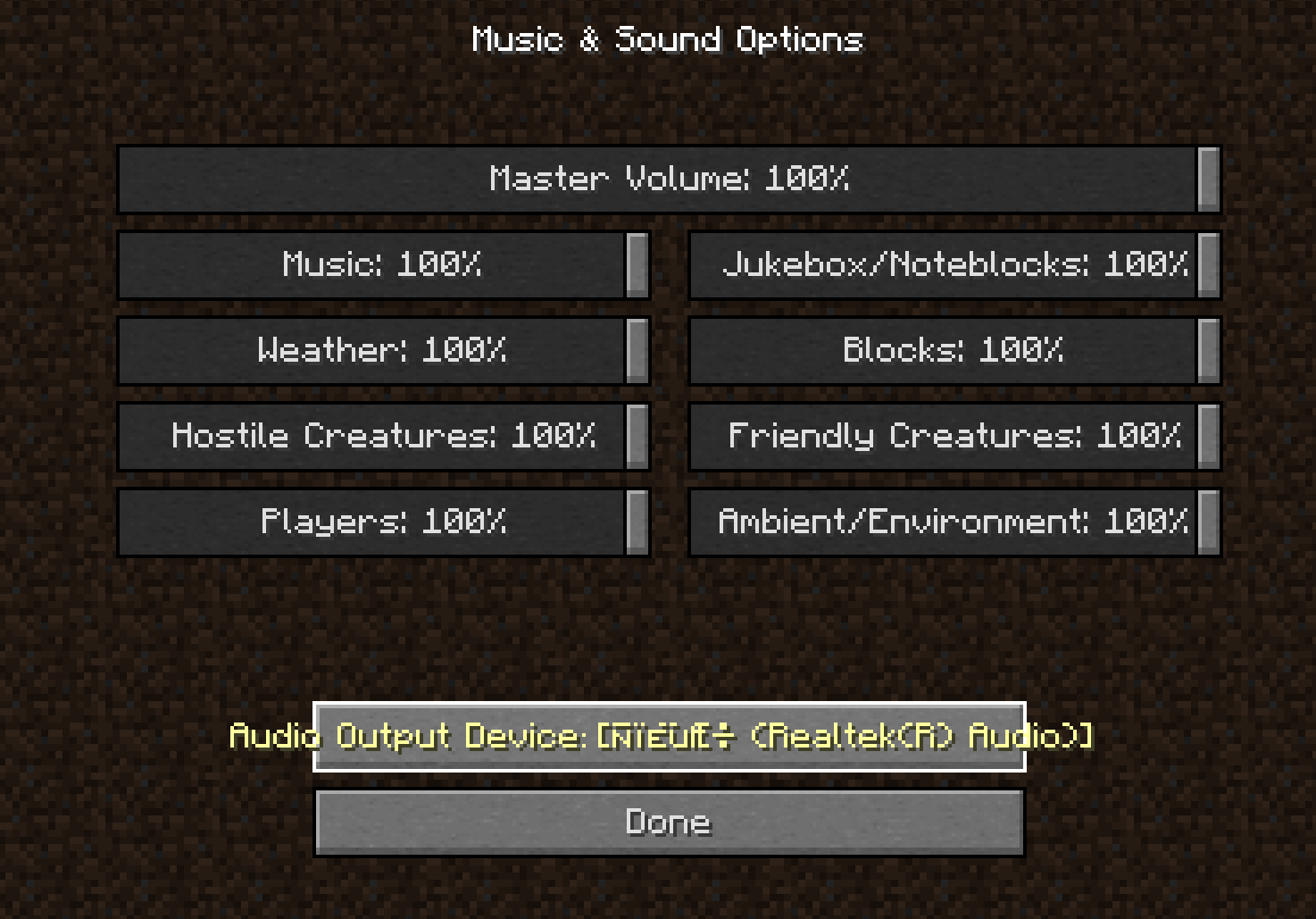
SoundSwitcher brings the “Device” button from the Minecraft 21w37a snapshot’s or newer version’s Music & Sounds menu to older versions of the game. Switch your headphones, speakers, or any other audio output on the fly — no restart required.
How It Works
- Device Enumeration – On game startup, SoundSwitcher queries OpenAL to build a list of all currently available audio output devices. This list is presented right inside the in-game sound settings.
- Live Switching – Selecting a device immediately reinitializes the OpenAL context, redirecting all game audio to your chosen output. No restart, no reload.
- Fallback Safety – If the selected device becomes disconnected or unavailable during gameplay, the mod automatically falls back to the system’s default device, preventing silent game audio.
Important Notes & Limitations
- New devices after launch won’t appear – Just like the original 21w37a implementation, the device list is captured at startup. If you plug in or pair a new audio device (e.g., Bluetooth headphones) while the game is running, you’ll need to restart Minecraft for it to show up in the list. While I tried a lot to add the ability to dynamically refresh the device list when new audio hardware is connected, I found that the required implementation is extremely complex. Current platform restrictions also make it impossible to deliver a fully working solution, so I have decided to abandon the development of this feature.
- For other non-English-speaking players – This mod displays device names exactly as they appear in OpenAL, so you may encounter garbled text. Please be aware of this.
- Client‑side only – SoundSwitcher is entirely client‑side and safe to use on any server, vanilla or modded.
Why use SoundSwitcher?
- Finally get the 21w37a device switcher on 1.7.10 .
- Instantly move game audio from speakers to a headset without interrupting your gameplay.
- Avoid the hassle of editing configs or restarting just to change your output device.
Creadits
Mojang Studio for the modern minecraft device switcher idea.
Nieobie for the logo icon.
常见问题
SoundSwitcher 支持哪些 Minecraft 版本?
SoundSwitcher 支持 Minecraft Java 版 1.7.10,可用的加载器:Forge。下载时注意选择和你游戏版本一致的文件。
SoundSwitcher 怎么安装?
先用 PCL2 或 HMCL 启动器安装对应版本的 Forge,再把下载的 .jar 文件放进游戏目录的 mods 文件夹,重新启动游戏即可。开启了版本隔离的,mods 文件夹在 versions/版本名 下面。运行环境:仅客户端。
Seniye 的其他作品
查看全部 →
MC New Textures
让你的 MC 1.0-1.4.7、1.6-1.13.2 支持 1.14 及更高版本的材质。/更新 1.14 之后未更新的材质。

MC New Textures: Aquatic
Archive the blue water for MC New Textures
CreateWorldUI
Modern Minecraft world creation, backported to 1.7.10 / 1.12.2

MC New Textures: Seamless Glass & Color
Seamless Glass and Modern color for MC New Textures Optifine (1.0-1.13) MCpatcher for Forge (1.7.10) Required
评论
登录后评论和评分