
SonyOpticalZoom
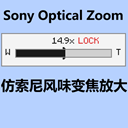
Sony-style optical zoom, yep that's right. When you press the designated button (can be assigned), you can zoom in on the view. You can adjust the zoom level wit索尼风味光学变焦放大,嗯对就是这样,当你按下指定的按键(可指派)就可以放大视角,用鼠标滚轮可以调节放大倍率,除此之外,在您的屏幕左边会有一个变焦倍率进度条,嗯对就像索尼一样,非常的OK😋
截图
介绍
Sony-style optical zoom, yep that’s right. When you press the designated button (can be assigned), you can zoom in on the view. You can adjust the zoom level with the mouse wheel. Besides that, there will be a zoom level progress bar on the left side of your screen. Yep, just like Sony, really cool 😋嗯对这些是通过Microsoft翻译翻译过来的我不会英文嗯对
常见问题
SonyOpticalZoom 支持哪些 Minecraft 版本?
SonyOpticalZoom 支持 Minecraft Java 版 1.21.1,可用的加载器:Fabric。下载时注意选择和你游戏版本一致的文件。
SonyOpticalZoom 怎么安装?
先用 PCL2 或 HMCL 启动器安装对应版本的 Fabric,再把下载的 .jar 文件放进游戏目录的 mods 文件夹,重新启动游戏即可。开启了版本隔离的,mods 文件夹在 versions/版本名 下面。运行环境:仅客户端。
评论
登录后评论和评分