
Social Chat
Social Chat enhances the default Minecraft chat experience. Adds mentions (@player, @everyone) with sound notifications and emojis
截图

介绍
Social Chat is a lightweight client-side mod that makes chatting in Minecraft more modern and interactive.
Features
@Mentions
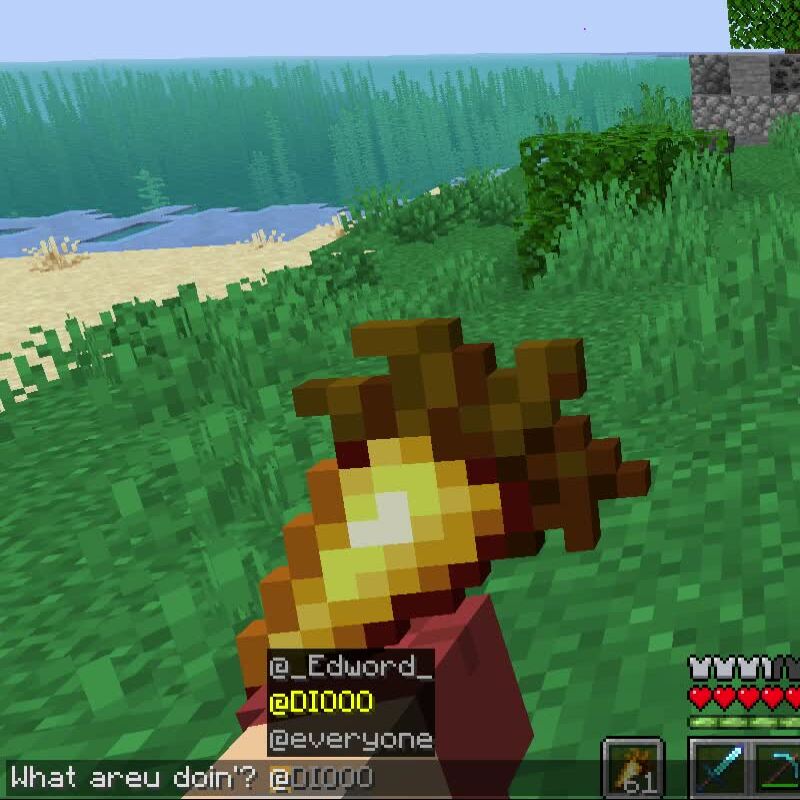
Type @ to see a list of online players, as well as @everyone.
Mentioning a player (@Player) or everyone (@everyone) sends them a notification sound, making it easier to get someone’s attention even if they’re busy.
Emoji Autocomplete
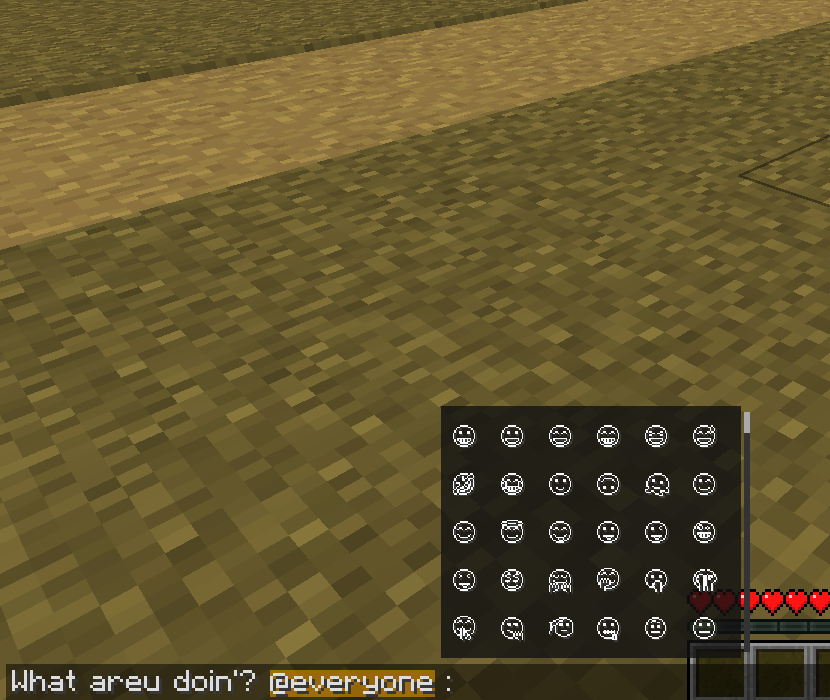
Type : to open an emoji picker.
Social Chat doesn’t include emoji textures by default. Instead, it uses Minecraft’s built-in emoji system, allowing you to install any compatible resource pack and customize their appearance however you like.
Typing Status (Server Required)
When the mod is installed on both the client and the server, players can see when others are typing.
Examples:
Steve is typing...Alex and Steve are typing...3 players are typing...
This feature is synchronized through the server and is the only functionality that requires the server to have the mod installed.
Client-Side
All core features—including mentions, notifications, and emoji autocomplete—work entirely on the client. Servers do not need to install Social Chat unless they want to enable typing indicators.
Social Chat is designed to improve communication while remaining lightweight, simple, and fully compatible with vanilla gameplay.
常见问题
Social Chat 支持哪些 Minecraft 版本?
Social Chat 支持 Minecraft Java 版 1.21.11,可用的加载器:Fabric。下载时注意选择和你游戏版本一致的文件。
Social Chat 怎么安装?
先用 PCL2 或 HMCL 启动器安装对应版本的 Fabric,再把下载的 .jar 文件放进游戏目录的 mods 文件夹,重新启动游戏即可。开启了版本隔离的,mods 文件夹在 versions/版本名 下面。运行环境:仅客户端。
Oybek 的其他作品
查看全部 →
My Skin
Upload custom skins and capes with a simple click that sync across all players on any Fabric server

Reworked Locator
Reworked vanilla LocatorBar. (keeps exp bar visible)

Paint
Bring real painting into Minecraft

Waxed?
Now you can see whether the copper blocks are waxed or not by toggling mode
评论
登录后评论和评分