
截图


介绍
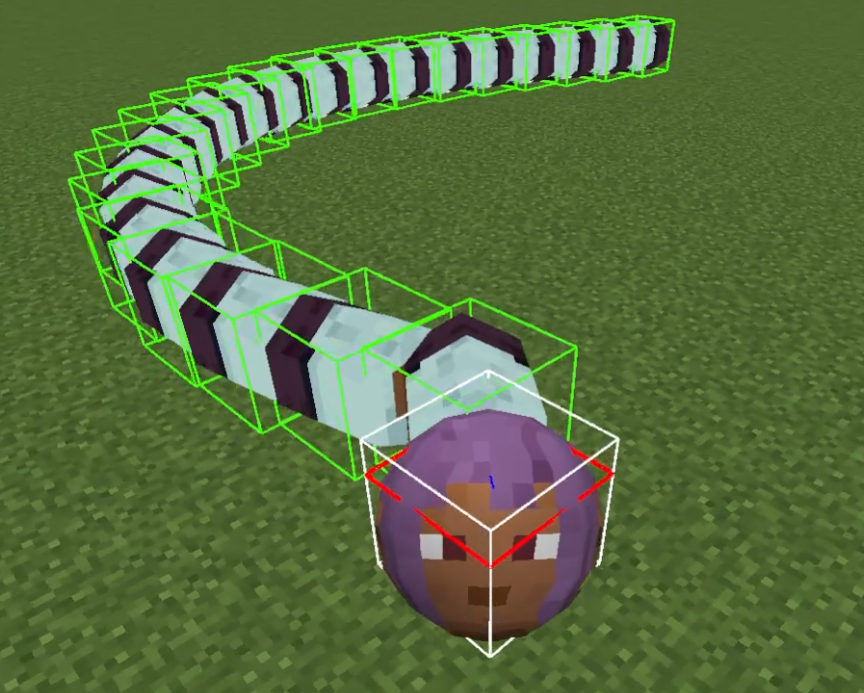
MOD that allows the player to become a snake.
The length of the player snake changes according to XpLevel.
The number of segments is XpLevel+1.
0. player NBT
| NBT Key | Type | Purpose |
|---|---|---|
IsSnake |
Boolean | Indicates whether the player is in “snake mode.” |
SnakeHeadSize |
Float | Stores the size of the player’s head in snake mode. |
SnakeBodySegmentSize |
Float | Represents the size of the player’s body segments in snake mode. |
SnakeDamage |
Float | Damage an entity suffers when it comes into contact with a player segment |
SnakeSpeed |
Float | Determines the automatic movement speed of the player in snake mode. |
1. Command
1.0. vanilla
You can use vanilla commands to modify the experience.
/experience set @s 100 levels
1.1. /snake <targets> <dataparameter_key> <value>
targets: Specifies the player(s) to apply the command to.
DataParameter_key: Specifies which attribute to modify. The following keys are available:
-
isSnake: A boolean (true or false) that determines whether the targeted player(s) should be in “snake mode.”
-
headSize: The size of the snake’s head (float, range: 0.1 – 10.0).
-
bodySegmentSize: The size of each body segment (float, range: 0.1 – 10.0).
-
damage: The damage dealt by the snake’s body segments (float, range: >= 0).
-
speed: The movement speed of the snake (float, range: 0.0 – 0.75).
Effect: Adjusts the corresponding attribute for the targeted players.
Each attribute has specific valid ranges, and attempting to set a value outside these ranges will result in an error.
1.2. (MOD ver1.3+) /snake config <action> [parameters]
Configuration to allow players to respawn avoiding other player positions already present.
Find the respawn position by partitioning the rectangular region with one side L centered at cx and cz into a grid with size r.
set: Allows modifying configuration settings related to the snake system.
- spread <true|false>
Enables or disables the spread functionality.
true: Enables spreading.
false: Disables spreading (default spawning).
- spread_pos <cx> <cz>
Sets the spread position’s center coordinates.
cx: X-coordinate (double)
cz: Z-coordinate (double)
- spread_Range <L> Sets the maximum range within which the snake spreads.
L: (double, range: 0.1 – 10000.0)
- spread_minimum_distance <r> Sets the minimum distance between spread entities.
r: (double, range: 0.1 – 100.0)
- segment_experience <exp> Sets the segment’s experience orb.
segment_experience: (int : 0 -)
get <key>: Retrieves the current value of a configuration setting.
常见问题
SnakePlayer 支持哪些 Minecraft 版本?
SnakePlayer 支持 Minecraft Java 版 1.20.1–26.3,共 9 个版本,可用的加载器:Fabric / Forge / NeoForge。下载时注意选择和你游戏版本一致的文件。
SnakePlayer 怎么安装?
先用 PCL2 或 HMCL 启动器安装对应版本的 Fabric / Forge / NeoForge,再把下载的 .jar 文件放进游戏目录的 mods 文件夹,重新启动游戏即可。开启了版本隔离的,mods 文件夹在 versions/版本名 下面。
TACOWASA059 的其他作品
查看全部 →
Katamari
Control a sphere that absorbs nearby blocks and grows in size

Katamari
Control a sphere that absorbs nearby blocks and grows in size

LogarithmicSpiralBiome
generates Overworld biomes in a logarithmic spiral pattern

SphericalPlayer
Mod to enable the player model to be changed to a sphere.
评论
登录后评论和评分