
SmartBooks
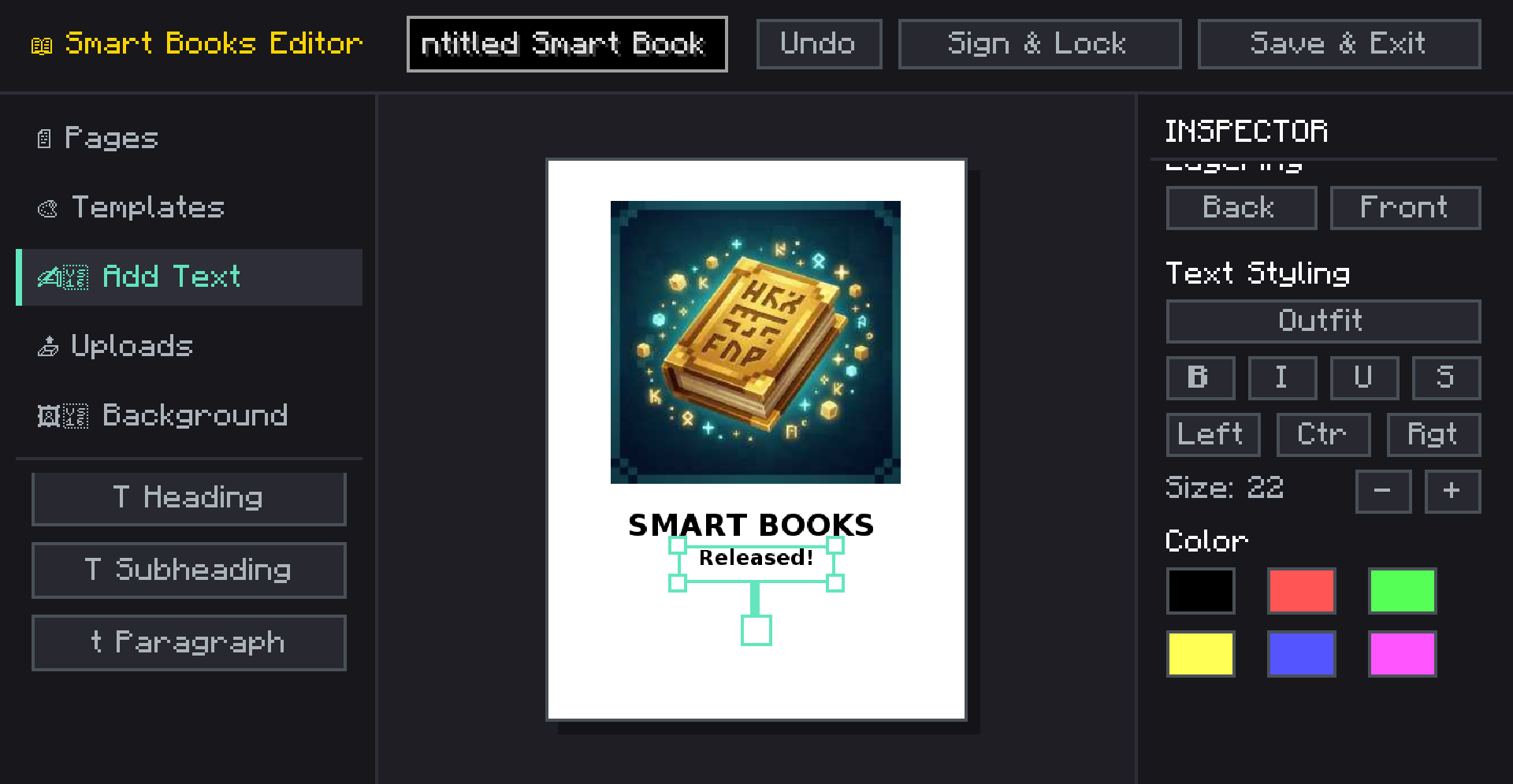
Create fully customizable books with images, custom fonts, and templates right inside Minecraft! A modern, canvas-based book editor.
截图
介绍
SmartBooks is an advanced, in-game book creation and editing mod that takes Minecraft’s traditional book and quill to a whole new level. Whether you are creating a detailed server guide, a rich quest log, a comic book, or an encyclopedia, SmartBooks provides a modern, canvas-like editor directly in the game.
✨ Key Features
- Modern Canvas Editor: Move, resize, and rotate text and image elements anywhere on the page, just like professional design software.
- Rich Text Formatting: Choose from built-in fonts, change font sizes, colors, and apply formatting (bold, italics, underline, strikethrough). Supports left, center, and right text alignment.
- Custom Images: Upload images directly from your computer or import them using a URL! Adjust image opacity, add rounded corners, and customize border styles.
- Page Backgrounds & Colors: Customize each page with specific background colors or styles like lined paper, grid, or classic parchment.
- 10+ Pre-made Templates: Don’t want to start from scratch? Use built-in templates like Comic, Magazine, Guide, Encyclopedia, Quest Log, Manual, and Newspaper to instantly format your pages.
- Layering System: Bring elements to the front or send them to the back with a simple click.
- Multiplayer Compatible: Fully synchronized with the server. Books are saved on the server and safely sent to clients.
📖 How to Use
- Get a Smart Book.
- Right-click to open the editor. (If the book is empty, or you sneak-right-click an unsigned book, the editor opens. Otherwise, it opens in reader mode).
- Use the left sidebar to add text, images, pages, or apply templates.
- Use the right inspector panel to customize the properties of the selected element.
- Click Save to keep your progress or Sign to lock the book permanently!
⚙️ Technical Details
- Version: Minecraft 1.20.1
- Loaders: Available natively for both Fabric and Forge.
- Client & Server: Needs to be installed on both the client and the server for multiplayer synchronization to work correctly.
NOTE: THERE ARE NO RECIPE FOR NOW. IN NEXT UPDATE
常见问题
SmartBooks 支持哪些 Minecraft 版本?
SmartBooks 支持 Minecraft Java 版 1.20.1,可用的加载器:Fabric / Forge。下载时注意选择和你游戏版本一致的文件。
SmartBooks 怎么安装?
先用 PCL2 或 HMCL 启动器安装对应版本的 Fabric / Forge,再把下载的 .jar 文件放进游戏目录的 mods 文件夹,重新启动游戏即可。开启了版本隔离的,mods 文件夹在 versions/版本名 下面。运行环境:客户端和服务端都要装。
bay4lly 的其他作品
查看全部 →
SecretRooms-Unofficial
Secret Rooms mod, now ported to 1.20.1,1.21.1 by bay4lly! Features fully functional camouflage blocks, Ghost Blocks, and hidden Redstone. Optimized rendering and bug-free performance for the ultimate stealth experience. Unofficial & high-performance.
GeckoMesh
A premium, lightweight PolyMesh rendering library for GeckoLib. Bring Bedrock-style geometry to your entities — with zero runtime cost.
MrCrayfish’s Vehicle Unofficial
The iconic vehicle mod developed by MrCrayfish has been meticulously ported to Minecraft 1.20.1/1.21.1 by bay4lly. This unofficial version aims to provide a high-quality vehicle experience in modern versions.

MrCrayfish’s Vehicle Unofficial
The iconic vehicle mod developed by MrCrayfish has been meticulously ported to Minecraft 1.20.1/1.21.1 by bay4lly. This unofficial version aims to provide a high-quality vehicle experience in modern versions.
评论
登录后评论和评分