Smart Renovation
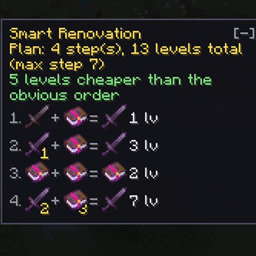
Shows what an anvil combine really costs, warns about Too Expensive before you hit it, and plans the cheapest order to merge your books. Client-side, changes no game rules.
介绍
Smart Renovation
The anvil shows you a number. It never tells you why.
Smart Renovation adds a panel beside the anvil that explains the price, warns about Too Expensive before you hit it, and works out the cheapest order to merge what you are already carrying. No commands, no hotkeys — open an anvil and it is there.
With only the left slot filled, it scans your inventory and lays out a plan: what to combine with what, in which order, and what each step costs. Hover an icon to see the item, its enchantments and its prior work penalty.
With both slots filled, it breaks the price down:
- how much is the accumulated prior work penalty, and how much is the actual work
- what the penalty becomes next, and how many affordable combines the item has left
- Too Expensive with the reason behind it
- swap the items when the reverse order is cheaper — including a book in the left slot, where vanilla just shows nothing at all
Why the order matters
An enchantment from a book costs half of what the same enchantment costs from an item, and the prior work penalty doubles with every operation.
Four Unbreaking I books on a pickaxe:
| Result | Cost | |
|---|---|---|
| One book at a time | Unbreaking II | 18 levels |
| Books paired up first | Unbreaking III | 13 levels |
Eight books reach Unbreaking IV, and the mod finds that order too.
It changes no game rules
No penalty tweaks, no lifted cap — it reads what vanilla already calculated and explains it. That makes it client-side only: it works on any vanilla server, including ones where you cannot install mods.
Settings live in config/smartrenovation.json.
Requires Fabric API. MIT licensed — use it in any modpack, no need to ask.
常见问题
Smart Renovation 支持哪些 Minecraft 版本?
Smart Renovation 支持 Minecraft Java 版 1.21.1–26.3,共 12 个版本,可用的加载器:Fabric。下载时注意选择和你游戏版本一致的文件。
Smart Renovation 怎么安装?
先用 PCL2 或 HMCL 启动器安装对应版本的 Fabric,再把下载的 .jar 文件放进游戏目录的 mods 文件夹,重新启动游戏即可。开启了版本隔离的,mods 文件夹在 versions/版本名 下面。
K1lSofix 的其他作品
查看全部 →
MirrorMod
实时镜像所有区块中的方块放置、破坏和交互。非常适合大型建筑、创造服务器和快速建造!

Global Alchemy: Chain Reaction
Instantly transmute the world around you with massive chain-reaction waves!

Aurora Client
All-in-one client mod: themed mod menu, draggable HUD, crosshair editor with live preview, per-server profiles, FPS optimizer, Mouse Tweaks and Discord status. Purely visual, no PvP advantage.
评论
登录后评论和评分