截图
介绍
Smart Ping
Mark blocks, mobs and players with one key. Compact markers, live distance, visible through walls.
Smart Ping lets you point at anything in the world and drop a small marker on it: a dot, the name underneath, and the distance underneath that. No giant glowing text, no clutter. Markers stay the same size at any distance, are always readable, and are visible through blocks. Pin the important ones and they stay forever, even after you leave and rejoin the world.
Minecraft 26.3 · Fabric · Client-side only (nothing to install on the server)
Features
One key for everything
Press V while looking at something. Smart Ping works out what you are aiming at:
| You look at | The marker shows |
|---|---|
| A player | Their nickname and the distance |
| A mob | Its name and the distance |
| A block | The block name and the distance |
Targeting works at long range (up to 256 blocks), and entities in front of a block take priority over the block behind them.
Compact, readable markers
- Dot on top, name below it, distance below the name.
- Constant size at any distance, so far-away markers never become unreadable and close ones never fill the screen.
- Text always faces you, so it is always readable.
- Visible through blocks, so you can track a target behind walls.
- The whole marker (dot, name and distance) always stays on screen. If the target is off-screen or behind you, the marker sticks to the screen edge.
- Distance updates in real time as you or the target move.
- Mob and player markers follow the target as it moves.
Block pings
A single press creates a Block ping attached to the exact block coordinates.
- If the block is broken, the marker says so under the distance and the ping disappears after 10 seconds.
- Normal pings fade away by themselves (30 seconds by default, configurable).
Pinning
- Press V twice within 2 seconds on the same place to pin the ping. Pinned pings never disappear, even if you relog or restart the game. They are saved separately for every world and server.
- To unpin, press V twice within 2 seconds on the pinned marker. It will disappear after 10 seconds, and during that time you can pin it back with another double press.
- A pinned marker has a white ring, an unpinning marker has a grey ring with a countdown.
- Pinned block markers stay even if the block is broken (the marker just tells you the block is gone), until you unpin or delete them.
Settings and marker manager
Open it with Y (rebindable) or from Mod Menu.
Global options
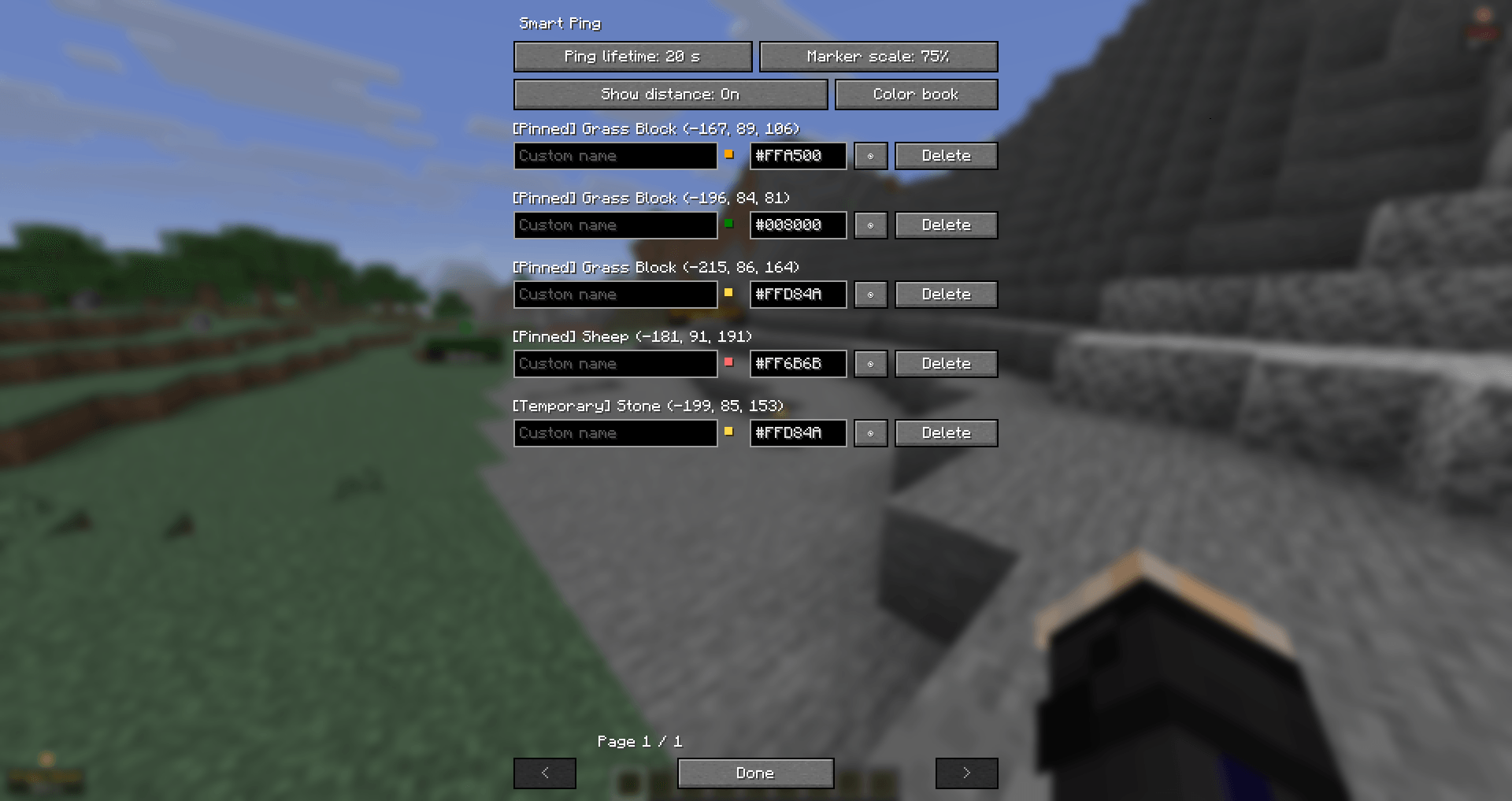
- Ping lifetime: 10 / 20 / 30 / 60 / 120 seconds.
- Marker scale: from 25% to 200% in steps of 25%.
- Show distance: on or off.
- Color book: a reference of 64 popular colors shown as a color swatch, the color name and its code, for example
■ White: #FFFFFF.
Per-marker controls
- See the default name (the block or entity name) together with its coordinates.
- Give any marker your own custom name.
- Change its color with a
#RRGGBBcode (pick one from the color book). - Hide a marker with the eye button (open eye = visible, closed eye = hidden). Hidden markers are kept but not drawn.
- Delete a marker.
Languages
English and Russian.
Controls
| Key | Action |
|---|---|
| V | Ping what you are looking at |
| V ×2 (within 2 s, same place) | Pin the ping |
| V ×2 (within 2 s, on a pinned marker) | Unpin it (10 s to pin it back) |
| Y | Open Smart Ping settings |
Both keys can be changed in Options → Controls → Smart Ping.
Requirements
- Minecraft 26.3
- Fabric Loader 0.19.5 or newer
- Fabric API
- Java 25
- Mod Menu (optional, adds a settings button)
Installation
- Install Fabric Loader for Minecraft 26.3.
- Put Fabric API and Smart Ping into your
modsfolder. - Launch the game and press V in a world.
FAQ
Do I need it on the server?
No. Smart Ping is client-side only and works on any server (and in singleplayer). Pings are visible only to you.
Where is my data stored?
Pinned pings: config/smartping/worlds/ (one file per world or server). Settings: config/smartping/config.json.
Can I use it in a modpack?
Yes, you are free to include it. A link back to this page is appreciated.
Known limitation
Marker positions are calculated from the player’s view and the base FOV setting, so in third-person view or with strong dynamic FOV changes (sprinting, speed effects) a marker can be slightly offset.
Support and feedback
Found a bug or have an idea? Join the Discord or leave a comment on the project page.
常见问题
Smart Ping 支持哪些 Minecraft 版本?
Smart Ping 支持 Minecraft Java 版 26.1–26.3,共 5 个版本,可用的加载器:Fabric。下载时注意选择和你游戏版本一致的文件。
Smart Ping 怎么安装?
先用 PCL2 或 HMCL 启动器安装对应版本的 Fabric,再把下载的 .jar 文件放进游戏目录的 mods 文件夹,重新启动游戏即可。开启了版本隔离的,mods 文件夹在 versions/版本名 下面。
Mr_Lan123 的其他作品
查看全部 →
Auto Totem
自动将不死图腾从背包移至副手。可通过快捷键切换(默认:O,26.2 及以上版本:J)。设置菜单(按 B 或通过模组菜单打开)提供统计信息 HUD 和图腾使用通知 HUD。PvP 助手,生活质量改进模组。Fabric
Fullbright (Night Vision)
全亮度。在任何服务器上都能看清黑暗,无需权限或药水。按 G 即可切换真正的客户端夜视效果,而非原版药水效果。夜视伽马。

[KSE] Keyboard Sound Effects
这个模组会为按键和鼠标点击添加音效,并内置了悦耳的声音。你也可以直接在游戏设置菜单中加载自己的音频文件。
Just Auto Totem
Automatically moves a Totem of Undying from the inventory to the off-hand. Toggled on/off via a hotkey (default: O)
评论
登录后评论和评分