
SlotStacked
SlotStacked adds a Half-Life-inspired inventory HUD that lets you hold a hotbar number key to reveal and swap items from the three inventory rows directly above that slot.
截图

介绍
SlotStacked

SlotStacked transforms your hotbar into a vertical inventory system heavily inspired by Half-Life’s weapon selection. Hold any hotbar number key for a configurable delay, and a column of three inventory slots will appear above it, displaying the items directly above that hotbar position. Use arrow keys (or scroll wheel, your choice) to highlight slots in the column, then release the key to instantly swap the highlighted item into your hotbar.
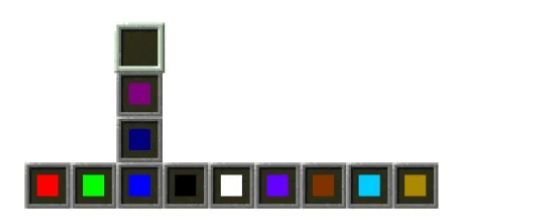
The mod is entirely client-side.
Using Cloth Config, you can choose to navigate inventory columns using either the mouse scroll wheel or keyboard keys. If you select the keyboard option, the keybinds can be customized in the Controls menu.
You can also configure the delay before the inventory slot column appears
Huge credit to William48822 for the idea.
常见问题
SlotStacked 支持哪些 Minecraft 版本?
SlotStacked 支持 Minecraft Java 版 1.20.1–1.21.1,共 2 个版本,可用的加载器:Fabric / Forge / NeoForge。下载时注意选择和你游戏版本一致的文件。
SlotStacked 怎么安装?
先用 PCL2 或 HMCL 启动器安装对应版本的 Fabric / Forge / NeoForge,再把下载的 .jar 文件放进游戏目录的 mods 文件夹,重新启动游戏即可。开启了版本隔离的,mods 文件夹在 versions/版本名 下面。运行环境:仅客户端。
hisRoyalty 的其他作品
查看全部 →
Bloo’s Gacha Machine v.2
用物品兑换扭蛋胶囊,试试手气,看看里面藏着什么惊喜!

CobbledGacha v.3 [Cobblemon 1.7] [Fabric/NeoForge 1.21.1]
Adds Cobblemon-centric gacha machines that drop awesome loot! Or maybe not?

Blazing Flint and Steel
An upgraded flint and steel that allows players to set living entities on fire by right-clicking them
评论
登录后评论和评分